¶ Dispensing — Dispense a Prescription
¶ What you'll be able to do
After reading this guide you will be able to dispense a prescription that has passed its accuracy check — the
clinical act itself, together with the NHS charge declaration that is recorded at the same moment.
Who does this? Dispensing is a Responsible Pharmacist step, and only a pharmacist can record it. A
Dispensing Technician's work on the prescription ends at the assembly. If the step is asked for directly, the
app refuses it — the role is checked by the app, not merely hidden in the page.
¶ What the dispense records
Dispensing ends the prescription's journey through the dispensary. Pressing the button does three things at
once:
- It records the clinical act. The prescription's history gains a step from Accuracy checked to
Dispensed, with your name and the time. - It records the NHS charge declaration — the patient's exemption or charge-paid category, recorded as
the NHSBSA's coded value, and whether exemption evidence was seen. The declaration is kept on the
prescription and is what the later reimbursement work is built on. - It moves the prescription on. Stock is consumed for the items that can be matched to it, and the
patient's collection-ready notification is queued.
No payment is taken here. The screen says so, and it means it: this step records the declaration, not the
money. Taking payment for a charge is the counter's business, at the till.
Dispensing closes the prescription. Until now the release and cancel actions were still on offer; from
Dispensed they are gone, and the only step left is the endorsement. If there is any doubt about whether
the prescription is going out, settle it before this step — an assembly or an accuracy check can still be
stopped, a dispense cannot.
¶ Before you start
- The prescription must be showing the state Accuracy checked — that is the only state dispensing is offered
from. - Your login must hold the Responsible Pharmacist role.
- Have the charge position ready: is the NHS prescription charge due, or is the patient exempt — and, if
exempt, whether you have seen the evidence. Those two things are the whole declaration, and nothing else can
set them later.
¶ Step 1: Open the prescription
- Log in to the pharmacy app.
- Click Dispensary in the top menu.
- Under In progress, find the prescription — its state reads Accuracy checked — and click Open.
- Click Dispense on the prescription.
¶ Step 2: Complete the declaration
The dispense screen asks for two things. There is no separate charge box: the charge position is worked
out from the category you choose.
| Field | What it means |
|---|---|
| Exemption or charge-paid category (EPS code) | The patient's position, chosen from the NHSBSA's coded exemption and charge-paid values — for example Is 60 years of age or over or is under 16, Maternity exemption certificate, HC2 (full help) certificate, Universal Credit and meets the criteria, HRT only prescription prepayment certificate, or Patient has paid appropriate charges. Only one value can be recorded. Its first entry is "— no exemption (charge due) —", which is the blank value: choose that one when the charge applies and no exemption is declared. |
| Evidence of exemption seen | Tick it when you have seen the evidence for the exemption. Leave it clear when you have not — the prescription then records that evidence was not seen, which is the honest record. |
The first entry — "— no exemption (charge due) —" — records that the charge applies and no exemption is declared
(its value is blank, and that is how the app reads it). A charges paid category
records that the patient paid the charge; an exemption category records that the charge did not apply. The app
works the charge position out from the code, so the declaration cannot contradict itself. Where a prescription
mixes free-of-charge items with others, the status of the chargeable items applies.
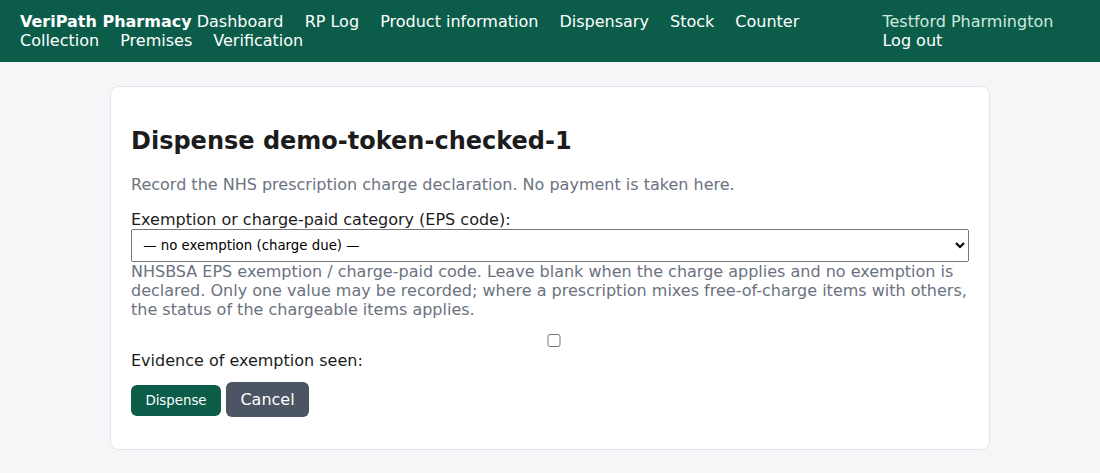
The dispense screen: one declaration field, and the evidence tick. The first entry, "— no exemption (charge due) —",
means the charge applies. Dispense records the declaration; Cancel returns you to the prescription with nothing
recorded.
¶ Step 3: Record the dispense
- Check the declaration against what you have in front of you.
- Click Dispense.
- The app records the dispense and returns you to the prescription's own page with a green banner:
"Token dispensed."
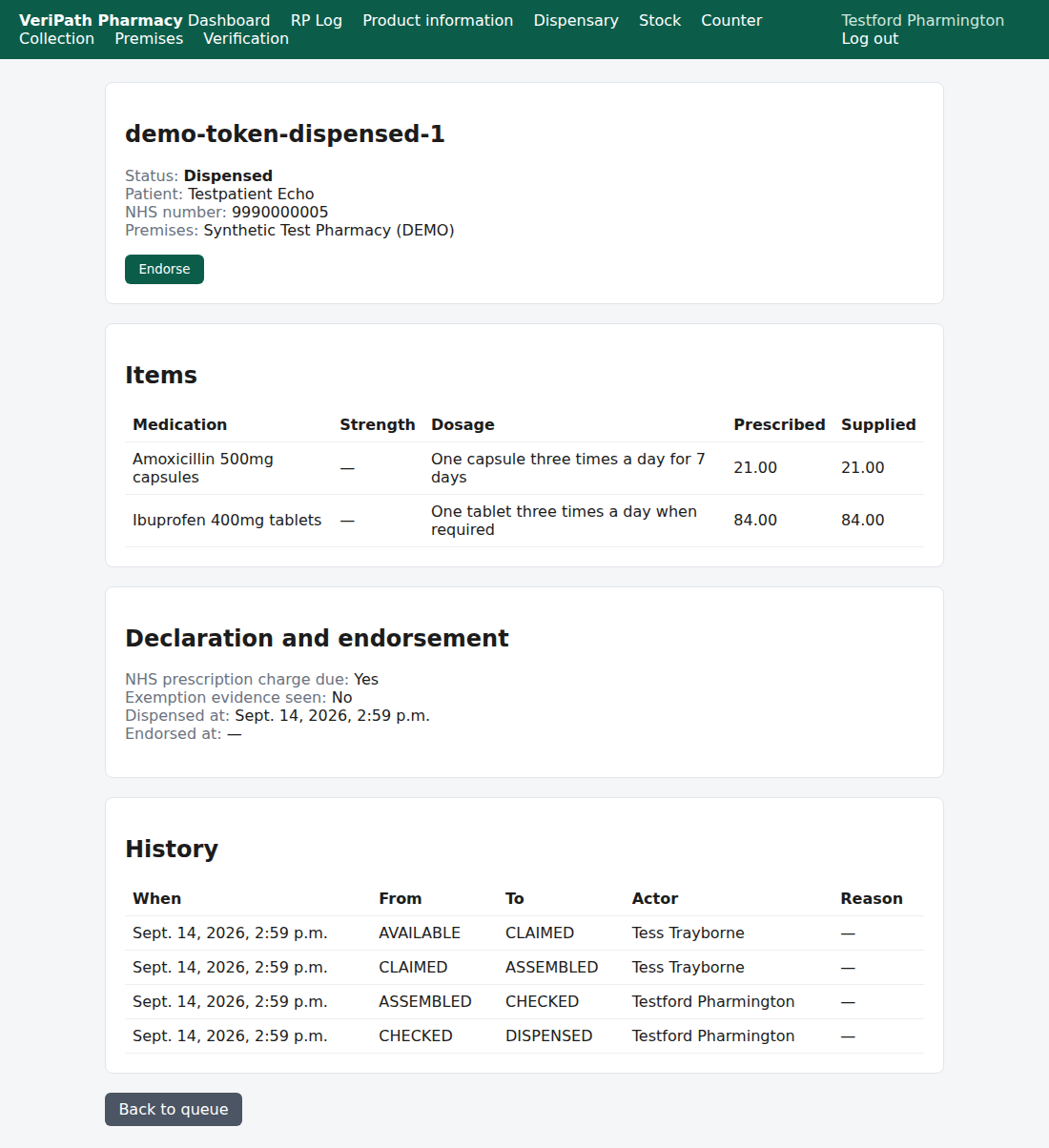
After the dispense: the state reads Dispensed, the prescription keeps the declaration it was given —
charge due, whether evidence was seen, when it was dispensed — and the next step is Endorse. Notice that
there is no release or cancel card on a dispensed prescription: the actions have gone.
Cancel records nothing. If you click Cancel, or navigate away, the prescription stays Accuracy
checked and the dispense screen can be opened again.
¶ What happens behind the dispense
Two things follow the dispense automatically. Both are deliberately "best effort" — neither can block or
half-finish a dispense:
- Stock is consumed. Each item is matched to a stock line, the oldest suitable batch is used first, and a
stock movement is written that names the batch and an opaque reference. It does not carry the patient's
name or any other identifier. - The collection notification is queued for the patient, so they can be told the prescription is ready
(see Collection and Notifications, group E).
If the stock ledger or the notification service cannot be reached, the dispense still stands. What you would
then have is a correct dispensing record and a piece of follow-up work — not a half-dispensed prescription.
¶ If an item moved no stock
If the app could not match an item to stock — no code recorded against the item, no mapping for it, or no
quantity to move — the prescription carries an amber line:
"Dispensed without a stock movement for at least one item — check the SNOMED mapping and the ERPNext batch
ledger."
The dispense itself is fine and stays recorded; it is the stock figure that is wrong. Tell whoever looks after
stock — normally the Business Manager — so the mapping can be put right. A stock problem must never be a reason
to re-dispense or to delay a patient.
¶ The Technician's view
A Dispensing Technician cannot record a dispense, and is not offered one. On a prescription that is ready to
dispense they see the state, the items and the history, but their actions have run out — the clinical steps
(the check, the dispense and the endorsement) belong to the pharmacist. Asking for the step directly gets the
same refusal as the button being absent.
¶ If it doesn't work
| What you see | What it means |
|---|---|
| The patient's exemption is not in the list | The list is the NHSBSA's coded set, so only those categories can be recorded — obsolete ones (such as the tax credit certificate) are deliberately absent. Take advice before dispensing rather than recording a category that is not the patient's. |
| "dispense requires the token to be CHECKED (it is DISPENSED)." | The prescription has already been dispensed — by you or by another pharmacist, or while your copy of the page was open. Nothing was recorded. Open the prescription and read History. |
| "dispense requires one of: PHARMACY_RESPONSIBLE_PHARMACIST (actor role is …)." | The step was asked for by a login that is not a pharmacist's. |
| No Dispense action on the prescription | Either the prescription is not in the state Accuracy checked, or your login is not a pharmacist's. |
| Amber line about a stock movement | See If an item moved no stock, above. |
| You are taken to the premises screen | The pharmacy has no premises profile yet. That is completed once, at setup — speak to your Business Manager. |
There is no second field to reconcile, so the category you leave in place is the declaration. If the
dispense is refused — the prescription is no longer in the right state — the message appears on the
prescription's own page and nothing has been recorded.
¶ What the record keeps
- A history row on the prescription: the time, the move from CHECKED to DISPENSED, and the name of
the pharmacist who dispensed it — recorded at the time, so a later change of name does not rewrite history.
No reason is asked for at this step. - The declaration, on the prescription itself — the NHSBSA category recorded as its code, the charge
position worked out from it, whether evidence was seen, who dispensed it and when. It is shown in the
Declaration and endorsement card. - The declaration is fixed once recorded. The endorsement step does not change what was declared here, so
a charge position recorded wrongly cannot be edited away. - An audit entry for the action and the person, with no clinical content.
- A stock movement per item moved, carrying the batch and an opaque reference — never a patient identifier.
¶ Related
- Dispensing — The Accuracy Check — the step before this one
- Dispensing — Assemble a Prescription — and the one
before that - Coverage Plan — the guides and what is left to write
- Endorse a Prescription — the next step, where the reimbursement claim is recorded (B5)
- Release or Cancel a Claim — how a prescription is stopped, which must be done before dispensing (B6)
- Roles and Permissions in the Pharmacy App — who can
reach the dispensary