¶ Collection — Record a Patient's Contact Preference
¶ What you'll be able to do
After reading this guide you will be able to record how a patient wants to be contacted about their
prescriptions — a mobile number, an email address, and which of the two (or the NHS App) they prefer — and
to read back what the pharmacy holds for them.
Who does this? The Responsible Pharmacist, Dispensing Technician and Business Manager. The
Counter Assistant does not see this screen: it holds patient contact details, so the app keeps the
counter out of it. If a patient gives the counter their number, pass it to one of those three.
¶ Why the preference lives here
The prescription does not carry a phone number. A dispensing record holds the patient's name and NHS
number; it does not hold how to reach them. That is why the pharmacy records it — once, deliberately, when
the patient is in front of you — and holds it for that patient.
It follows the patient, not the prescription. A preference belongs to the patient within this pharmacy:
the app matches it by the NHS number where there is one, and by the patient's name otherwise. Record it
once and later prescriptions for the same patient use it; record it again and it is updated, not
duplicated.
The preferred channel is the instruction; the address is the capability. If the patient prefers email
and an email address is on file, the messages go by email. If the preferred channel has no address on file,
the app falls back to whichever detail is recorded, so a contact the pharmacy took the trouble to record
is never quietly unused. Change the preference when the patient changes their mind — the next message uses
it (E3).
¶ Before you start
- Have the patient's details in front of you (or the message the patient sent), and their permission to
use them. - At least one of a mobile number or an email address is needed — the app will not save a preference
with neither (that would be a channel it cannot use).
¶ Step 1: Open the contact preference screen
From the Collection screen, press Preference on the prescription's row.
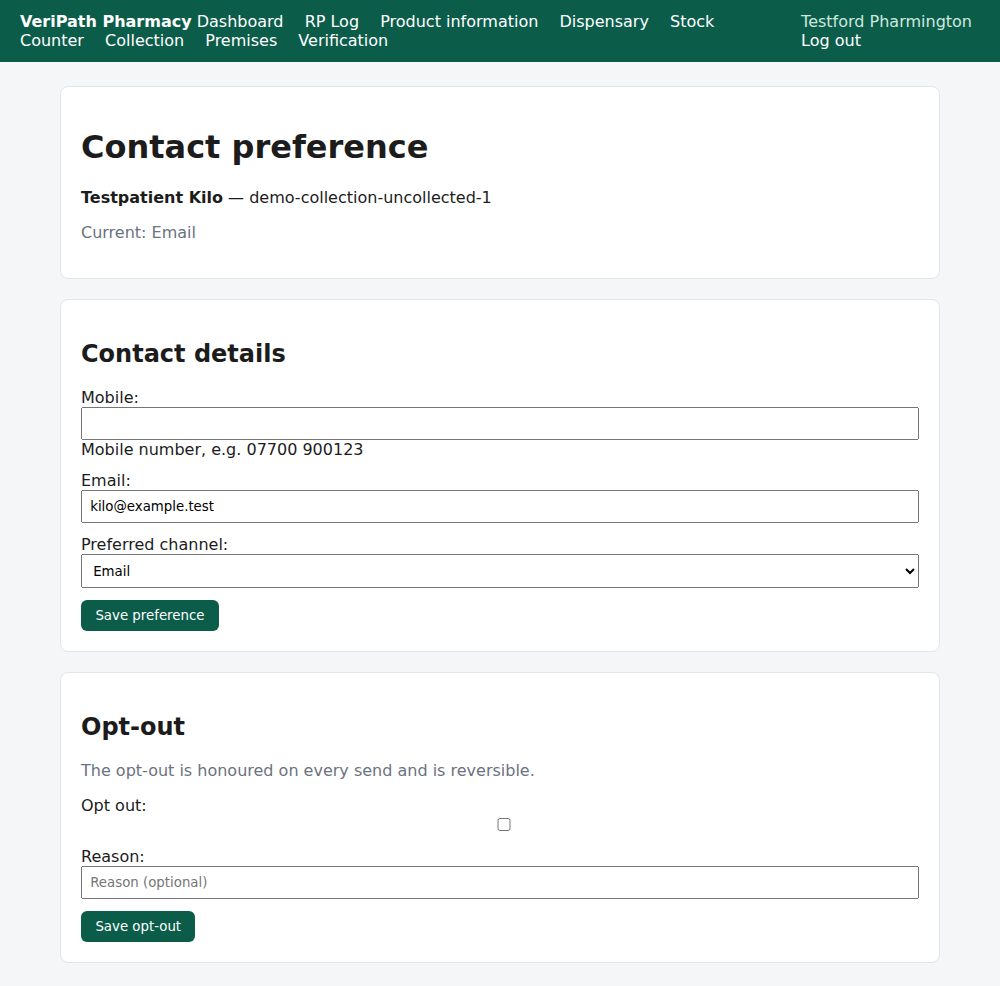
The contact-preferences screen on the test pharmacy, 6 October 2026, as the pharmacist: the patient and
their prescription at the top, Current: Email — what the pharmacy holds — then the Contact details
form, already filled in with the address on file and with Email chosen as the preferred channel.
| On the screen | What it is |
|---|---|
| Current | What the pharmacy holds now — the preferred channel, and an Opted out pill where there is one (E6). No preference recorded yet. means there is nothing on file. |
| Mobile | The number the pharmacy may text. |
| The address the pharmacy may write to. | |
| Preferred channel | SMS, Email or NHS App — which one the patient wants. |
¶ Step 2: Record it and save
- Type the Mobile number and/or the Email address the patient has given.
- Choose the Preferred channel.
- Press Save preference.
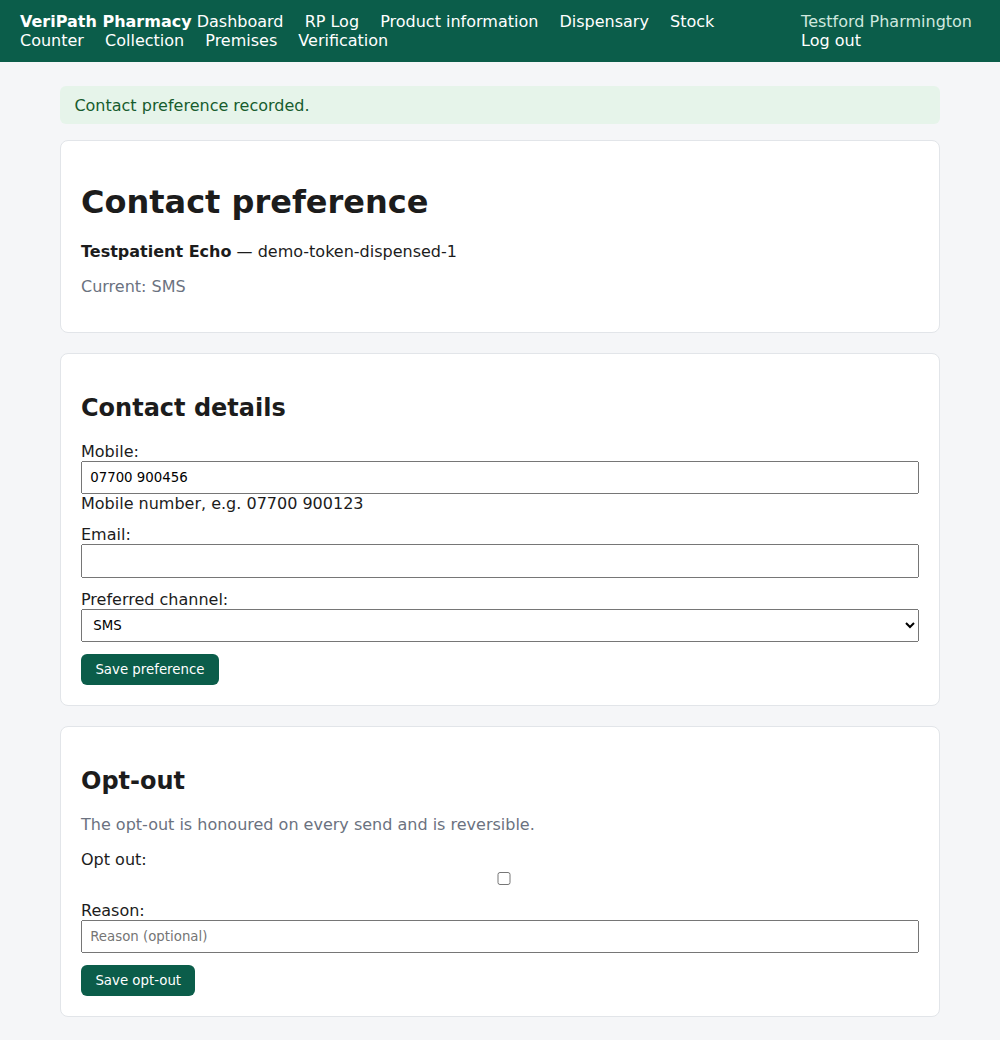
Saved: the app confirms Contact preference recorded. and the screen's Current line now reads the
channel the patient chose — here SMS for a patient who had nothing on file before. Messages for that
patient will now go that way (E3).
Read it back before you leave the screen: Current is what the pharmacy will use. If the patient wants
messages stopped altogether, that is the opt-out, not a blank preference (E6).
¶ When something is not right
| What you see | What to do |
|---|---|
| Record a mobile number or an email address. | Nothing was entered in either box. A preference with no address would be a channel the app cannot use — record one of the two. |
| No preference recorded yet. | Nobody has recorded this patient's details. Record them; the trail will then show what was sent and where (E4). |
| The patient's number has changed | Open the screen and save the new one. It updates the same preference; the next message uses it, and earlier messages keep their own history on the trail. |
| The messages keep failing though the details look right | Check the recipient against what the trail recorded (E4), and correct the address here before resending (E3). |
| The patient says they asked for email but gets texts | Look at Preferred channel: the app uses the recorded preference where the address exists, and falls back to the other detail where it does not. Set both if you want no fallback. |
| Two patients share a name and you are unsure whose record this is | The app matches on the NHS number first and the name only when there is none. Check the number on the prescription against the patient's. |
| A patient asks not to be contacted at all | Leave the details as they are and record the opt-out instead (E6) — the opt-out is what stops the messages. |
¶ What happens next
- E6 — record a patient opt-out. When the patient wants no messages at all.
- E3 — send or resend a collection notification. Where the preference is used.
- E4 — the delivery trail. What the patient was sent, and to where.
- E1 — hand a prescription over. The everyday collection act.
¶ Related pages
- Pharmacy App Guides — the published guides
- Coverage Plan — every everyday task, and what is published
- Roles and Permissions in the Pharmacy App