¶ Patient Portal — Booking with AI Assist (Dental)
Status: LIVE (verified 2026-08-23) — AI Booking Assist Tier 1 is deployed
and working on the patient portal PWA. This page explains what patients see
when they book a dental appointment, and how the booking-assist features help
them choose the right appointment without calling reception.
¶ What you'll be able to do
After reading this guide you will understand the patient's experience of booking
a dental appointment in the Personal Web App (PWA) — including the parts that
assist the patient rather than leaving them to guess:
- The appointment details are pre-filled from the patient's record (NHS band
or private, and their usual dentist), so they don't re-answer the same
questions every time. - The "Something different?" widget gives a plain-language suggestion when a
patient says their situation has changed (pain, swelling, a new problem) —
advisory only, never a diagnosis. - The clinician is allocated automatically from the patient's registered
dentist, with a plain explanation of the choice — there is no clinician
picker for the patient to get wrong. - The "What this covers" card explains the band, what to bring and what
happens at the visit. - The booking outcome is always clear: confirmed on the spot, booked
pending staff confirmation, or not booked — with a callback request offered
when a human needs to be involved.
Who reads this? Patients using the dental PWA
(test-client-dental.patient.veripath.co.uk→ Book a Dental Appointment),
and staff who want to know what patients experience before calling reception.
¶ The booking screen at a glance
The booking screen is a single scrollable page — no chat window, no separate
AI box. Everything happens on the form the patient is already using.
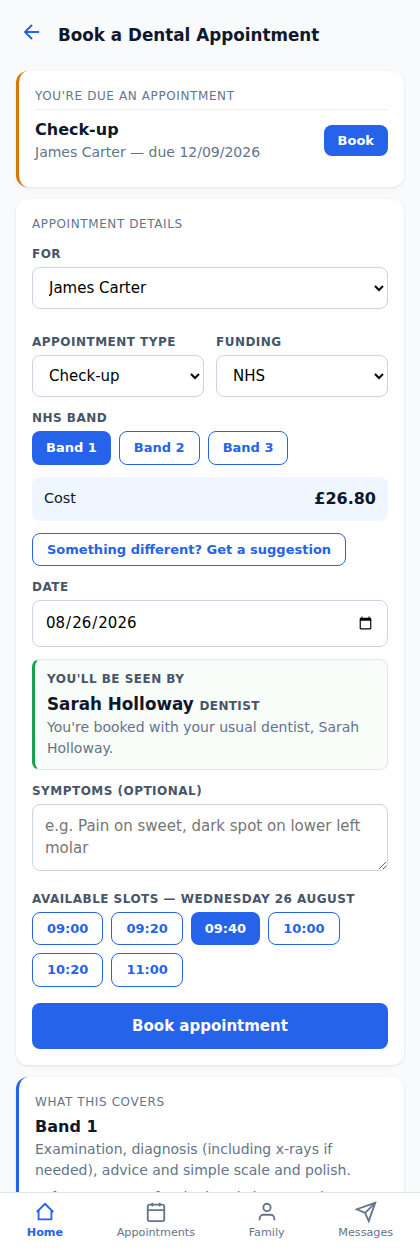
Reading top to bottom:
- Due an appointment? — a recall prompt ("You're due a check-up") with a
one-tap Book button, shown when the patient has an outstanding recall. - Appointment details — who it's for (household member if linked), the
appointment type, funding (NHS or private) and the NHS band. - Cost — shown up front from the real FP17 band charges.
- "Something different? Get a suggestion" — the booking-assist widget
(see below). - Date — the patient picks a date; the system shows who they'll be seen by.
- Symptoms (optional) — free text the patient can add.
- Available slots for that date, then Book appointment.
- What this covers — the plain-content card for the selected band.
- Emergency appointment — a separate request path for severe toothache,
swelling, trauma or bleeding.
¶ "Something different?" — the reassessment widget
The patient's record already holds their usual NHS band (or private flag) and
their registered dentist — set by staff. Most bookings are a one-tap confirm of
those defaults. When something has changed, the patient taps "Something
different? Get a suggestion" and answers a few quick questions:
- Do I have some pain? (and how severe — mild / moderate / severe)
- Swelling in my mouth or face
- A cracked or broken tooth
- Something new since my last visit
- Things have changed since my last visit
- An optional short description in their own words
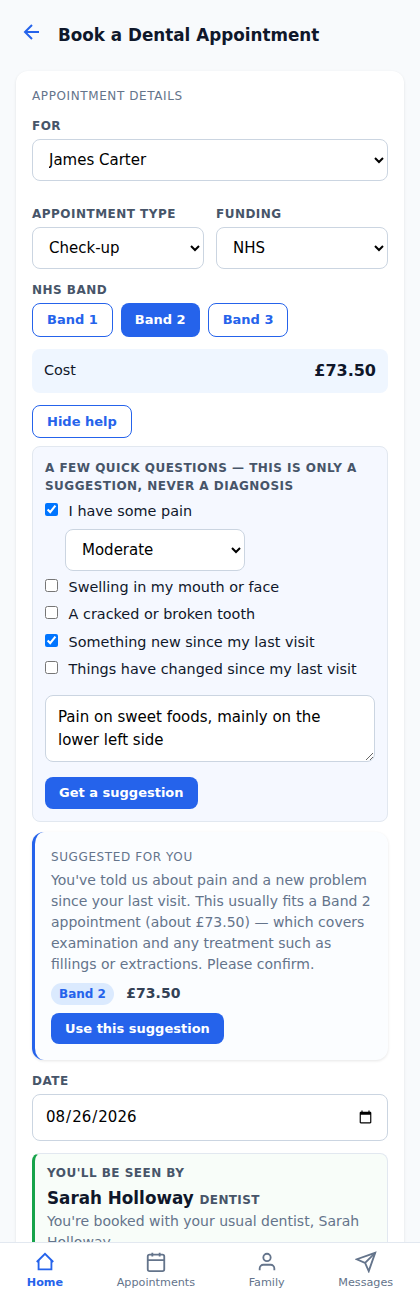
The widget returns a suggestion card in plain language — for example:
"You've told us about pain and a new problem since your last visit. This
usually fits a Band 2 appointment (about £73.50) — which covers examination and
any treatment such as fillings or extractions. Please confirm."
The patient can tap Use this suggestion (the band on the form updates) or
ignore it. It is advisory only:
- No diagnosis — clinical wording like "likely decay" never appears.
- No auto-booking and no change to the patient record — staff confirm any band
change before it is applied to the record. - What was suggested, and what the patient chose, is stored on the appointment
and visible to staff (the justified-AI audit trail).
¶ Who will I see? — automatic clinician allocation
There is no clinician picker in the booking flow. The patient picks a date
and the system allocates the clinician, in this order:
- Registered dentist — the patient's usual dentist, if they're active in
the practice and have a free slot on that date. - Usual cover — a colleague from the practice's cover map for that
appointment type, if the registered dentist isn't available. - Any capable clinician — anyone who can handle the appointment type with
a free slot.
The allocation is shown on the booking form with a plain explanation, e.g.
"You're booked with your usual dentist, Sarah Holloway" or "Your usual
dentist isn't available on that day, so you'll be seen by [name], who covers
their patients." Staff can always see and override the allocation.
If no clinician is available for the requested type and date, the patient is
told so and the booking cannot be completed automatically — see the outcome
below.
¶ What happens when the patient books
The system decides the outcome at the point of booking:
| Outcome | What the patient sees | What staff see |
|---|---|---|
| Confirmed | "Appointment booked successfully" — done, no staff touch needed | Normal booked appointment, no badge |
| Booked — confirmation needed | "Booked — one of our team will review it and may call to confirm" | Appointment shows a yellow Confirm badge in Appointments and Triage |
| Could not book automatically | Explanation + Leave a callback request | A new entry in the Callbacks queue (/dental/callbacks/) |
¶ When is confirmation needed?
The practice configures the triggers; the defaults are:
- Strong reassessment — the widget flagged pain, swelling or a band change
(staff see the suggestion alongside the patient's choice). - First visit — patient has never attended before.
- Complex medical history — flags on the patient record.
- Payment / exemption question — the patient mentioned exemptions (HC2/HC3),
help with payment, or an NHS number. - Patient asked to discuss first — e.g. "I'd like to speak to someone".
- Household member with no record — booked for a linked member who has no
dental record yet.
¶ When can it not be booked?
- New patient with no record — they must be registered first.
- Allocation unresolved — no clinician available for the type/date.
- Household member with no record — nothing to book against.
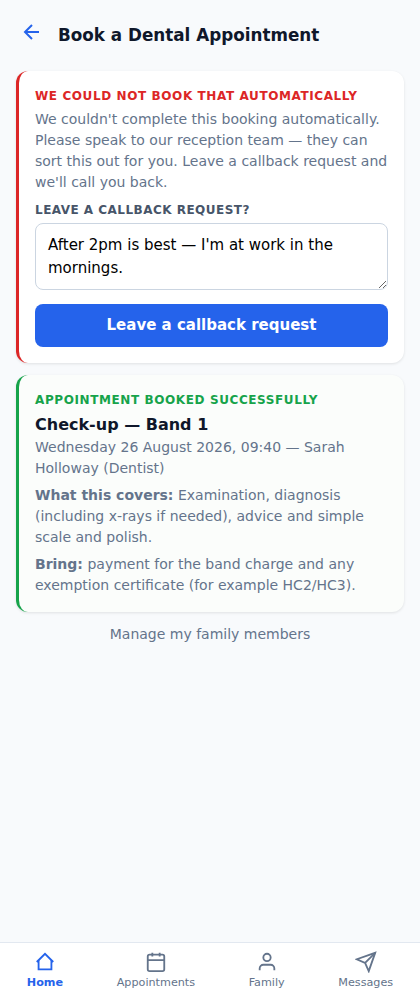
In these cases the patient is never left without an outcome: they're told
the booking couldn't be completed automatically and are offered a callback
request, with a notes box for preferred times ("after 2pm is best — I'm at work
in the mornings"). The request lands in the staff Callbacks queue, which is
covered in the staff guide to callbacks and confirmations.
¶ Out of hours
If the patient needs a human but reception is closed (per the practice's
configured opening hours), the callback request is still captured and appears
in the queue for the next working day.
¶ "What this covers" — the coverage card
For NHS bookings, the booking screen shows a plain-content card for the
selected band (configured per practice, not AI-generated):
- Band 1 — examination, diagnosis (including x-rays if needed), advice and
simple scale and polish. - Band 2 — everything in Band 1, plus treatment such as fillings, root
canal work and extractions. - Band 3 — everything in Bands 1 and 2, plus more complex work such as
crowns, dentures and bridges.
Each card also says what to bring (payment for the band charge and any
exemption certificate, e.g. HC2/HC3) and what happens at the visit, so the
patient knows what to expect before they arrive.
¶ What booking assist deliberately does NOT do
- No patient chat bot — the booking flow stays the flow; there is no separate
AI chat window. - No diagnosis or clinical triage scoring that staff never see.
- No blocking of the form — the patient can always book as usual.
- No changes to the patient record without staff confirmation.
- No external processing of patient symptom text — all rules run on-tenant
(DSPT Category 3 safe; the reassessment is deterministic rules, not an LLM).