¶ Dispensing — Claim a Prescription
¶ What you'll be able to do
After reading this guide you will be able to claim a prescription that the spine is holding for your
pharmacy, so that it can be worked on, and to find the prescriptions the pharmacy has already started.
Who does this? Claiming is done by the Responsible Pharmacist or the Dispensing Technician —
both work the dispensary. If you cannot see Dispensary in the top menu, your login does not hold one
of those two roles; that is a permission setting, not something you can change yourself.
¶ Why a prescription has to be claimed
When a prescriber sends a prescription electronically, the spine holds it for the pharmacy the patient
chose. Until somebody claims it, another pharmacy can still take it. Claiming is the moment your
pharmacy says "this one is ours" — and from then on the pharmacy is responsible for it.
Three things follow from that, and they explain how the screens behave:
- Only one pharmacy can hold a prescription at a time. If another pharmacy has already claimed it, the
claim is refused and you cannot work on it. - Claiming makes a local record. The app copies the prescription to the pharmacy's own record — the
reference, the patient, the prescribed items — so the dispensary can work on it without the spine being
available at every step. - Every step is recorded against a person. Claiming records who claimed it and when, and each later
step records its own actor, so the trail shows who did what.
¶ Before you start
- Your login must hold the Responsible Pharmacist or Dispensing Technician role (see above).
- The pharmacy's premises profile must exist. If it does not, the app takes you to the premises screen
first — this is normally completed once, at setup. - The pharmacy is identified to the spine by its ODS code, which is recorded with the premises
verification. Without it the spine does not know which prescriptions are yours, so the list can come back
empty. If it does, check with your Business Manager that the verification has been recorded. - You do not need the paper or the patient present: claiming is about taking responsibility for the
prescription, not about handing anything over.
¶ Step 1: Open the dispensary
- Log in to the pharmacy app.
- Click Dispensary in the top menu.
The Dispensary Queue is in two panels:
- Claimable prescriptions — what the spine is holding for this pharmacy right now. This list is read
from the spine each time you open the page. - In progress — the prescriptions this pharmacy has already claimed and is working on, with the state
each one is in.
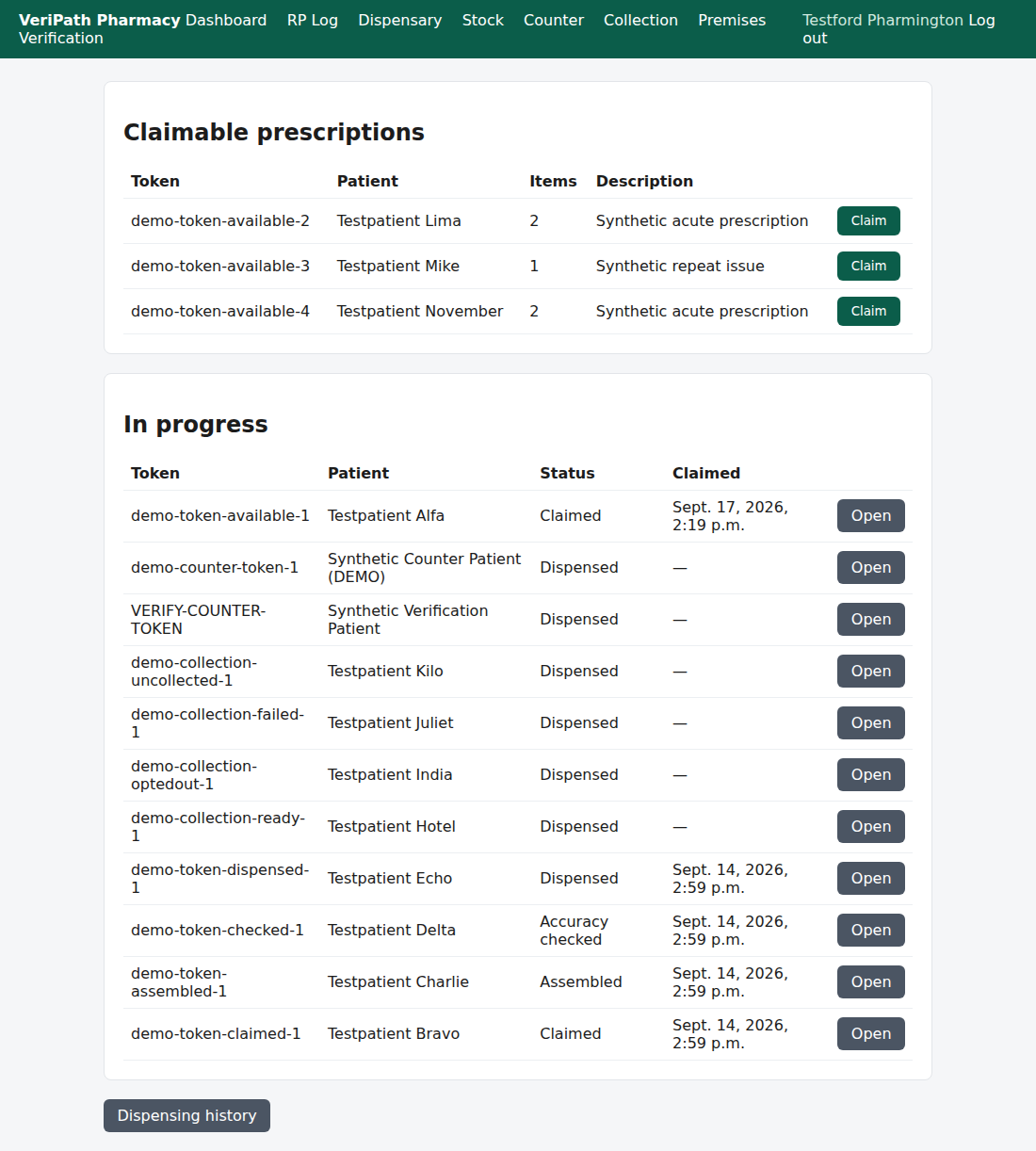
The dispensary queue. "Claimable prescriptions" comes from the spine; "In progress" is this pharmacy's own
work, with the state of each prescription.
¶ Step 2: Find the prescription
In Claimable prescriptions, each row shows:
| Column | What it tells you |
|---|---|
| Token | The reference the prescription is claimed by. This is the identifier you will see on every later screen. |
| Patient | The patient's name as the spine holds it. |
| Items | How many items the prescription contains. |
| Description | The spine's own description of the prescription. |
¶ Step 3: Claim it
- Click Claim on the row.
- The app claims the prescription at the spine, creates the pharmacy's own record of it, and takes you
straight to that record. - A green banner confirms it: "Claimed token <reference>."
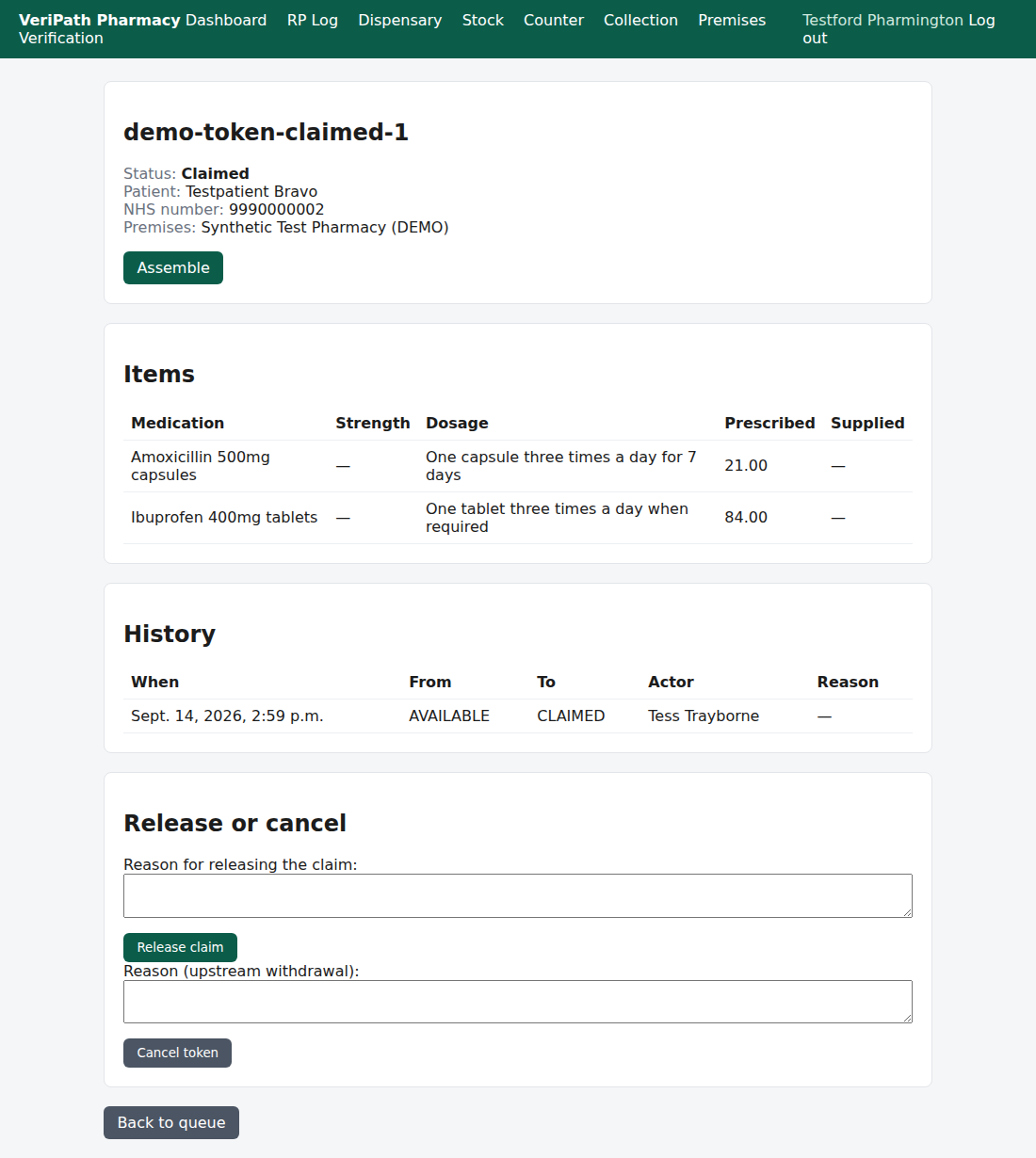
Immediately after claiming: the state reads Claimed, the prescribed items are listed, the next actions
are offered, and the history already shows the claim with the name of whoever made it.
¶ What you can do next
On the prescription's own page, what you are offered depends on the state it is in and on your role:
- Assemble — record what is being supplied for each item. This is the next step in the normal flow (see
Assemble a Prescription). - Release claim — hand the prescription back so it is available again. Use this when the prescription
should not have been claimed here — for example the patient has gone to another pharmacy. The reason is
required, and the history keeps both the release and who made it. - Cancel token — for a prescription that has been withdrawn, so that it cannot be dispensed. Cancelling
is not possible once the prescription has been dispensed.
Only a pharmacist sees the clinical steps — the accuracy check, dispense and endorse actions are
not offered to a Dispensing Technician.
¶ If it doesn't work
| What you see | What it means |
|---|---|
| "That token is already claimed." | This pharmacy already has it. The app opens the existing record instead of claiming it twice. |
| "That token was claimed concurrently." | Two people clicked Claim on the same prescription at the same moment. Only one record is created, and the other is told rather than duplicated. |
| "Could not claim the token. It may be held by another pharmacy, or EPS may be unavailable — please try again." | Either another pharmacy holds it, or the spine did not answer. Nothing has been claimed locally, so the prescription is untouched — try again, and tell your Business Manager if it keeps failing. |
| "No prescriptions are available to claim." | The spine is holding nothing for this pharmacy at the moment. |
Nothing is written down until a claim succeeds, so a refused claim needs no tidying up.
¶ What the record keeps
Each step appends a row to the prescription's history: the time, the state it moved from and to, who
did it (a name recorded at the time, so a later change of name does not rewrite history) and the reason
where one was given. The audit trail records the action and the person — not the clinical content.
¶ Related
- Coverage Plan — the guides and what is left to write
- Assemble a Prescription — the next step after claiming (B2)
- Release or Cancel a Claim — handing a prescription back (B6)
- Dispensing History — looking back over what the pharmacy has dispensed (B7)