¶ Collection — See the Delivery Trail for a Notification
¶ What you'll be able to do
After reading this guide you will be able to read a prescription's delivery trail — what the patient was
told, down which channel, to which address, when, and what the messaging service said — and answer the
question a patient, a colleague or an inspector actually asks: did they know?
Who does this? The Responsible Pharmacist, Dispensing Technician and Business Manager. The
Counter Assistant has no access to the trail — the recipient's phone number or email address is patient
contact data, and it stays off the counter.
¶ What the trail is
One row per message kind, not per attempt. A prescription has two possible messages: the
collection-ready one (sent when it was dispensed) and the uncollected reminder (E3). Each kind gets
one row; a resend is counted as another attempt on the same row, so the trail cannot fill up with
duplicates and "did we ever send it?" always has one answer.
It holds outcomes, not content. The app stores no message body: the trail shows the template, the
channel, the recipient, the status, how many attempts, and when the last attempt was. That is deliberate —
the content carries no clinical detail worth keeping, and the record stays about the send.
It shows the patient's side of the picture. The top of the page says whether the prescription has been
handed over (and by whom), and which contact preference the messages were sent on.
¶ Step 1: Open a prescription's trail
From the Collection screen, press Trail on the prescription's row.
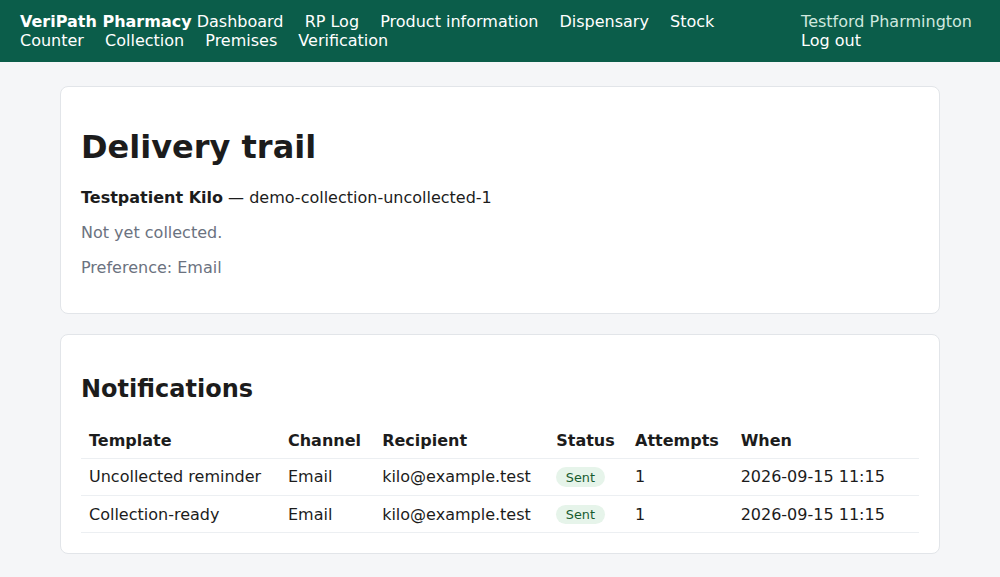
The trail on the test pharmacy, 6 October 2026, as the pharmacist: the patient and the prescription at the
top, Not yet collected., the contact preference the messages went on — and both notification rows
Sent, one attempt each, to the email address on file.
Read it in this order:
| On the page | What it tells you |
|---|---|
| The patient and the reference | Whose prescription this is. |
| Handover — or Not yet collected. | Whether it has been collected (and by whom), from E1. |
| Preference | The channel the messages use — or No contact preference recorded. |
| Template | Which message: Collection-ready or Uncollected reminder. |
| Channel / Recipient | How it was sent and to which mobile or email. |
| Status | Sent, Failed, Suppressed (opted out), or Queued. |
| Attempts | How many times the app tried (a resend adds one). |
| When | The time of the last attempt — not the time of the first. |
| Resend | Offered on a Failed row (E3). |
¶ Step 2: Read the two ends of it — sent, and suppressed
The same screen shows a message that was deliberately not sent. A patient who has opted out has their
messages recorded rather than dropped silently, so a missing message is never a mystery.
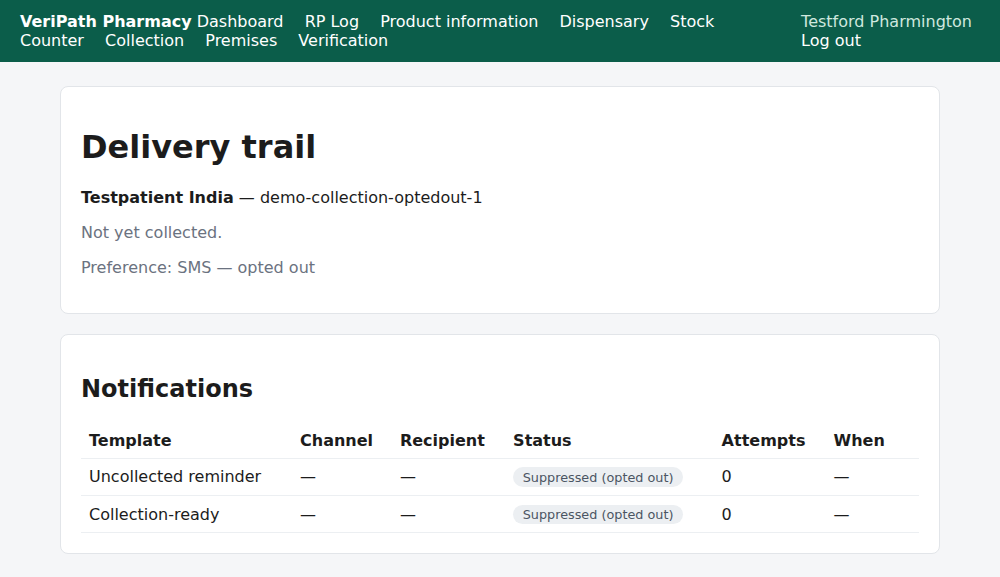
An opted-out patient's trail: both rows read Suppressed (opted out) — no channel, no recipient, no
attempt — and the preference line says SMS — opted out. The app did not message them, and it says so
on the record (E6).
¶ When something is not right
| What you see | What to do |
|---|---|
| No notifications have been queued for this token. | Nothing has been attempted for this prescription. It may not have been dispensed yet — the first message goes at dispense. |
| A Failed row | Read the reason, fix what you can (usually the contact details, E5) and Resend (E3). |
| Sent but the patient says nothing arrived | The app reports that the message was handed to the messaging service, not that it was read. Check the recipient against the details the pharmacy holds (E5). |
| Both rows suppressed | The patient has opted out. Respect it; ask them to opt back in if they want messages (E6). |
| The patient says they got two messages | There are two: collection-ready, and the reminder if it sat uncollected past the threshold (E3). |
| You cannot see the trail | It is the pharmacist's, technician's and business manager's screen — the Counter Assistant has no access to patient contact details. |
| You need to prove what the patient was told | The trail is the record: template, channel, recipient, status, attempts and time. The message text itself is not stored. |
¶ What happens next
- E3 — send or resend a collection notification. The action the trail offers.
- E5 — record a patient's contact preference. Where the channel and recipient come from.
- E6 — record a patient opt-out. Where the suppression comes from.
- E1 — hand a prescription over. Where the handover line comes from.
¶ Related pages
- Pharmacy App Guides — the published guides
- Coverage Plan — every everyday task, and what is published
- Roles and Permissions in the Pharmacy App