¶ Stock — Receive a Delivery
¶ What you'll be able to do
After reading this guide you will be able to record a delivery of stock into the pharmacy: the supplier, what
arrived, in which batch and with what expiry — so that the goods are on the shelf and in the stock ledger, and
so that the pharmacy can show what it received and when.
Who does this? Recording a delivery requires the Responsible Pharmacist, the Dispensing Technician
or the Business Manager. The Goods-in history can be read by all four roles, including the Counter
Assistant. If you cannot see Stock in the top menu, your login does not hold a stock role — that is a
permission setting, not something you can change yourself.
¶ Why a delivery has to be recorded
Two separate things are true about stock arriving, and they explain why this screen exists.
The pharmacy has to be able to account for what it received. The professional guidance on the safe and secure
handling of medicines requires an audit trail where medicines are received from an external source (3.11),
and that all orders and dispatches are authorised and recorded with receipt of goods recorded (3.38). The
GPhC's standards put it as a requirement to keep the records needed for the safe provision of services (1.6),
and to obtain medicines from a reputable source (4.3).
Recording the delivery is what puts the stock on hand. Until a receipt is posted, the pharmacy's ledger does
not know the goods exist, so they are not counted in the stock figures — whatever is physically on the shelf.
Two further requirements shape what you are asked to record:
- The guidance requires that all medicines received are of the quantity and quality specified and suitable for
the purpose intended, with attention to product integrity — for example that the cold chain and other
storage requirements have been maintained (3.13). What you record is your assertion that this is so; the app
records it, it cannot check it. - The GPhC's standards require that concerns are raised when medicines are suspected not to be fit for
purpose (4.4). A delivery that is short, damaged, out of date on arrival or has broken its cold chain is a
concern — see If something is wrong with the delivery, below.
¶ Before you start
- Have the delivery paperwork in front of you: supplier, items, quantities, batch numbers and expiry
dates. Every line you record needs all four. - Check the delivery against what was ordered. The app holds no purchase order, so "the quantity specified"
is a check only you can make, against the order or delivery note you hold. - Every item must already exist as a stock item in the app — the item list on the form is the pharmacy's
stock list. If something has arrived that is not on it, it has to be added to stock first (speak to whoever
looks after stock, normally the Business Manager). - The app must be able to reach ERPNext, because that is where the receipt is posted. If it cannot, the
receipt is saved but not posted, and the stock is not on hand — see If it doesn't work.
¶ Step 1: Open the goods-in screen
- Log in to the pharmacy app.
- Click Stock in the top menu.
- Click Record goods-in.
You can also reach it from the Goods-in history (Record goods-in at the foot of the page).
¶ Step 2: Fill in the delivery
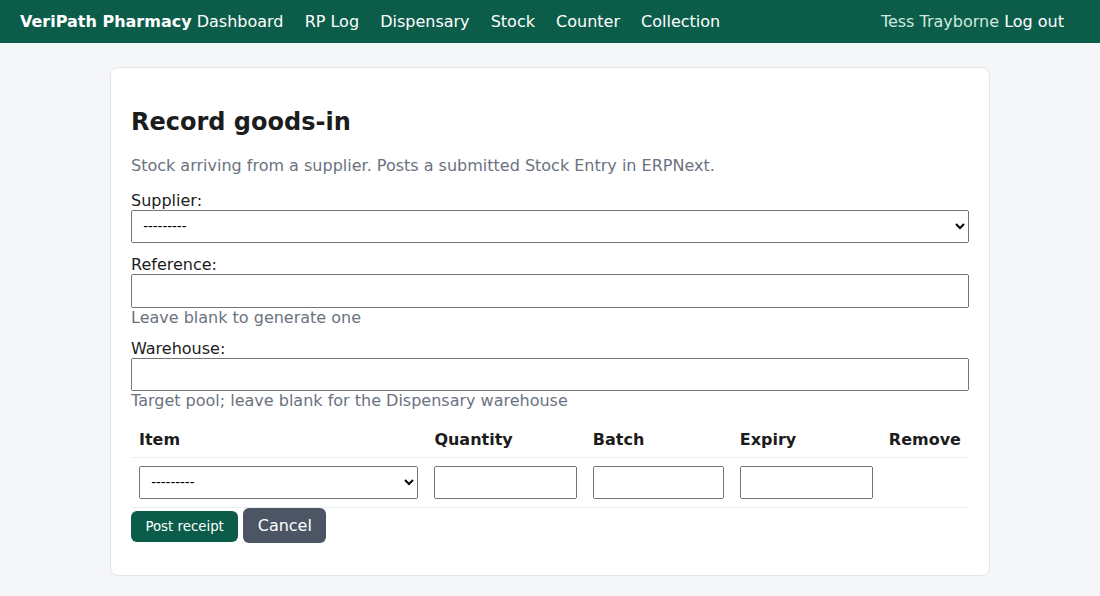
The goods-in form: the supplier and two optional boxes, then one row per batch delivered. The Item list is
the pharmacy's own stock list.
| Field | What to put in it |
|---|---|
| Supplier | The supplier the delivery came from, chosen from the pharmacy's active suppliers. This is the record of where the medicines were obtained. |
| If the supplier is not in the list, it has to be added to the pharmacy's supplier list first — the app has no supplier screen yet, so ask whoever looks after stock. | |
| Reference | The pharmacy's own reference for the receipt — leave it blank and the app generates one (for example GIN-20260919-4F1A2B). If you type one, use a reference that has not been used before. |
| Warehouse | The pool the stock belongs to. Leave it blank for the Dispensary warehouse; type a different one only if the pharmacy holds stock in another location. |
¶ Step 3: Add the lines
Add one row per batch. If the same medicine arrived in three batches, that is three rows — the batch is what
the stock is tracked by.
| Column | What to put in it |
|---|---|
| Item | The stock item, from the pharmacy's stock list. |
| Quantity | How much arrived, in the item's unit. It must be more than zero. |
| Batch | The batch or lot number from the packaging. Required. |
| Expiry | The expiry date on the packaging. Required, and it cannot be in the past — the app refuses a date that has already gone. |
Use Remove on a row to take it off before posting. A receipt needs at least one line: posting with none is
refused and nothing is recorded.
¶ Step 4: Post the receipt
- Check the lines against the delivery note.
- Click Post receipt.
The app then:
- records the receipt, with your name against it, and the date and time;
- creates the item and the batch in ERPNext if they are not there yet, and posts the receipt as a submitted
Stock Entry — one document for the whole delivery; - writes one stock movement per line, naming the batch, so the movement can be traced back to this receipt;
- returns you to the Goods-in history with a green banner: "Receipt <reference> posted to ERPNext."
If the posting to ERPNext fails, the receipt is saved but not posted and the history shows it as Failed —
the delivery has not reached the stock ledger. See If it doesn't work.
¶ Step 5: Read the history
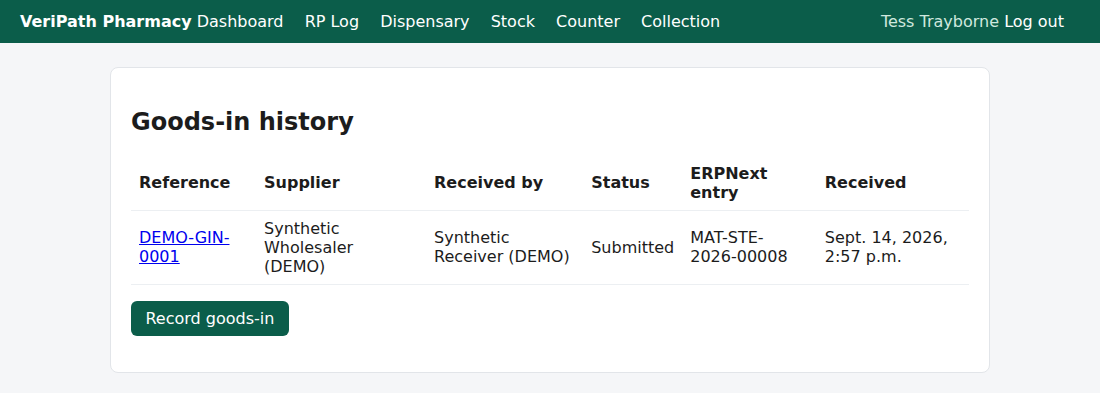
The goods-in history: every receipt the pharmacy has recorded, newest visible at the top, with its supplier, who
received it, its status and the ERPNext entry it produced.
| Column | What it tells you |
|---|---|
| Reference | The receipt's own reference. |
| Supplier | Where the delivery came from. |
| Received by | Who recorded the receipt (the name as it was at the time). |
| Status | Pending — created but not yet posted; Submitted — posted to ERPNext; Failed — see below. |
| ERPNext entry | The Stock Entry the receipt was posted as. It reads — until the posting has succeeded. |
| Received | When the receipt was recorded. |
Click a reference to open the receipt on its own page: the same details, every line with its batch and expiry,
and the full text of any ERPNext error.
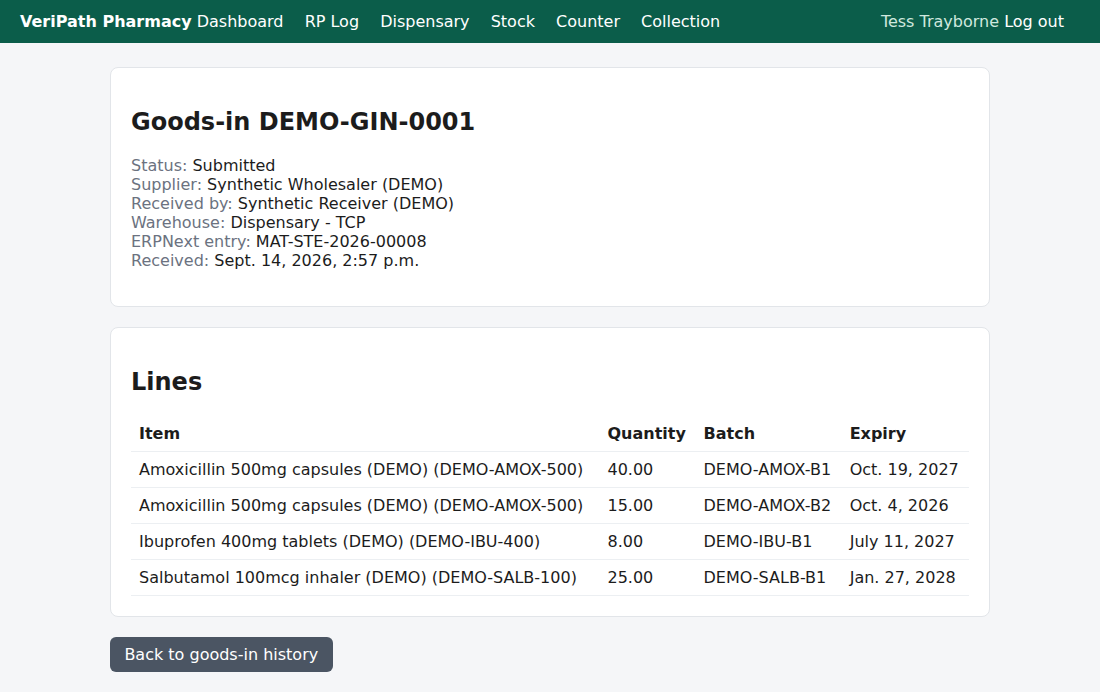
One receipt in detail: header, then every line with its quantity, batch and expiry — the record of what the
pharmacy received.
¶ If it doesn't work
| What you see | What it means |
|---|---|
| "Add at least one line to the receipt." | You pressed Post receipt with no lines. Nothing was recorded — add the lines and post again. |
| "The expiry date is in the past." | The expiry date on one of the rows has already gone. Check the packaging and correct the date. If the stock really has expired, do not receive it as usable stock — see below. |
| "The receipt was saved but the ERPNext posting failed." | The receipt exists but the stock ledger does not have it. Open the receipt from the history, read the error in full, and use Retry the ERPNext posting. |
| "The ERPNext posting failed again. The error has been updated." | The retry failed too. Read the error on the receipt page — it is normally a connection problem or an item ERPNext will not accept. Nothing is duplicated: retrying is safe. |
| "This receipt is already posted to ERPNext." | The receipt has already reached the ledger, so there is nothing to retry. |
| An error starting with a long technical message on the receipt page | That is ERPNext's own error, shown in full. Pass it on to whoever looks after the stock connection. |
Retrying is safe. The app adopts the Stock Entry if ERPNext already has one for that receipt, so a retry can
never post the same delivery twice.
¶ If something is wrong with the delivery
The app records what was received. It has nowhere to record a problem with it, so a delivery that is short, has
damaged packs, has broken its cold chain, or contains something you doubt, is handled outside the system:
- Do not post it as usable stock yet. Set it aside — segregated, and securely — until it has been dealt with.
- Raise it with the pharmacist or the person who looks after stock the same day. The GPhC's standards require
that concerns about medicines not being fit for purpose are raised (4.4). - Take advice before receiving it. If you receive it and the stock is wrong, the correction is a stock
adjustment — a separate step, with its own record. - If nothing was recorded and nothing has been posted, there is nothing to correct in the app: the receipt simply
should not be created for goods that are not going into stock.
¶ What the record keeps
- The receipt: its reference, the supplier, who received it by name, the warehouse, the time, and the ERPNext
Stock Entry it was posted as. - The lines: one per batch, with the item, the quantity, the batch number and the expiry date.
- A stock movement per line, naming the batch, traced back to the receipt.
- An audit entry for the receipt and for each movement — with no patient content, because there is none here.
¶ What this step does not do
- It does not refresh the stock figures. The Stock overview counts come from the last refresh of the
positions held in ERPNext, so a delivery you have just posted appears there only after a refresh — that is the
Refresh positions from ERPNext button (see Sync Stock Positions). - It does not record a problem with a delivery — a short delivery, damaged goods or a rejected item cannot be
recorded here (see above). - It does not touch Controlled Drugs. The pharmacy app holds no Controlled Drug register; if a delivery
contains CDs, their own record must be kept separately.
¶ Related
- Stock — Coverage — where this guide sits in the stock group
- Roles and Permissions in the Pharmacy App — who can
reach the stock screens - Pharmacy App Guides — the published guides
- Check Stock Levels and the Low-Stock Report (C2) — what is on hand, once positions have been refreshed
- Sync Stock Positions (C5) — refreshing the figures from ERPNext