¶ Responsible Pharmacist — Sign On & Sign Off
¶ What you'll be able to do
After reading this guide you will be able to sign yourself on as the Responsible Pharmacist (RP) when
your shift begins, see who is currently on duty, sign off at the end of your shift, and check the
record of previous shifts.
Who does this? Signing on and off is done by the pharmacist — it is a legal duty, not an
administrative task. Other pharmacy staff can see who is on duty, but only a pharmacist can sign the
log.
¶ Why the app asks you to sign on
A pharmacy cannot operate without a Responsible Pharmacist on duty at the premises. The app therefore
keeps a Responsible Pharmacist log: a running record of who was on duty, when their shift started
and ended, and which registration number they were working under at the time.
The log entry is not a "clocking in" convenience — it is the record that shows who was legally
responsible at any given moment. Three things follow from that, and they explain how the screens
behave:
- Only one pharmacist can be on duty at a premises at a time. The app will not let a second
pharmacist sign on while someone is already on duty. - Entries are never deleted. If something needs correcting, a new entry is added rather than the old
one being edited or removed. The record is kept for at least five years. - Your details are captured as they were at that moment. The name and registration number stored
against a shift are a snapshot taken when you sign on, so a later change to your profile does not
rewrite history.
¶ Before you start
- You need your own login for the pharmacy app, and your account must hold the Responsible
Pharmacist role. If you cannot see the sign-on button, ask your app administrator to check your
role — this is a permission setting, not something you can change yourself. - The pharmacy's premises profile must exist. If it does not, the app takes you to the premises
screen first and asks you to complete it (this is normally done once, at setup, by the Business
Manager). - Have your GPhC registration number to hand. The app will pre-fill it if it already knows it, but
you should check it is right before signing on.
¶ Step 1: Sign on at the start of your shift
- Log in to the pharmacy app.
- On the dashboard, find the Responsible Pharmacist on duty panel. While nobody is signed on it
reads "No Responsible Pharmacist is currently on duty." - Click Sign on as Responsible Pharmacist.
- Check the GPhC registration number shown in the form, and correct it if needed.
- Click Sign on.
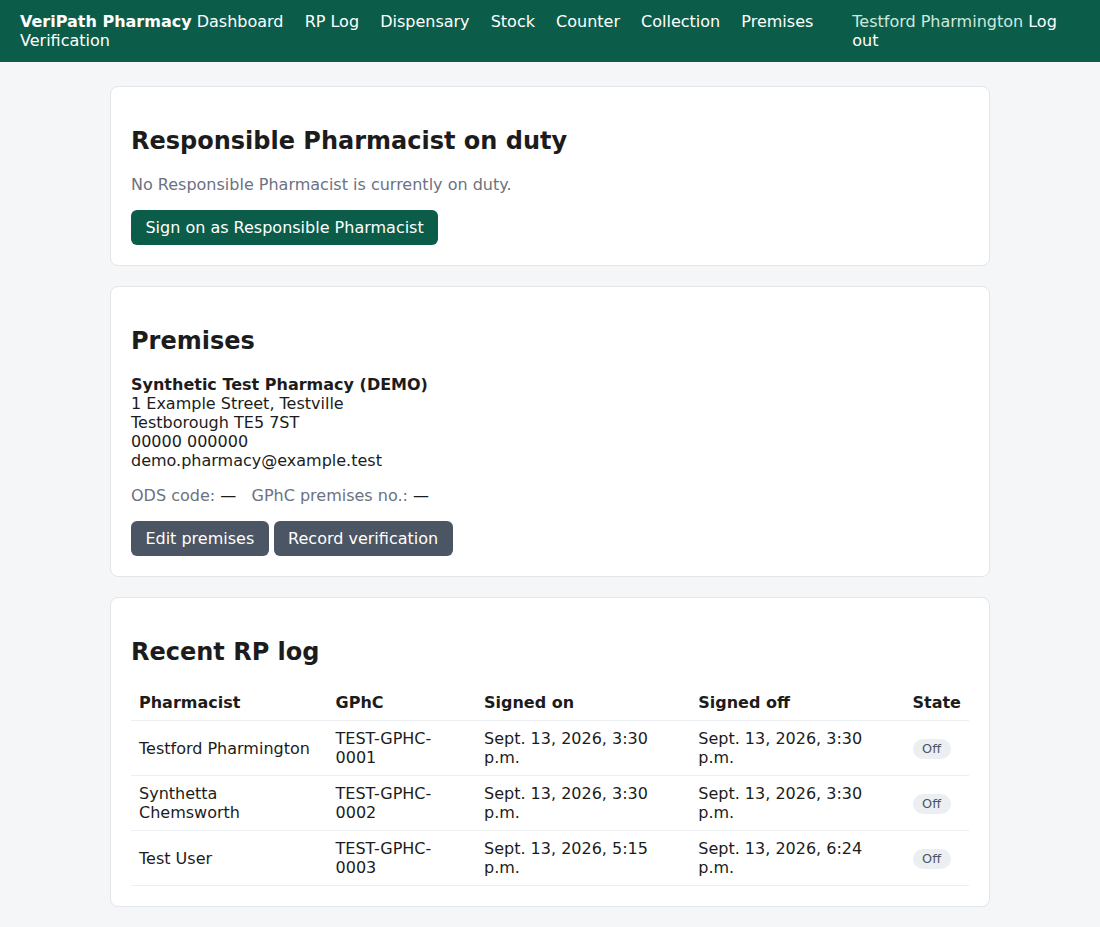
The dashboard while nobody is on duty. The sign-on button appears only for a pharmacist.
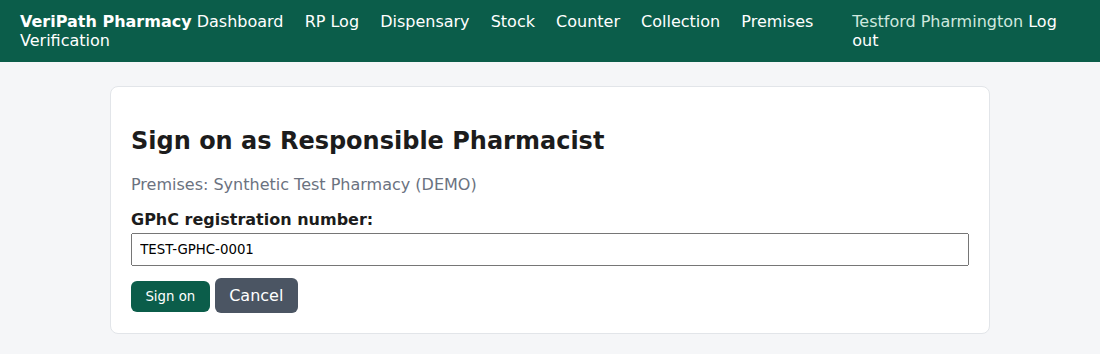
The sign-on form. Your GPhC registration number is pre-filled from your profile, so check it before you
sign on rather than retyping it.
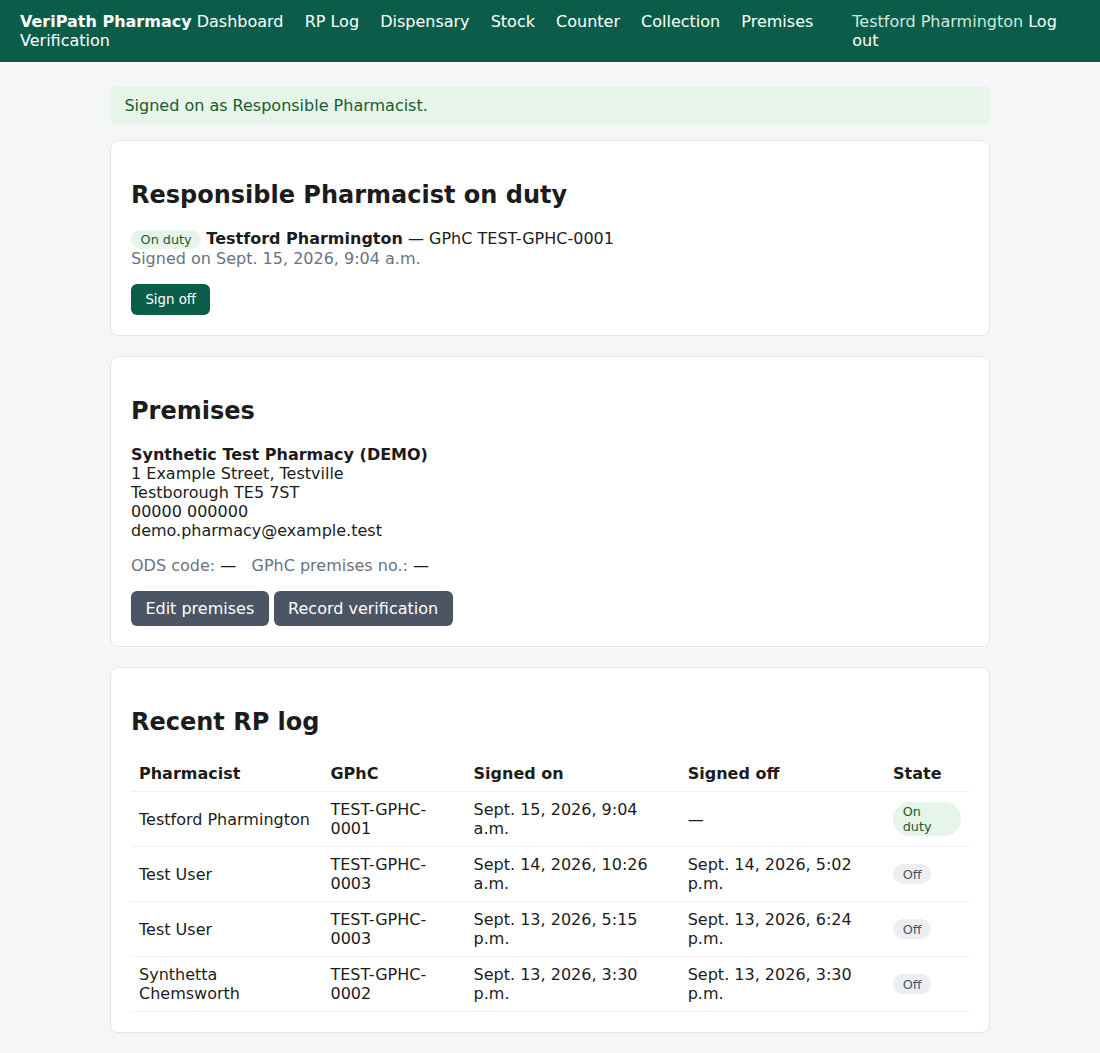
After signing on: the confirmation message, the on-duty panel with your name and GPhC number, and the
open shift at the top of the log.
You are returned to the dashboard and it now shows you as on duty, with your name, your GPhC number and
the time you signed on.
If the app replies "A Responsible Pharmacist is already on duty." then someone else is already
signed on at this premises. Check with your colleague before doing anything — two pharmacists must not
both believe they are responsible. In practice this message appears when a colleague forgot to sign
off at the end of their shift.
¶ Step 2: Check who is on duty
The dashboard's Responsible Pharmacist on duty panel is the quick answer to "who is responsible
right now?":
| What you see | What it means |
|---|---|
| A green On duty badge with a name, GPhC number and a signed-on time | That pharmacist is the Responsible Pharmacist at this premises |
| "No Responsible Pharmacist is currently on duty." | Nobody is signed on. The pharmacy should not be operating |
The panel also shows a Sign off button, available to any pharmacist holding the Responsible
Pharmacist role (see Step 4).
¶ Step 3: Look back at previous shifts
- From the dashboard, open the Responsible Pharmacist log (also reachable while signing on).
- The log lists each shift with these columns:
| Column | Meaning |
|---|---|
| Pharmacist | The name recorded at the time of that shift |
| GPhC | The registration number recorded for that shift |
| Signed on | When the shift started |
| Signed off | When the shift ended (blank while a shift is still open) |
| State | Whether the pharmacist is currently on duty, or off |
Use this when you need to answer "who was on duty on Tuesday afternoon?" — for example when reviewing
an incident, or handing over to an inspector.
Two things to know about the list while the series is being tested. On the dashboard the card is
headed "Recent RP log" and shows the last ten shifts; on the RP Log page all shifts are listed. At
the moment neither list is sorted — the app shows the entries in the order it happens to hold them,
which in practice means the oldest first. So the current shift can appear at the bottom rather than the
top, and on the dashboard it can drop off the card once there are more than ten shifts. A development
note has been raised to sort both lists newest-first; until that lands, search the list rather than
assuming the top entry is the latest.The ODS code and GPhC premises number on the Premises card read "—" until the premises
verification has been recorded (see Premises Profile & Registration
Details). They are not part of
signing on, and the app does not ask you for them here.
¶ Step 4: Sign off at the end of your shift
- Log in (if you are not already) and open the dashboard.
- In the Responsible Pharmacist on duty panel, click Sign off.
The panel returns to "No Responsible Pharmacist is currently on duty." and your shift now shows a
signed-off time in the log.
Who can sign off. The button closes whichever shift is open at the premises, and it is available
to any pharmacist holding the Responsible Pharmacist role — not only the pharmacist named in that
shift. That covers a handover, or a colleague who left without signing off. The audit trail records
who performed the sign-off, so close a colleague's shift only when you are sure it is finished.
Please sign off. If you leave without signing off, the next pharmacist cannot sign on, and the
record will claim the pharmacy had a Responsible Pharmacist on duty when it did not.
¶ If something goes wrong
| What you see | What it means | What to do |
|---|---|---|
| "A Responsible Pharmacist is already on duty." | Someone is still signed on | Ask the pharmacist on duty to sign off, then sign on yourself |
| "Another Responsible Pharmacist signed on concurrently — only one may be on duty per premises." | You and a colleague signed on at almost the same moment; the app accepted only one | Refresh the dashboard and check who the app recorded as on duty. Do not both continue |
| "Create the premises profile first." | The pharmacy's premises details have not been set up | Ask the Business Manager to complete the premises profile |
| "Only a Responsible Pharmacist can sign on." | Your account does not hold the Responsible Pharmacist role | Ask your administrator to check your role |
| You cannot see the sign-on button | Your role, or the premises profile, is not in place | Work through the two rows above |
¶ What the app records
For every sign-on and sign-off the app stores:
- your name as it was at that moment (a snapshot),
- your GPhC registration number as entered for that shift,
- the start and end times of the shift,
- whether you were on duty, and
- an audit entry recording that the sign-on or sign-off happened, which pharmacist performed the
action and when (on a sign-off performed by someone other than the pharmacist on the shift, the audit
trail names the person who clicked, not the pharmacist on duty).
Notice what is not recorded: nothing about patients, prescriptions or clinical care. This log is
about who was responsible and when — no patient information is involved at any point.
¶ Keeping the record
- Entries are append-only: they cannot be edited or deleted from the app. A correction is made by
adding a new entry. - Records are kept for at least five years.
- The log lives on your pharmacy's own system, alongside your other pharmacy records.
¶ Where this sits in the series
This is the first of the pharmacy guides, because the operational day starts with a Responsible
Pharmacist signing on. The full worklist of everyday tasks is on the
Coverage Plan.
¶ Related pages
- Pharmacy App Guides — all the published guides
- Coverage Plan — the everyday tasks we document, and what is next
- Premises Profile & Registration Details
- Roles and Permissions in the Pharmacy App