¶ Dispensing — Dispensing History
¶ What you'll be able to do
After reading this guide you will be able to look back over the prescriptions this pharmacy has worked on —
find one by its reference or its patient, read where it got to, and open the full record behind it.
Who does this? The history is a dispensary screen: the Responsible Pharmacist and the Dispensing
Technician both see it, and it looks the same for either of them. No other role can reach the dispensary,
so no other role sees this list. If you cannot see Dispensary in the top menu, that is a permission
setting, not something you can change yourself.
¶ What this list actually holds
The page is called Dispensing history, but it is broader than the name suggests, and that is worth knowing
before you use it to check something:
- It is every prescription this pharmacy holds a record of — not only the dispensed ones. Claimed,
Assembled, Accuracy checked, Dispensed, Endorsed and Cancelled prescriptions are all in the list, and you can
tell them apart from the Status column. - It is this pharmacy's own record. Prescriptions that have not been claimed here, or that another pharmacy
holds, are not in it — the list is scoped to this premises. - It is the summary, not the detail. Each row is a headline; the items, the declaration and the
step-by-step trail of who did what live on the prescription's own page, one click away. - It is read-only. Nothing on this page changes a prescription. The only thing a row does is open it — and
the actions you find there still obey the prescription's state and your role.
¶ Step 1: Open the history
- Log in to the pharmacy app.
- Click Dispensary in the top menu.
- Click Dispensing history at the bottom of the Dispensary Queue page.
The list opens with the most recent first. Rows are ordered by when this pharmacy created its own record of
the prescription — in normal use, when it was claimed.
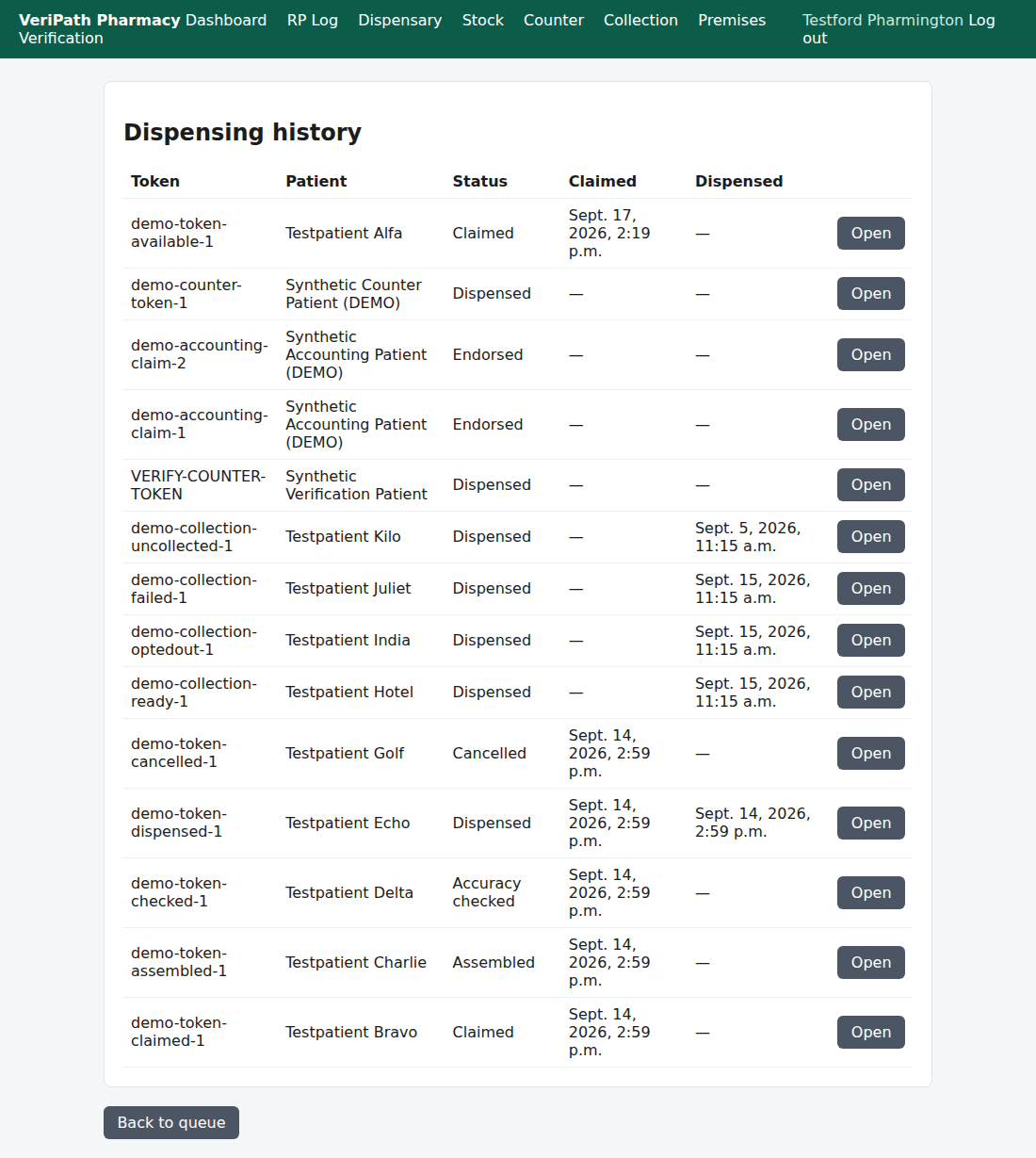
The dispensing history. One row per prescription, newest first, with the state it has reached, when it was
claimed, when it was dispensed, and an Open button into the full record. Back to queue returns you to
the dispensary queue.
Each row shows:
| Column | What it tells you |
|---|---|
| Token | The reference the prescription came in under — the same reference you see on every other screen. |
| Patient | The patient's name, as the spine held it when the prescription was claimed. |
| Status | How far the prescription has got: Claimed, Assembled, Accuracy checked, Dispensed, Endorsed or Cancelled. |
| Claimed | When the prescription was claimed. A dash (—) means it was not claimed through the app. |
| Dispensed | When it was dispensed, taken from the declaration recorded at the dispense. A dash (—) means it has not been dispensed. |
| Open | Opens the prescription's own page: its items, its declaration if it has one, and its full history. |
¶ Step 2: Find the prescription you want
- There is no search box and no filter. The list is a single table and it is not paged, so it grows as the
pharmacy works. Scanning it newest-first is quick for recent work; for an older reference, the browser's own
find (Ctrl+F on a keyboard) will jump straight to it by token or patient name. - Click Open on the row to see the record itself — where you can read the prescribed and supplied
quantities, the declaration (charge due or exemption category, evidence seen), and the history: every step,
with the time and the name of whoever did it.
¶ Reading the status column
| Status | What it means in practice |
|---|---|
| Claimed | Claimed here and waiting to be assembled. |
| Assembled | The quantities supplied have been recorded; waiting for the pharmacist's accuracy check. |
| Accuracy checked | Checked by a pharmacist; waiting to be dispensed. |
| Dispensed | Dispensed, with the charge declaration recorded. Waiting for the endorsement. |
| Endorsed | The reimbursement claim has been recorded. |
| Cancelled | Stopped, for instance because the prescription was withdrawn. It will never be dispensed, and it stays in this list as part of the record. |
An Endorsed prescription will also show a Dispensed time, because a prescription cannot be endorsed
without having been dispensed first.
¶ If it doesn't work
| What you see | What it means |
|---|---|
| "No dispensing records yet." | Nothing has been claimed at this premises yet. The list fills up as the pharmacy starts working prescriptions. |
| A prescription you expected is not in the list | Only this pharmacy's own prescriptions appear. If it has not been claimed here — or is still with the spine, or with another pharmacy — it is not in this list. |
| Dispensed shows a dash for a prescription you thought had gone out | It has not been dispensed through the app. Check the Status column first: it may be sitting at Assembled or Accuracy checked, or it may have been cancelled. |
| The list is long and unwieldy | There is no filter or paging on this screen. Use the browser's find, or open the row you want and work from the prescription itself. |
| You cannot see Dispensary in the top menu | Your login is not a pharmacist's or a technician's. |
¶ What the record keeps
- Every step is on the prescription, not on this list. The list points you at the record; the record is
where the trail lives — each step with its time, the state it moved from and to, and the name of the person
who did it, recorded as it was at the time. - A cancelled prescription is not deleted. It stays in the history, marked Cancelled, so the pharmacy
can always answer what happened to it. - Nothing on this page can be edited. Reading the history does not alter it, and there is no way to correct
a record from here — a mistake in a step is fixed by the next step, not by editing the past.
¶ Related
- Dispensing — Claim a Prescription — where a prescription
enters the dispensary - Dispensing — Assemble a Prescription — recording what
is supplied - Dispensing — The Accuracy Check — the pharmacist's check
- Dispensing — Dispense a Prescription — the clinical
act and the charge declaration - Endorse a Prescription — recording the reimbursement claim (B5)
- Release or Cancel a Claim — how a prescription is stopped (B6)
- Coverage Plan — the guides and what is left to write