¶ Stock — Record an Adjustment or Wastage
¶ What you'll be able to do
After reading this guide you will be able to correct the stock ledger when it and the shelf disagree, or take stock
out of the figures for a reason — wastage, disposal, an expired pack, a return to the supplier — so that the record
shows what changed, by how much, and why, with your name against it. It is the one place stock is altered by hand,
and an adjustment is never a silent edit: it carries a reason and it is posted as a document.
Who does this? Only the Responsible Pharmacist and the Dispensing Technician can post an adjustment. The
Counter Assistant and the Business Manager can read the other stock screens but this one is refused for them
(the page returns 403 Forbidden). If you are refused, ask one of those two roles.
¶ Why an adjustment has to be recorded
The ledger has to be able to explain itself. The professional guidance requires that medicines are protected by
controlled storage, that stock levels are monitored and that records are kept where appropriate (3.14), and the
GPhC's standards require the records needed for the safe provision of services (1.6). A stock figure that changes with
no reason attached cannot answer either: nobody can tell a wastage from a mis-scan from a delivery that was never
entered.
And the shelf is not always the ledger. Packs break, get dropped, go out of date on the shelf (C3), come back from
a patient, or turn out never to have been counted in. The app does not attempt to guess any of that — it asks for the
movement and a reason, and records both.
The correction is a posted document, not an edit. An adjustment creates a submitted Stock Entry in ERPNext —
a Material Issue when stock goes down, a Material Receipt when it goes up. Nothing is ever deleted or overwritten, so
the history of a mistake and its correction both survive.
¶ Before you start
- Look at the figures first. The adjustment form does not show what is on hand, so check the stock overview
(C2) or the expiry report (C3) before you change anything. - Know the reason you are going to give. The Reason box is required and holds up to 64 characters. The
pharmacy's convention is a short, specific reason: wastage, disposal, expired, returned to supplier,
correction. - Type the expiry date the way this app reads dates. The box is plain text and the app expects the year first
or a month name — for example2027-12-25or25 Dec 2027. Do not type25/12/2027: a slashed date is
read the American way (month first) when it is accepted at all, so04/03/2027becomes 3 April rather than
4 March. This matters more here than anywhere else, because the date you type is the one the expiry alerts use. - Anything you change in ERPNext is real. One adjustment means one posting; see If it doesn't work about what to
do if a posting fails.
¶ Step 1: Open the adjustment screen
- Log in to the pharmacy app.
- Click Stock in the top menu.
- Click Adjustment — one of the buttons in the row below the headline figures.
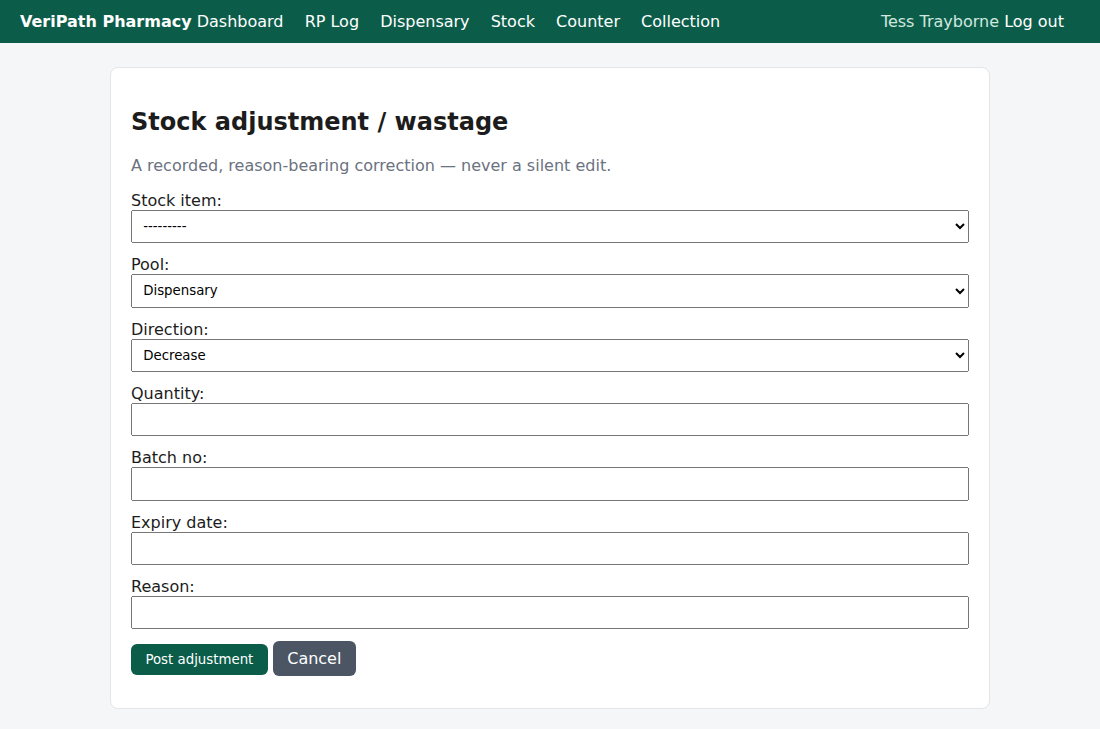
The adjustment form. Every field matters: which item, which pool, which way the stock moves, the quantity, and the
reason. The page is the same for both roles that can use it.
¶ Step 2: Fill in the adjustment
| Field | What to put in it |
|---|---|
| Stock item | The item being corrected, from the pharmacy's active stock list. Required. |
| Pool | Dispensary or Counter — the pool the stock is in (D3.3). Defaults to Dispensary. It must be the pool that is actually wrong: the two are counted separately, and a correction against the wrong one puts the figures out twice. |
| Direction | Decrease (the default) when stock goes down — wastage, disposal, expired, returned; Increase when it goes up — stock found, a patient's return back onto the shelf, a correction in the pharmacy's favour. An increase cannot name a batch whose date has already gone: the ledger refuses to receive expired stock (see If it doesn't work). |
| Quantity | How many, in the item's unit. Required, and it must be more than zero: the app refuses 0 and refuses a negative number, because the direction already says which way the stock moves. |
| Batch no | The batch the adjustment applies to. Optional — but leave it blank only when the correction really is about the item as a whole, because quantities are held per batch. |
| Expiry date | The batch's expiry, in the format above (2027-12-25 or 25 Dec 2027). Optional, and only meaningful with a batch number: the app records the date against the movement, but there is no batch in ERPNext to hold it unless you give one. Give both, or neither. |
| Reason | Why the stock changed. Required, up to 64 characters. |
Two things the direction does that are worth knowing:
- Decrease is posted as a Material Issue — stock leaving the ledger.
- Increase is posted as a Material Receipt with no value against it. It records a quantity correction, not
a purchase: if stock actually arrived from a supplier, record it as a delivery (C1), not here.
A worked example — the expired batch from the expiry report (C3). Five packs of
Amoxicillin 500mg capsules (DEMO), batch DEMO-AMOX-B3, expiry 2026-09-09, are on the shelf and past their date:
| Field | Value |
|---|---|
| Stock item | Amoxicillin 500mg capsules (DEMO) |
| Pool | Dispensary |
| Direction | Decrease |
| Quantity | 5 |
| Batch no | DEMO-AMOX-B3 |
| Expiry date | 2026-09-09 |
| Reason | expired — disposal |
¶ Step 3: Post it
- Check the figures you typed against the shelf or the paperwork.
- Click Post adjustment.
The app then:
- posts the movement as a submitted Stock Entry in ERPNext — Material Issue for a decrease, Material Receipt for an
increase — with the reason carried in the entry's remarks asadjustment: <your reason>; - creates the item and the batch in ERPNext first if you named a batch that is not there yet;
- records the movement locally with your name, the reason, the quantity, the batch, the expiry and the ERPNext
entry it produced; - returns you to the Stock overview with a green banner: "Adjustment posted to ERPNext."
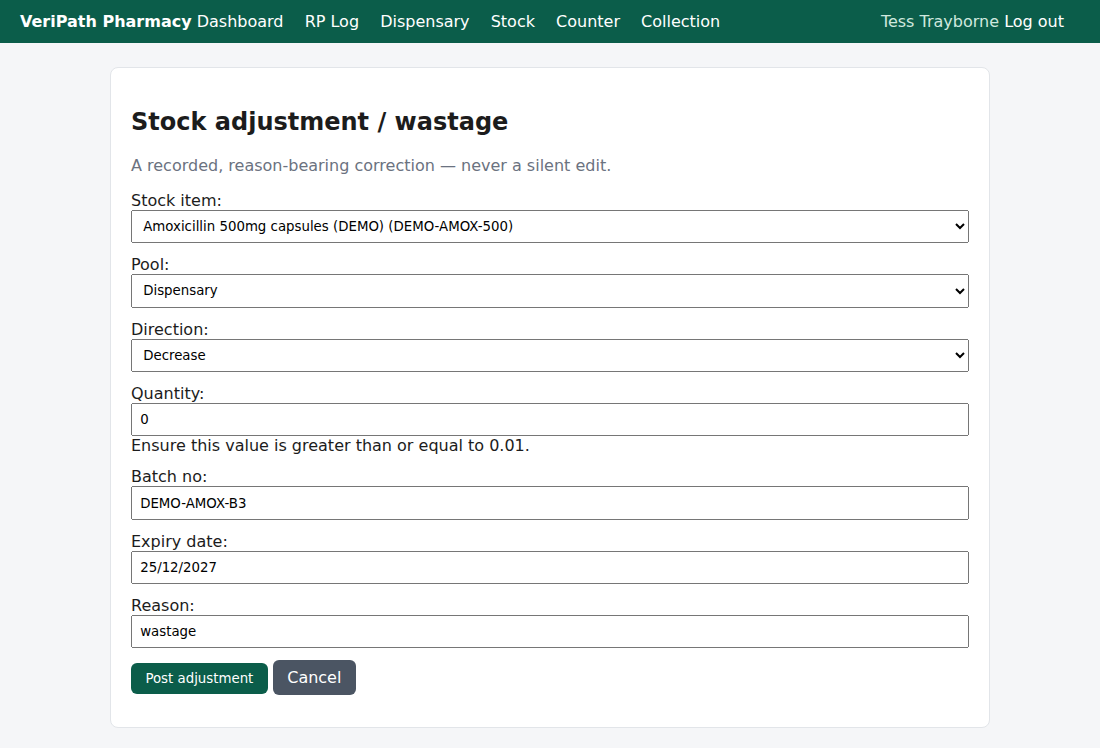
A refused entry: the app keeps what you typed and says what is wrong — here, a quantity that is not above zero. A date
it cannot read comes back the same way but with no message at all; see below.
¶ Step 4: Refresh the figures to see the effect
The ledger changes the moment the adjustment is posted, but the stock figures do not. Every screen you read your
stock from — the overview, the low-stock report (C2), the expiry report (C3) — shows the cached positions, which
only move when the positions are refreshed from ERPNext (C5). So after a wastage the quantity you have just taken out
will usually still be counted until somebody refreshes.
¶ If it doesn't work
| What you see | What it means |
|---|---|
| "Ensure this value is greater than or equal to 0.01." | The quantity is zero, negative, or empty. The direction decides which way the stock moves; put the count in as a positive number. |
| "This field is required." on Reason | The reason box was left empty. An adjustment without a reason is refused on purpose — that is the whole point of the record. |
| "Ensure this value has at most 64 characters." | The reason is too long. Keep it short and specific: wastage, expired — disposal, returned to supplier. |
| The form comes back with your values still in the boxes and no message anywhere | The app could not read the expiry date. It refuses the entry silently — there is no error text beside the field. Re-type the date as 2027-12-25 or 25 Dec 2027, and never as 25/12/2027. |
| "The adjustment could not be posted to ERPNext. Please try again." | The posting failed. Do not simply press the button again — see below. |
| It appears on an increase, and the batch's date has already gone | ERPNext refused the entry: it will not move an expired batch in. Trying again cannot help — the ledger will never accept that batch as received. Check the batch and the expiry you typed, and if the stock genuinely exists on the shelf, record what you are doing with it as a decrease instead (an expiry that has passed does not stop a batch being written off). |
| The quantity did not change in the stock figures | The adjustment posted but the figures are cached: refresh the positions (C5). |
| A stock figure moved without an explanation you recognise | Every hand-made change to stock is an adjustment with an actor and a reason. If the audit trail does not explain it, that is worth raising with the Business Manager. |
About that retry. The red message invites you to try again, and two quite different things arrive wearing it —
only one of which is worth a second press.
- A refusal. ERPNext has refused the entry and nothing was posted — an expired batch on an increase is the case the
app can produce. Pressing again posts nothing either; the entry has to be corrected first. - A failure after the post. The app cannot tell whether the first attempt reached ERPNext: if the entry was
accepted and the recording of it then failed, a second press posts the same adjustment twice.
The message is the same either way — the app does not yet tell them apart — so before pressing again, tell whoever
looks after stock what the message said, check whether the first entry landed, and if you do post it a second time,
say so, so the duplicate can be cancelled in ERPNext.
¶ The record it keeps
- In ERPNext: a submitted Stock Entry — its type (Material Issue or Material Receipt), the item, the quantity, the
warehouse, the batch, and the reason in the remarks. - In the pharmacy app: a stock movement record — the reason, the item, the pool, the quantity, the batch, the
expiry, the time, your name as it was at the time, and the name of the ERPNext entry — together with an audit
row for the action. Nothing in the app edits a movement once it is written: a further correction is a new movement,
not an edit of the old one. - No patient content, because an adjustment has none: it is about stock, not about a person.
¶ What this screen does not do
- It does not show you a list of past adjustments. Once you post, you are returned to the stock overview and the
app has no adjustment history screen — the record lives in ERPNext and in the audit trail, not on a page you can
open. If you need to prove what was adjusted, ask whoever looks after stock. - It does not update the stock figures — that is the refresh (C5).
- It does not segregate or dispose of anything. There is no quarantine step in the app: setting stock aside,
and its physical disposal, happen outside it. - It does not check the quantity against what is on hand, and it does not warn you that a batch is expired. It
records what you tell it — and if the ledger then refuses the entry, all the app can tell you is that the posting
failed. - It does not change what a sale or a dispense did. Correcting the effect of a sale is a refund (the counter), and
of a dispense is a fresh adjustment — neither is an edit of the original. - It does not touch Controlled Drugs. The pharmacy app holds no Controlled Drug register, so a CD adjustment here
is a stock figure like any other and the register must be kept separately. - It does not order stock. Ordering supplies is not part of the app.
¶ Related
- Stock — Coverage — where this guide sits in the stock group
- Stock — Receive a Delivery — stock arriving from a supplier (C1)
- Stock — Check Stock Levels — the figures you are correcting (C2)
- Stock — Run the Expiry Check — finding the stock this guide
often deals with (C3) - Roles and Permissions in the Pharmacy App — who may adjust
- Sync Stock Positions (C5) — refreshing the figures after a change