¶ The Bookkeeper Handover Pack — Running the Pharmacy's Books
What this is. Everything the pharmacy's bookkeeper or accountant needs in order to keep the books for a
VeriPath pharmacy: where the ledger is, what the software posts to it and what it deliberately does not, which
reports to run, and how to prove any figure you are asked about. It is written so that a bookkeeper who has
never seen the pharmacy app can produce a VAT return and reconcile the bank from the pharmacy's own
ERPNext ledger.
Who this is for. The bookkeeper or accountant first, with a one-page owner summary at the top for
the pharmacy owner. Nothing in this pack needs the pharmacy staff to do anything for you.
The one thing to take away. The pharmacy's books live in ERPNext, on the pharmacy's own server — not
in the app. The app records what happened in the pharmacy and reads that ledger; it is not a second set of
books, and it holds no figures of its own that you are expected to trust.
Two ways to work, and this pack covers both.
- Work in ERPNext itself — that is where the ledger is. What posts what, below, names every document and
every account you will meet, so you can go straight to them. - Ask the pharmacy's Business Manager for the period's figures. They are produced from eight screens in the
app's Accounting section — that is the Period-end pack you print and file — and Which reports to run
says what each screen gives you and what to check on it.
This page describes the app as it runs today, and every figure-level detail in it is read from the running
test client. Nothing here describes a feature that does not exist. Where figures are quoted they are the
synthetic (dummy) figures of the test client, never a real pharmacy's.
¶ The owner summary
- Your books are ERPNext, on your own server. Sold through the VeriPath platform, the pharmacy's data —
including its accounts — stays on the pharmacy's own box. The platform holds nothing financial. - The app reports; it never posts. It will not write a period-end journal, an accrual or a tax adjustment
for you. That is deliberate: automation that posts silently is automation nobody can audit. - Income is recognised when the money arrives, not when a prescription is claimed. Until then the claim is
an estimate, shown with the basis it was worked out from. - A prescription charge the patient pays is not income. It is collected on the NHS's behalf and sits against
the NHS receivable. Treating it as revenue would overstate income and misstate VAT. - Six things stay with your bookkeeper — listed in full under What the app deliberately does not do.
- You will be asked about three figures, and the pack tells you where each comes from: the VAT for the
period, the takings that should be in the bank, and the NHS money expected against what arrived.
¶ Where the money lives — one ledger
ERPNext is the ledger. Sales invoices, payments, journals, tax and stock all sit in the pharmacy's ERPNext
site, reached over its own API. The pharmacy's counter, its goods-in, its dispensing and its NHS claims all post
there; nothing is posted anywhere else.
What the app holds of its own is small, and is labelled as such. Two things:
| The app's own record | What it is | Why it is not the ledger |
|---|---|---|
| The expected reimbursement for an endorsed claim | an estimate with the basis it was computed from and the date it was computed | it is a claim, not money; income is recognised only when the receipt is posted in ERPNext |
| The receipt record | a note of the NHSBSA payment and the variance against the estimate | the money itself is a document in ERPNext; this only reconciles to it |
Everything else is ERPNext's. If the app and ERPNext ever disagree, ERPNext is right — and the reports are
built to say so rather than to smooth the difference over.
¶ What posts what — every document, and the account it touches
This is the mapping a bookkeeper needs when reading the ledger. It is the app's own tested map: the same
table the software asserts in its tests, so it cannot quietly drift.
| What happened in the pharmacy | The ERPNext document it becomes | The accounts it touches |
|---|---|---|
| A counter sale (walk-in, retail) | Sales Invoice + Payment Entry | retail income (standard-rated) · NHS dispensed income (zero-rated) · VAT · the counter till |
| A prescription dispensed | Material Issue | Cost of goods sold · stock |
| A delivery received (goods-in) | Material Receipt | stock · stock received but not billed |
| A stock adjustment or wastage | Material Issue / Receipt | Stock adjustment · stock |
| A prescription charge collected for the NHS | (not income — see below) | the NHS receivable |
| An NHSBSA payment for endorsed claims | a document posted in ERPNext, recorded by the app | NHS reimbursement income · the NHS receivable |
The one rule to remember. A prescription charge collected at the counter is not income. It belongs
against the NHS receivable, because the pharmacy is collecting it on the NHS's behalf. The app's map records
this as the one place the charge must never resolve to — the reimbursement income account — and the test suite
pins it, so a later change cannot quietly turn that charge into revenue.
In ERPNext itself, the documents to look at are: the Sales Invoice for a counter sale — its per-item tax
detail carries the band split — with the Payment Entry for the tender; the Stock Entry for goods-in, for a
dispense and for an adjustment; and a Journal Entry for an NHSBSA payment. The accounts named above are the
ones to read against them.
The accounts a VeriPath pharmacy has. A pharmacy's chart of accounts is a standard clinical chart with
pharmacy-shaped accounts added, so the pharmacy's income can be told apart from retail:
| Account | What lands there |
|---|---|
4060 - NHS Dispensing Income |
income from NHS dispensed prescriptions (zero-rated) |
4070 - Counter Retail Sales |
standard-rated retail counter sales |
4080 - NHS Reimbursement Income |
the NHSBSA payment — income is recognised here and nowhere earlier |
1160 - Accounts Receivable - NHS |
prescription charges collected for the NHS |
1170 - Pharmacy Counter Till |
the counter's takings |
| Stock in hand · Cost of goods sold · Stock adjustment | the three from the clinical chart, used as they are |
VAT |
the site's tax account — both VAT bands post to this one account |
One thing that is not wired, on purpose. The site may carry a zero-rated VAT account as well; it stays
unused. Both bands post to the same VAT account, one at 20% and one at 0%, because that is what makes the
per-band split readable on the invoice. Wiring a separate zero-rated account is what breaks it.
(Each account is suffixed with the company's own abbreviation on the ERPNext site — for the test client, - TCP
— so the full name of the last line above reads 1170 - Pharmacy Counter Till - TCP.)
¶ Which reports to run — and when
All eight are Business Manager only: every other role, including the Responsible Pharmacist of the same
pharmacy, is refused — verified on the running tenant, where each of the eight returns 403. The whole section
opens at one address on the pharmacy's app host, /accounting/, and from that page the six reports are one
click away. You reach it from the app's own menu: when you are signed in, the Business Manager sees an
Accounting entry in the header, and the accounting dashboard's button row carries all the reports — including
Unmatched receipts, whether or not anything is currently unmatched.
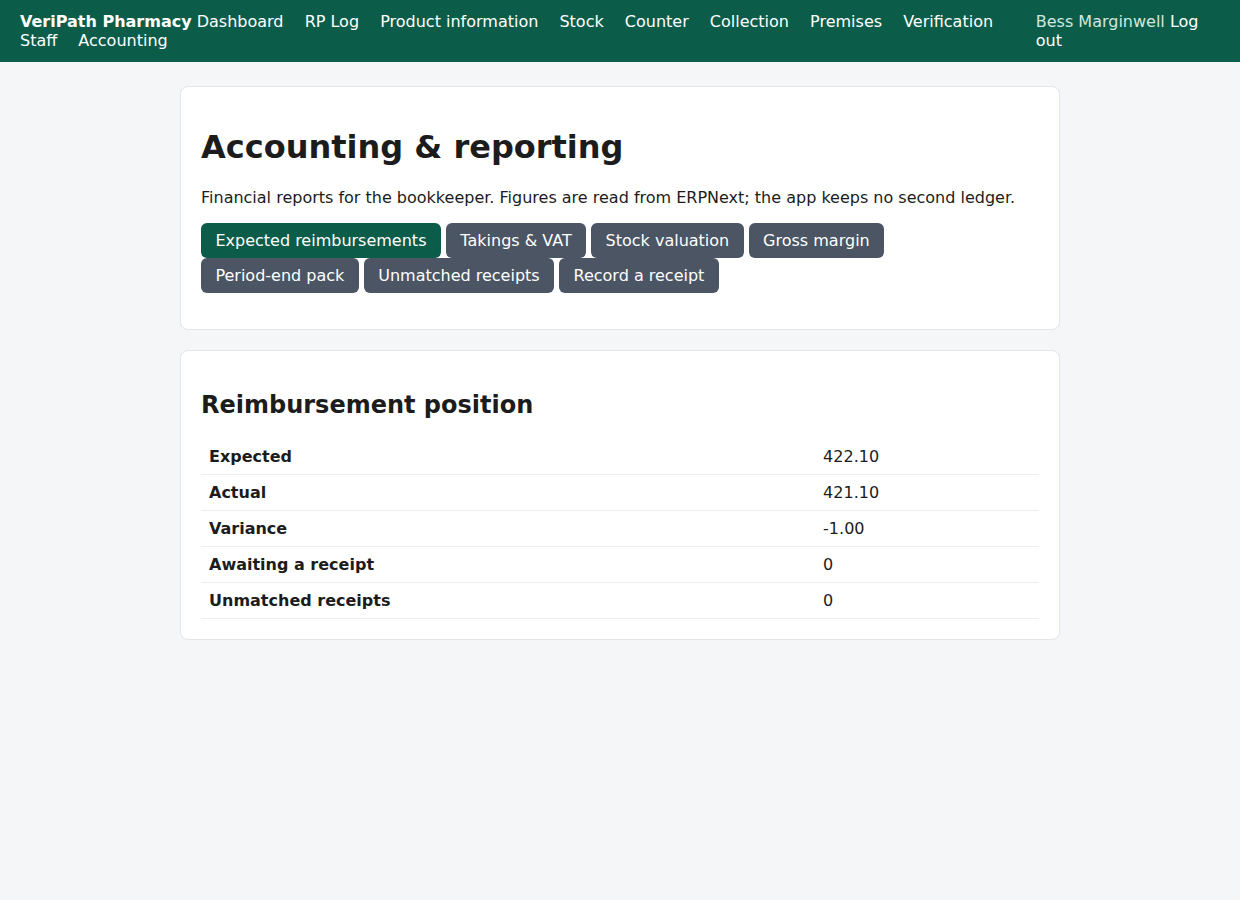
The accounting dashboard as the Business Manager sees it: the reports one click away, and the pharmacy's
reimbursement position — expected, actual, variance, awaiting a receipt, unmatched.
| Screen | The question it answers | When to run it |
|---|---|---|
| Accounting (the dashboard) | the reimbursement position — expected, actual, variance, awaiting a receipt, unmatched | first, each period |
| Expected reimbursements | every endorsed claim and what the pharmacy expects to be paid, with its basis and the date computed | before the NHSBSA money lands; when a claim is queried |
| Takings & VAT | takings by tender and VAT by band, reconciled to the day's sales | for the VAT return; to check the till |
| Stock valuation | the value and quantity of stock by item, with expiry exposure | at period end; for a stock query |
| Gross margin | revenue, cost and margin by band — NHS dispensation against retail | at period end |
| Period-end pack | every one of the above for one period, plus the list of what stays manual | at period end |
| Unmatched receipts | money received that matched no claim | whenever a receipt will not match |
| Record a receipt | recording an NHSBSA payment and reconciling it to the claim it pays | when the NHSBSA pays |
Each report takes a period as From and To, and a Run button. They open on the current month, so
set the dates to the period you are working on — a month with no sales will honestly report zeros.
¶ How to prove a figure
Read both sides. Every figure in these reports is meant to be traceable, and the reports are built so that a
figure which cannot be traced says so rather than being quietly included.
- The VAT split is ERPNext's own arithmetic, not the app's. It is read back from the submitted invoice's
own per-item tax detail — what ERPNext callsitem_wise_tax_detail— and the band each line belongs to comes
from its item tax template. The report is labelled from ERPNext for that reason. - The takings screen reconciles itself. Under Reconciliation it names both sides — "ERPNext gross 15.90
vs linked sales 15.90 — variance 0.00" — and states plainly whether they tie. A sale whose invoice cannot
be read is listed as a mismatch, and a completed sale with no invoice at all is listed as unlinked.
Neither is hidden and neither is counted as a tie. - The expected reimbursement is an estimate, and says so. Each row carries its basis — the professional
fee per item and the ERPNext price list the prices came from — and the date it was computed. Its
Complete column matters: where an item had no price at all, the estimate is marked incomplete with the
reason and no figure is invented for it. - A receipt is reconciled to its claim, and the difference is shown. A receipt records the amount, the
ERPNext document it was posted as, and the variance against the estimate: Matched, Short payment
or Overpayment. A receipt that matches no claim is Unmatched, and it stays visible on its own list. - Stock valuation is ERPNext's own valuation. Quantities come from ERPNext's stock balances and the value
from ERPNext's own valuation rate for the item; the expiry bands are the pharmacy's own (90 days warning, 30
days critical). - Each report view is recorded. Opening a report writes an audit row naming who ran it and for which period,
so a question about a figure has an answer about who looked at it.
A caveat worth knowing. On a tax row charged on net total, ERPNext's row-level net figure is the whole
invoice's net — not the band's. The band split must be read from the per-item tax detail, which is exactly
what the takings report does. If you read the tax row directly in ERPNext, read the per-item detail with it.
¶ Producing the VAT return
- Open Accounting → Takings & VAT.
- Set From and To to the VAT period you are filing, and press Run.
- Read the By VAT band (from ERPNext) block. It gives, for each band, the net and the VAT:
- Standard-rated (retail) — the VAT to declare.
- Zero-rated (NHS) — net only; NHS dispensed sales are zero-rated.
- VAT total — the figure that goes on the return.
- Check the Reconciliation line beneath it. It should read "Linked figures tie."; if it reports a
variance or a mismatch, resolve that before filing. - Take the takings by tender from the same screen for the bank side of the period.
The VAT account itself is the pharmacy's ordinary tax account on the ERPNext site: both bands post to it, one
at 20% and one at 0%, which is why the split has to be read per item.
¶ Reconciling the bank
- Takings. Accounting → Takings & VAT gives the period's takings by tender (cash and card) with a
total. That is what should have reached the till and the card clearing account. - The NHS money. Accounting → Expected reimbursements lists what the pharmacy expects; the
dashboard totals it against what has actually arrived, with the variance. A payment recorded as
Short or Over is a query to raise with the NHSBSA, not a rounding to absorb. - Money that will not match. A payment that matches no claim appears on Unmatched receipts — "surfaced,
never dropped". Open it from the accounting dashboard's button row (it is always there now), and work it there
rather than leaving it in a suspense figure. - The statements themselves. The bank and cash accounts are ordinary ERPNext accounts; reconciling them is
the bookkeeper's job, done in ERPNext, with the takings figures above as the shop-side counterpart.
¶ What the app deliberately does not do
The Period-end pack prints this list on the screen itself, so the boundary is visible rather than discovered:
- Posting period-end journals (accruals, prepayments, depreciation)
- VAT return preparation and submission
- Bank reconciliation
- Stock write-offs and provisions the accountant directs
- Payroll and personal tax
- The NHSBSA submission itself
Three of those are decisions rather than omissions, and they are worth stating in the bookkeeper's own terms:
- The app never posts a period-end journal or a tax adjustment. It produces figures; a bookkeeper or an
accountant posts them. Every posting in the ledger is traceable to something the pharmacy actually did. - The stock valuation method is the client's accountant's choice, configured in ERPNext per item. The app
must not invent a valuation method of its own — it reports what ERPNext does. - The NHSBSA submission is out of scope. The app tracks the money; it does not claim it.
¶ Worked example — a period on the test client (synthetic data)
Every figure below was read off the running test client on 2026-10-02. The data is synthetic.
1. The period's takings and VAT — Takings & VAT, From 2026-09-01 To 2026-09-30:
| By tender | By VAT band (from ERPNext) | Net | VAT | |
|---|---|---|---|---|
| CASH | 15.90 | Standard-rated (retail) | 5.00 | 1.00 |
| CARD | 0.00 | Zero-rated (NHS) | 9.90 | 0.00 |
| Total | 15.90 | VAT total | 1.00 |
Reconciliation: "ERPNext gross 15.90 vs linked sales 15.90 — variance 0.00. Linked figures tie." — so on the
period's one completed sale the app's record and ERPNext's ledger agree exactly, and the screen says so.
2. Gross margin by band for the same period: standard-rated revenue 5.00, cost 0.00, margin 5.00 (100.00%);
zero-rated (NHS) revenue 9.90, cost 0.00, margin 9.90 (100.00%). Read the cost column with care on this demo
site: the demo items carry no valuation rate in ERPNext, so cost is 0.00 and the margin reads 100%. On a
live site the valuation rates are set — it is the client's accountant's configuration, not the app's assumption.
3. The reimbursement position — the dashboard: Expected 422.10, Actual 421.10, Variance −1.00, Awaiting a
receipt 0, Unmatched receipts 0. The −1.00 is the short payment in the demo data, shown rather than
absorbed. The Expected reimbursements list shows the two claims behind it — demo-accounting-claim-1 at
353.85 (charge due) and demo-accounting-claim-2 at 68.25 (exempt), both Zero-rated (NHS) and both
Complete, each with the basis "Professional fee 0 per item; prices from ERPNext price list 'NHS
Reimbursement'" and computed 15 September 2026.
4. Stock valuation — 353.85 across 252.00 units as of 2 October 2026, with two batches in the critical
expiry band (DEMO-AMOX-B3, DEMO-AMOX-B2) and the rest ok.
5. The period-end pack for 2026-09-01–2026-09-30 repeats all of the above in one place and adds the six
manual items verbatim — which is the page a bookkeeper prints.
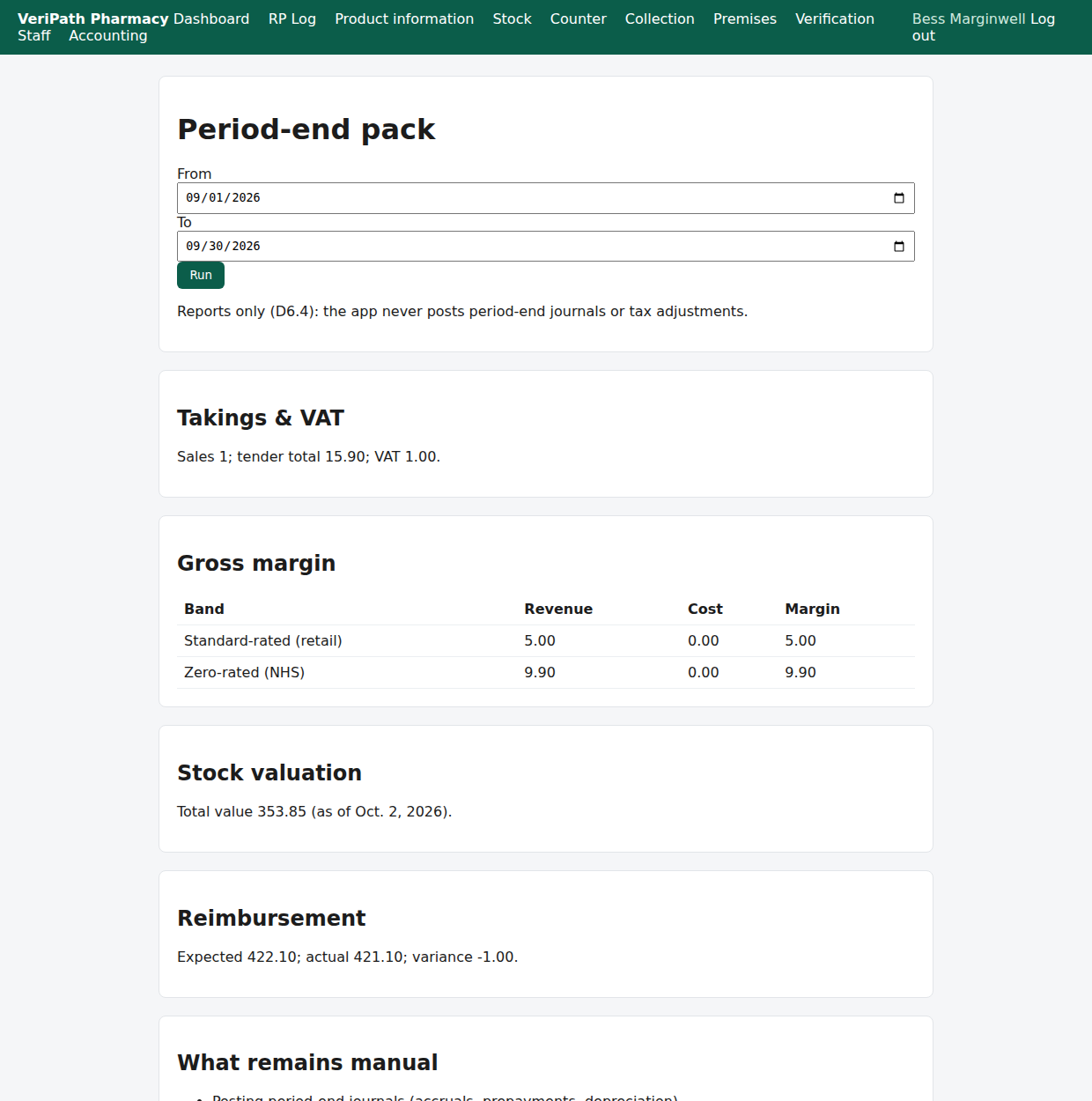
The period-end pack for 1–30 September on the test client: the period's figures in one place, and the six things that
stay with the bookkeeper.
¶ Related pages
- Dispensing — Endorse a Prescription — the endorsement that creates the expected reimbursement
- Stock — Receive a Delivery — where the goods-in postings in the ledger come from
- Pharmacy App — Overview — the app as it stands today
- Pharmacy App — Phase 6: Accounting, Reporting & Handover — the build record behind this pack
- Pharmacy App Guides — the task-by-task guides for pharmacy staff