¶ Pharmacy App — Overview
VeriPath Pharmacy is the pharmacy management application of the VeriPath platform — a
community-pharmacy day-to-day system covering duty and the Responsible Pharmacist record, dispensing,
stock, the over-the-counter counter, patient collection, the accounting that answers for it, and the NHS
reference data it shows.
It is its own sector on the platform (alongside GP, dental and the shared client tier) and shares the
platform's foundations rather than rebuilding them: single sign-on through Keycloak, the sovereign SIAAS
hosting model, the ERPNext accounting engine and the platform's audit and DSPT hygiene stack.
Living page — this is the picture of the app as it stands today, not as planned. Last updated
2026-10-02, when the ordering views went live: for the first time the Business Manager has one
collective view to decide from — each item's best four supplier offers in order, beside its NHS
reimbursement and its margin, with the running basket order at the foot. Alongside it, also live: the
order satellite, the helper a manager downloads and runs on their own PC to drive a wholesaler's portal;
and the supplier register (the MHRA wholesale-dealer register), now held and refreshed by a daily check.
Before all of that: the derived reimbursement computed per pack (4,439 packs) and shown beside the
pharmacy's own purchase price; the pack link that ties a published concession line to a real dm+d pack;
the derived pricing; and the Part II group rules (discount-not-deducted). What is not built is listed
as not built, and little coding is owed: one guide figure to re-capture, and the stage 5/6 and first-real-
wholesaler work on the satellite thread.
Live hosts
| Host | What it is |
|---|---|
pharmacy.veripath.co.uk |
the platform-owned "apex" tenant — not a SIAAS deployment, and to be retired |
test-client-pharmacy.pharmacy.veripath.co.uk |
the first client-tier tenant: the app's test model, live on a client-owned server |
¶ The app inside the SIAAS framework
SIAAS — Sovereign Infrastructure as a Service — is the platform's hosting model: the client keeps their
data on a server of their own, and the platform holds only what it needs to identify and route them.
For a pharmacy that means the pharmacy's operational data never leaves the pharmacy's own box.
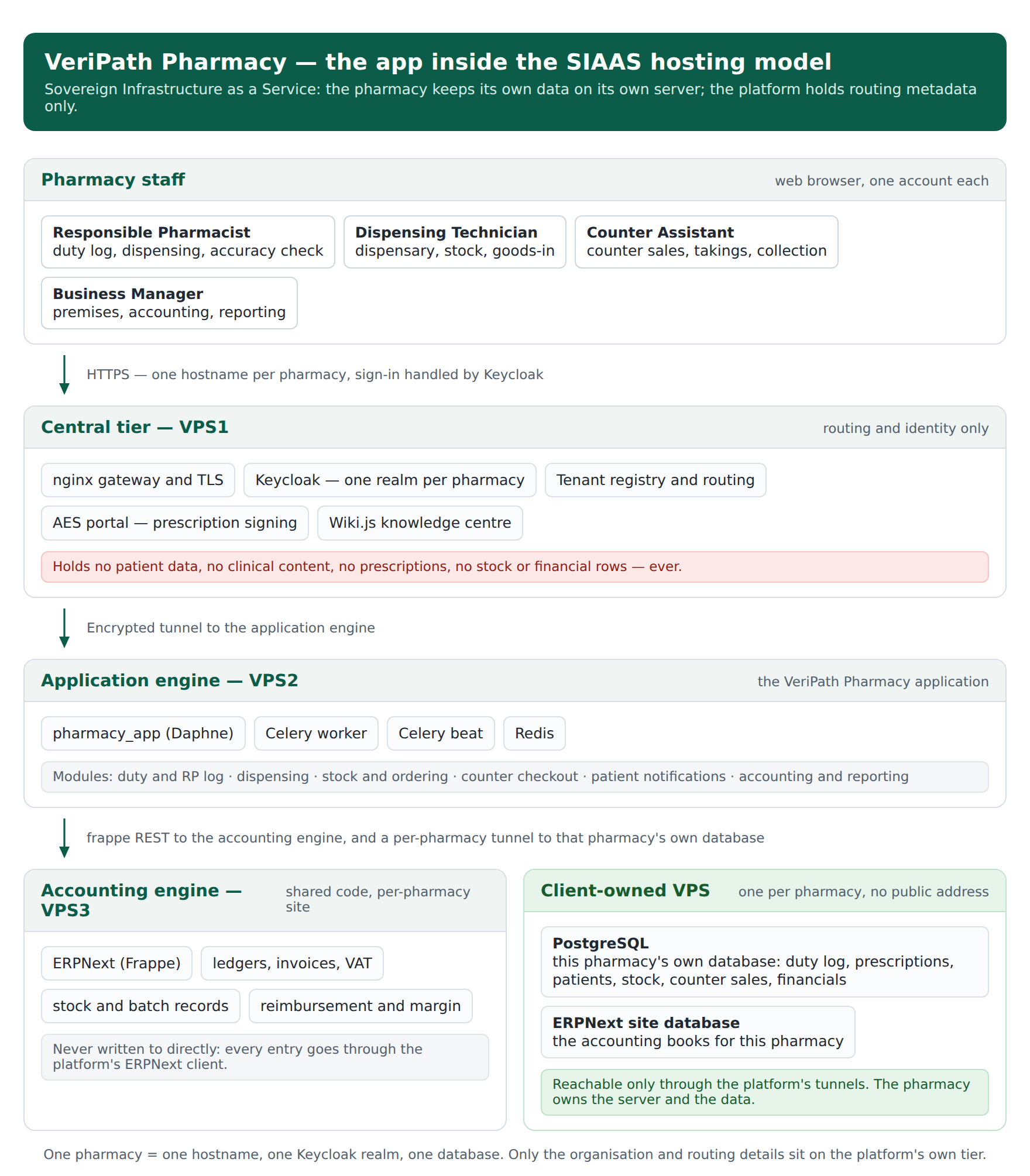
Read from the top: staff sign in at their pharmacy's own hostname; the central tier terminates the
connection, identifies the pharmacy and routes the request; the application runs on the shared
application engine; and everything the pharmacy actually does — patients, prescriptions, stock, sales,
books — is written to that pharmacy's own database on that pharmacy's own server, reached only down a
tunnel the platform maintains.
¶ What sits where
| Tier | What lives there | What must never live there |
|---|---|---|
| Central tier (the platform's gateway and identity host) | the pharmacy as an organisation, and routing metadata only: ODS code, GPhC premises number, tenant name and subdomain, Keycloak realm, tunnel bindings, onboarding verification status | patient-identifiable information, clinical content, prescriptions or dispensing records, counter sales, stock, quoted prices, or any financial row |
| Application engine | the application code itself — no storage | clinical or financial data of its own |
| Accounting engine | the pharmacy's books and stock picture, held on the ERPNext site for that pharmacy | — |
| Client-owned server (one per pharmacy) | everything operational: the pharmacy's PostgreSQL database (duty log, prescriptions, patients, stock, batches, counter sales, imported prices, financial records) and its ERPNext site database | — (this is its legitimate home) |
One qualification to the rule, approved 2026-09-23 — licensed national reference data. A dataset that
carries no client or patient content and is identical for every tenant — the NHS terminologies and
published tariffs the platform receives centrally — is held once, centrally, as platform reference
data: versioned by release, licensed per release, read by the tenant applications, and labelled in the
app so that anyone looking at it can see where it came from (the label is a licence condition, not
presentation). A client's own prices, supplier files, stock, quotes and commercial terms remain
client-tier data and never move centrally. See
Central Reference Data.
Two consequences worth stating plainly, because they are the model's selling point:
- One pharmacy = one hostname, one Keycloak realm, one database. The realm is per client, so an
identity created for one pharmacy cannot be used at another. See
client-realm. - The pharmacy's database has no public address. It is reachable only through the tunnels the
platform runs, which is why the client can be told their data is not exposed to the internet at all.
See client-vps.
¶ What the app does
Grouped as the guides are, so a section here maps to the guides that cover it. Sixteen guides are
published; the running worklist is the
Coverage Plan.
¶ Duty and the legal day
The Responsible Pharmacist signs on duty at the start of a shift and off at the end. The log is
append-only, records who closed a shift, and enforces one Responsible Pharmacist on duty at a time per
premises — a second sign-on is refused. Anyone can see who is on duty now and who was on duty on a
given day. Guide: Responsible Pharmacist — Sign On & Sign Off.
¶ Dispensing
A prescription arrives from the spine and is worked through a state machine — claimed, assembled,
accuracy-checked, dispensed, endorsed — with each step recorded against the person who did it:
claim → assemble → accuracy check → dispense → endorse, plus release, cancel, and a dispensing
history. The clinical acts (the accuracy check, the dispense and the charge declaration, the
endorsement) are Responsible Pharmacist only; a Dispensing Technician works the dispensary and can
release or cancel a claim. Prescription charges are recorded as a declaration, and the endorsement is the
pharmacy's local claim record with an expected reimbursement computed from ERPNext pricing. Guides:
Claim,
Assemble,
The Accuracy Check,
Dispense,
Endorse,
Release or Cancel,
Dispensing History.
¶ Stock
Goods-in receipts post real stock entries to the pharmacy's ERPNext ledger; the stock screens read the
ledger through a local position cache, which carries the last-refresh time so its currency is visible.
There is an expiry report (expired and short-dated in one list), an adjustment and wastage screen with a
mandatory reason, ordering with a supplier order file to export, and a supplier list. Guides:
Receive a Delivery,
Check Stock Levels,
Run the Expiry Check,
Record an Adjustment or Wastage,
Sync Stock Positions,
Order Stock and Export the Order File.
¶ Buying: wholesaler prices, order value and the minimum
A price file the pharmacy obtains from its wholesaler can be imported as a CSV by the Business
Manager. The import is a recorded, editable mapping per wholesaler — which column is the item code,
which is the price, and whether that price is per pack or per unit — so a new wholesaler layout is a
mapping entry, not a code change. Imported prices are then shown against the stock items to all three
stock roles (Responsible Pharmacist, Dispensing Technician, Business Manager), each with the date it was
imported and the basis it was recorded under; a price too old to rely on is shown but marked unusable,
never hidden (freshness counts in working days), and a price whose basis is not stated is never
presented as comparable.
Ordering can then be driven from those prices, and every order line keeps the price it was built on,
copied by value — so a later import never rewrites an earlier order. The order carries a value on the
list and the detail in one of three honest states: £X, £X (partial — N line(s) without a price), or
Value not known — never £0.00 and never a total invented from missing prices. The supplier's
minimum order value is now a live advisory — "£25.28 of a £150.00 minimum — £124.72 short" — on
the build screen per supplier group and once on the order detail. It states the wholesaler's contractual
threshold for the pharmacist's judgement: it never blocks an order, never changes a quantity and never
adds a line, and a short order can still be created.
These four stages — the import, the visible prices, price-driven ordering, and the value with the
minimum advisory — are deployed and verified live on the test client (35/35, 24/24, 24/24, 49/49, each
verified independently against the running app). The plans, decisions and evidence are on
Supply Orders Part 3 — Pricing. The
C6 guide has since been rewritten for the ordering view below; its first figure still shows the older
screen and wants re-capturing.
¶ The ordering views: one screen to decide from
The buying data above existed, but there was no one place to stand while deciding — a business manager
assembled an evening order by moving between the stock dashboard, the low-stock report, the build screen, the
price files and the supplier list, opening a dropdown per row to compare suppliers. Since 2026-10-01 there
is one collective view: each item on a single row, the best four offers in order, each naming its own
supplier with the price, the basis, the file's date and its freshness, and beside them the item's NHS
reimbursement with the rule that produced it and, next to that, the margin — a loss shown rather than
hidden. A sticky basket bar carries each supplier's running value against its own minimum, its
shortfall and a create-draft action, with no cross-supplier total; a collection strip tops the grid; and the
dashboard's low-stock card is a pointer into the view rather than a second copy of it.
Two limits are stated on the screen rather than glossed over. We hold prices, not stock — so a line a
supplier's file does not list reads not in their file of <date>, and there is no "short supply" claim
anywhere; and a row with six suppliers shows the best four with +N more offers not shown, the rest staying on
the line's own supplier control. It is deployed and verified live (39/39 on the deployed tenant; the on-order
figures cross-checked per item against the app's own orders list; suite 645 OK) and advisory only — it never
blocks an order or changes a quantity. See
The Ordering Views — the Business Manager's Decision Screen.
¶ The order satellite: the app's helper in the manager's own browser
Ordering still ends with a file for a wholesaler's portal, so the app now offers the manager a helper rather
than an integration: the order satellite, downloaded from the app's own setup screen (no terminal needed),
run on the manager's own PC, and given a portal record per wholesaler. On the order page the app emits a
signal telling the satellite what to do; the satellite then drives the wholesaler's own portal in the
manager's browser — staging the exported order file into the portal's own upload control, or filling its
quantity grid — and stops before any submission, saying so plainly ("Nothing has been submitted."). The
inbound half works the same way: a price page's signal names the portal's download control, the satellite
activates it, catches exactly one new file and places it in our own upload box — nothing is imported by
the satellite. It is verified live against the synthetic wholesaler rig (21/21), the package ships Windows
and Linux launchers (VERSION 0.2.0), and what remains is stage 5/6 — the probe-run record — and the first
real wholesaler, which needs a real account and Matthew's say-so. See
The Satellite View — Setup and Controls
and Supplier price downloads.
¶ Who we may buy from: the wholesaler register
The app also holds the MHRA wholesale dealer's authorisation register — the statutory list of licensed
wholesalers — as a platform-level registry, taken once and read by the supplier screen, and labelled with
its source. A supplier record is created from a licensed site (the 2026-10-01 snapshot carries 1,757
records and 2,902 licensed sites), carrying that site's licence number, trading name and address, so a
pharmacy recording who it buys from works from the register rather than from memory. Holding it is not the point:
it is maintained — a daily check fetches the register, compares its hash and imports only when the file has
changed, and shows last checked / next due on the platform's feed-status page, the first feed in the store to
report it that way. See
The Supplier Register — MHRA WDA Licence Data.
¶ The comparison: the NHS reimbursement beside what the pharmacy paid
The layer the reference-data programme exists to produce: every stock line now
carries what the NHS will pay for that pack, shown next to what the pharmacy is being charged for it. The
figure is the pack's derived reimbursement — the month's concession price where the pack has one,
otherwise its dm+d tariff price — less the deduction that applies, and the rule that produced it is
named on the screen: "£1.04 — 20% deducted", or "£3.61" where the pack is on concession and the
tariff says no discount is deducted at all. Each figure also carries the pack it belongs to and the
releases behind it, so a contractor asking "why that number?" gets an answer from the row rather than from a
re-run.
Where it appears: on the stock item view (the pack, the figure, the basis, the rule, the releases, and
Your price — for Amoxicillin that reads £1.04 reimbursed against £2.10 paid), on the low-stock and
expiry reports and the order build as an NHS reimbursement column beside the price columns, on the
ordering views as that column with the margin beside it, and as
counts on the stock dashboard (linked / queued). It is advisory only: it never blocks an order, never
changes a quantity and colours nothing red — the pharmacist decides, exactly as with the minimum-order
advisory above.
Two things it does not pretend. Where a stock item cannot be tied to a pack, the screen says so and
names the reason ("Not linked to a dm+d pack yet — no code that matches a pack") rather than showing a
number; and where an item has no imported price the figure is shown with "no supplier price on file". In
the demo catalogue 7 of 13 items are linked; the rest are unbridgeable by design or by missing codes, and
that queue is visible rather than hidden. The whole thing is walked through in
Pricing & the Reimbursement Comparison.
¶ NHS reference data: product information
The app shows the published NHS dictionary of medicines and devices (dm+d) to pharmacy staff, from the
copy the platform holds once, centrally — nothing is downloaded to a client and nothing has to be
imported by the pharmacy. Staff open Product information (/medicines/) from the navigation: one
name search of three characters or more, results capped at 25 with a "showing the first 25" note,
and a detail page per pack. A pack with a published price shows it in £ with the basis dm+d records
(for example priced when manufactured) and the previous price where there is one; a pack with none reads
"no published price" — never £0.00. The pack's identifiers (AMPP code, and GTIN where dm+d carries
one) are on the detail page.
Every page carries the source label, generated from the live release record rather than typed into a
template: "NHSBSA dm+d, distributed by TRUD — release 3170926, published 21/09/2026", the sentence
stating that this is a published NHS list price — not VeriPath's price, not the pharmacy's purchase
price, and not a quotation — and a link to a short "about this data" page naming the publisher, source,
release, licence and the fact that the information carries no guarantee. A label naming a superseded
release would be a defect, so the check asserts the label's presence with the live release identity.
What the view is not: it is read-only by construction — no write path to the store, no tenant data
read, and no export or download in v1 — it reads only the live release (a superseded release can never
be shown), and it needs no new permission: any signed-in pharmacy role sees it, because published NHS
content is the same for every tenant. It is a baseline to be modified, not a finished screen — the
fuller lookup by SNOMED code or barcode is the first named modification, and so is a search index if
the measured ~186 ms lookup ever feels slow.
This is the app's use of a platform capability, not a pharmacy-only feature: the platform takes each
NHS release centrally, keeps one copy, and makes it available to every pharmacy client for their own
information, with dm+d as the first dataset — the Drug Tariff and price concessions follow the
same route. The platform watches its own feeds from a backend status view, platform-admin only, and
all three sources now report a real routine: dm+d reads Current (release 3170926, published
21/09/2026); the Drug Tariff reads Monthly document fetch with release 2026-09 live — the three
deduction rates and the Single Activity Fee; and price concessions read Email alert stream, holding
September's 216 concession lines taken from CPE's own alerts. What a pharmacy sees has moved on since
this page last said otherwise: the tariff's rates and the month's concession prices are now computed into
the reimbursement shown on the pack panel and beside the pharmacy's own price on the stock screens (see
The comparison above) — and the source the client sees for a concession price is the NHSBSA Drug Tariff
News notices (Open Government Licence v3, no consent gate), not the CPE alert stream, which stays the
platform's cross-check. So the display is honest by construction: a figure is only shown when the source it
rests on is publishable, and a figure that could not be derived says which input is missing. Clients still
see none of the machinery — only the figure, its rule and its label.
¶ The counter
Walk-in trade: a basket, an optional NHS prescription charge on the sale, payment through the till, and a
printed or emailed receipt — with the refund and void path restricted to the Pharmacist and the Business
Manager. VAT is ERPNext's own arithmetic: the standard-rated retail part and the zero-rated NHS charge
are split on the invoice itself, and the takings are reconciled to the till.
¶ Collection and patient contact
A prescription that has been dispensed gets a collection-ready notification (built against the NHS
Notify sandbox until DSPT Standards Met), the handover is recorded when the patient collects, and the
delivery trail, contact preferences, opt-outs and the uncollected list are visible to the dispensary
roles.
¶ Premises, registration, money and access
The premises profile carries the trading details; the GPhC premises number and ODS code are captured with
a verification record. The Business Manager — and no one else — has the accounting and reporting
surfaces: expected reimbursement per endorsed claim, actual receipts from the NHSBSA with the variance,
the unmatched receipts list, takings and VAT, stock valuation, gross margin, and the period-end pack.
Guides: Premises Profile & Registration Details,
Roles and Permissions.
¶ The roles
Four operational roles, with clinical and commercial access deliberately separated — a
data-minimisation control for DSPT Category 3.
| Role | Does | Deliberately cannot |
|---|---|---|
| Responsible Pharmacist | signs the duty log, performs the clinical acts, claims and dispenses, works the ordering screens and sees the prices | corporate accounting ledgers |
| Dispensing Technician | the dispensary, goods-in, stock management and adjustments, the ordering screens and the prices | the clinical acts — no accuracy check, no dispense, no endorsement |
| Counter Assistant | counter sales, takings, collection | any prescription surface at all, the ordering and price surfaces, and the accounting ledgers |
| Business Manager | premises details, staff accounts, the price-file import, all accounting and reporting | patient clinical records and the dispensary |
Staff accounts are created in the app by a Business Manager, through a screen that sets the role, the
realm-scoped access and a temporary password, with audit rows on every action — see
staff-user-management.
¶ What v1 does not include
Named here so the boundary is visible rather than discovered. Some of it is deferred by decision, and
some is gated on DSPT Standards Met:
- Live NHS EPS. The app works against a mock/sandbox EPS client; the real spine waits on DSPT.
- Controlled Drugs register (Schedule 2/3 with witness signatures), MDS and instalment dispensing,
repeat dispensing nuance, click-and-collect, multi-premise chains, and expanded DCB0129 work. - A wholesaler link the app makes itself — the satellite does the driving, the app still does not. Prices
arrive as a CSV the pharmacy uploads — the import and its per-wholesaler mapping are built — and the order
satellite can now stage the exported order file into a wholesaler's own portal and fetch the inbound
price file back into the app's upload box, with the manager watching. But the app itself still makes no
wholesaler connection: no SFTP, no API pull, no wholesaler password held anywhere, and no automatic
refresh. Stages 5–6 (the probe-run record) and the first real wholesaler — a real account, and Matthew's
say-so — are what remain on that thread, and the drive is proved against the synthetic test rig, not a live
wholesaler. - A stock-valuation or profitability figure — the margin is now built, the valuation is not. The
reimbursement is computed and shown (the derived pricing, live, one figure per pack) beside the
pharmacy's own price, and on the ordering views the difference now appears as a margin column —
a loss shown rather than hidden — beside it (Matthew's ruling of 2026-10-01: "I want both — why do we
have to choose one or the other?", which superseded the earlier parked position, W4 on the
Phase 4 page).
What is still not built is a stock-valuation or profitability number across the whole holding, and the
expected reimbursement per endorsed claim on the accounting side still rests on synthetic demo
values, so no margin is derived from it either. - Lookup and export in the product-information view. v1 is a capped name search: no lookup by SNOMED
code or barcode (though the data to do it is already held), no browsing of the whole catalogue, and no
export or download. An export is the classic way to lose the source label, so it waits until it can
carry it. - Retention and purge of imported prices (stage 5 of the pricing plan). Prices are expected to be
uploaded daily and a purge is foreseen, but what survives a purge is still an open decision — nothing
is deleted today, and the choice was deliberately kept open. It blocks nothing. - Automatic ordering or top-ups, or a purchase order raised in ERPNext. The buy-above-reimbursement
guardrail now exists as a display — the reimbursement sits beside the purchase price, advisory and
never blocking — but nothing acts on it: no alert, no reorder rule, no automatic substitution. - A way to record a problem with a delivery (short, damaged or rejected items) — handled outside the
app today. - The bookkeeper handover pack — the last outstanding piece of the accounting phase.
Standing rules that hold across the app: nothing patient-identifiable is held on the platform's
central tier; ERPNext is only ever reached through the platform's ERPNext client over frappe REST,
never by writing its tables directly; imported prices are the pharmacy's own data and live on the
pharmacy's own database, never centrally; and no entry is invented — see the
Regulatory Content Audit, which is the
register of claims made about the app and their authority.
¶ Where it is today
The v1 build is complete. Every build item across Phases 0–6 (onboarding and the duty log,
dispensing core, stock, counter checkout, patient notifications, accounting and reporting) is delivered,
deployed and verified. The one gap in the accounting phase is the bookkeeper handover pack above.
The buying layer is built on top of it, and its decision screen now exists. The wholesaler price-file
import, the prices visible on the stock screens, price-driven ordering, and the order's value with the
minimum-order-value advisory are all deployed and verified live on the test client; the four stages
were each verified separately against the running app (35/35, 24/24, 24/24, 49/49). On top of them, the
ordering views (2026-10-01) give the Business Manager one collective view to decide from, and the
order satellite drives a wholesaler's portal from the manager's own PC — both deployed and verified
live (the ordering view 39/39 on the deployed tenant with the suite at 645 OK; the portal drive 21/21
against the synthetic rig). The only coding left in that plan is stage 5, retention and purge, which
waits on the open retention decision and blocks nothing; on the satellite thread what remains is stage 5/6
and the first real wholesaler. The walkthrough exists —
Pricing & the Reimbursement Comparison,
five stops in one sitting, every figure read off the live test client — and the C6 guide has been
rewritten for the ordering view; its first figure still shows the pre-ordering screen and wants
re-capturing.
The newest layer is the NHS reference data — and all three sources now arrive. The platform's central
reference data capability took its first workload on 2026-09-23: the dm+d release (3170926) held once
centrally and read by the app, with the Product information view deployed and verified live on the apex and the
client host (all six acceptance criteria pass — a signed-in pharmacy user gets the same published rows, and the
release label is on every page), and the backend feed status view live beside it. Search was measured on the
real 187k-pack store at ~186 ms, so no index was added.
Since then the two remaining sources completed, and both are verified live. The Drug Tariff (2026-09-26):
the month's full document is discovered, fetched and parsed unattended — the three deduction rates
(9.85 / 20 / 5 %) and the 152p Single Activity Fee — with a validation gate that refuses a doctored or
wrong-month document rather than publishing it. Price concessions (2026-09-27): CPE's email alerts are read
from the platform's own mailbox (server-side, sender-scoped, read-only), and each update reconciles to its own
stated total — September's 216 lines matched CPE's published page exactly, line for line. The application
engine carries that work, and both new routines are scheduled (a daily tariff check and a 15-minute concession
poll), so the three feeds are now maintained without a human step.
And the programme has now delivered its purpose — the comparison is live. Matthew's steer of 2026-09-27 was that
holding the three sources is not the point in itself: they exist to produce one derived price per pack — dm+d's
published price, the tariff's deduction and fee, and the concession override that also moves the line to
discount-not-deducted — so a client can compare it with their own supplier pricing. The three phases that
followed from that are all deployed and verified live: the pack link that ties a published concession line to a
real dm+d pack (216/216 of September's lines matched, no score deciding anything), the derived pricing (4,439
figures, all recomputed independently from their inputs), and the comparison itself — the reimbursement beside
the purchase price on the client's own stock and ordering screens, advisory only (verifier 64/64 over HTTPS; the
ordering path does not read it at all). The Part II group rules — the tariff's drugs for which discount is not
deducted — are applied as data too: five of the eight groups, including the controlled-drug schedules and the Part II
item list, with the two that have no signal in the data named as limitations rather than guessed. Detail:
Central Reference Data and
the phase-8 spec.
The supplier register is held and maintained. The MHRA wholesale dealer's authorisation register — the
statutory list of licensed wholesalers — is a platform-level registry read by the supplier screen (1,757 records
and 2,902 licensed sites in the 2026-10-01 snapshot), and a daily check keeps it current: it fetches the
register, compares its hash and imports only when the file has changed, showing last checked / next due on the
feed-status page. See
The Supplier Register — MHRA WDA Licence Data.
The first client is live. test-client-pharmacy runs on a client-owned server with its own database,
its own Keycloak realm and its own tunnel — a real SIAAS deployment, and the model the guides are written
and tested against. See test-client and
client-realm.
The apex tenant goes. pharmacy.veripath.co.uk has no client instance behind it, so it does not
operate as SIAAS; it is kept only until removal is completed and nothing should be built against it — see
apex-tenant.
The guide series is in progress, worked through one page at a time, each page followed in the live app
by the reviewer before the next is written. Sixteen pages are published; the worklist and status are on
the Coverage Plan. The product-information view, the
reimbursement comparison and the ordering views have no guide yet — they are the next candidates for the
worklist, and the C6 guide's first figure wants re-capturing now that the ordering screen has changed
under it. For a walked-through account of the buying and reimbursement screens in the meantime, use
Pricing & the Reimbursement Comparison.
¶ Related pages
- Pharmacy App — build status, decisions and the audit trail
- Pricing & the Reimbursement Comparison — Walkthrough — the screens, stop by stop
- Central Reference Data — the store, the feeds and the derived pricing
- Module map — scope, module boundaries and the data boundary
- Pharmacy App Guides — the task-by-task guides and the coverage plan
- Client realm — one Keycloak realm per pharmacy
- Client VPS — how a pharmacy's own server is provisioned and reached for the pharmacy app
- SIAAS hosting model — Client VPS — the sovereign model itself
- Supply orders — the ordering feature and its datasets
- Supply Orders Part 3 — Pricing — the price import, price-driven ordering and the order value, staged
- The Ordering Views — the Business Manager's collective decision screen, with its spec and its live verification
- The Satellite View — Setup and Controls — where a manager sets the order satellite up, without a terminal
- The Supplier Register — MHRA WDA Licence Data — the wholesaler register, and its daily check
- Central reference data — dm+d held once centrally, the licence position and the datasets that follow
- Data feeds — backend status view — where the platform watches its feeds and whether they are current
- Data feeds — pharmacy view — the product-information view, its spec and its verification
- The Drug Tariff — phase 4 ingestion — the monthly document fetched, parsed and published unattended
- Price concessions — phase 5 ingestion — CPE's email alert stream, and what client availability needs