¶ Collection — Send or Resend a Collection Notification
¶ What you'll be able to do
After reading this guide you will know when a patient is messaged that their prescription is ready, what
that message may contain, which way it goes, what to do when it fails — and how to send it again.
Who does this? The Responsible Pharmacist, Dispensing Technician and Business Manager. The
Counter Assistant does not see the notification surfaces — patient contact details are kept off the
counter.
¶ When the message goes, and what it says
The first message is automatic. When a prescription is dispensed, the app queues the collection-ready
message and sends it straight away. Nothing has to be pressed. A prescription whose claim was released or
cancelled is never messaged.
The reminder is a second, separate message. Uncollected reminder goes out for prescriptions that have
sat uncollected past the pharmacy's age threshold (seven days — the same rule the Uncollected list uses,
E2). The pharmacy's daily job sends it; it is not a per-patient decision.
What the message may contain. Only the minimum: the patient's name, the pharmacy's name, telephone and
address, and a reference the patient will recognise. No medicine names and no clinical detail — the
message is handed to a messaging service and read by whoever is holding the phone. The app stores no
message content: the trail keeps what was sent, when, down which channel, and what the service said.
Which channel. The patient's recorded preference (E5) decides: SMS, Email, or the NHS App. Where the
preferred channel has no address recorded, the app falls back to whichever detail is on file, so a contact
the pharmacy took the trouble to record is never quietly unused. With nothing recorded at all, the send is
reported as Failed — No contact details recorded, and no message goes.
An opted-out patient is never messaged (E6). The message is recorded as Suppressed (opted out)
instead, so you can see that it was deliberately not sent.
¶ Step 1: Look at the prescription's trail
From the Collection screen, press Trail on the prescription's row.
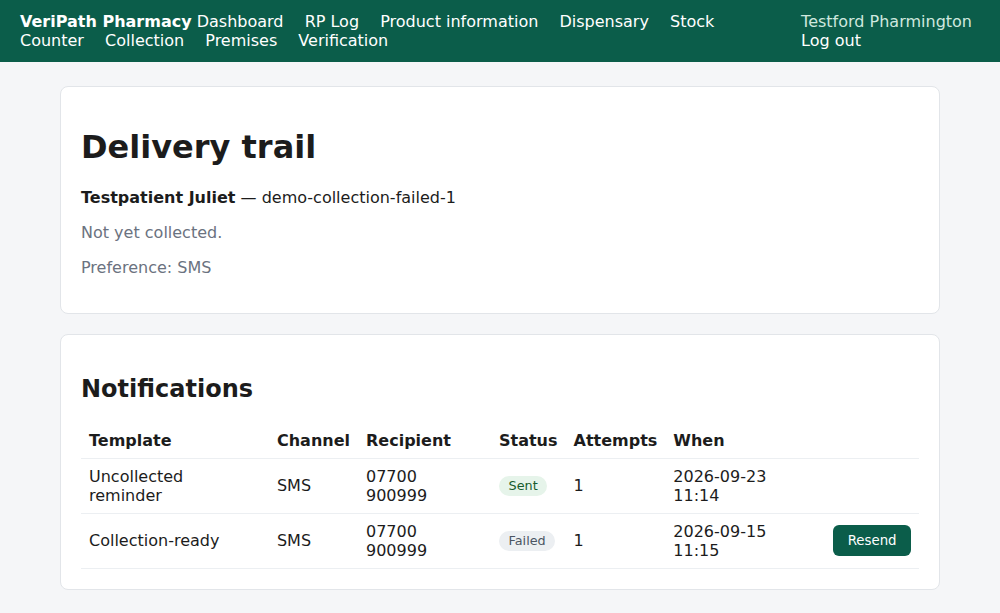
The trail for a prescription whose collection-ready message failed: the Collection-ready row is
Failed, with the recipient and the time of the attempt — and, because it did not go, a Resend
button. The uncollected reminder above it went Sent on the first attempt.
The trail is the answer to "does the patient know?", so read it before chasing anyone:
| Status | What it means | What to do |
|---|---|---|
| Sent | On its way. Sending counts as sent — delivery itself is not reported back. | Nothing. |
| Failed | The attempt did not go — the reason is on the row. | Fix the cause, then Resend. |
| Suppressed (opted out) | Deliberately not sent: the patient has opted out. | Nothing — that is the patient's instruction. |
| Queued | Waiting for the next attempt. | Leave it; the daily job picks it up. |
¶ Step 2: Send it again
Press Resend on the failed row.
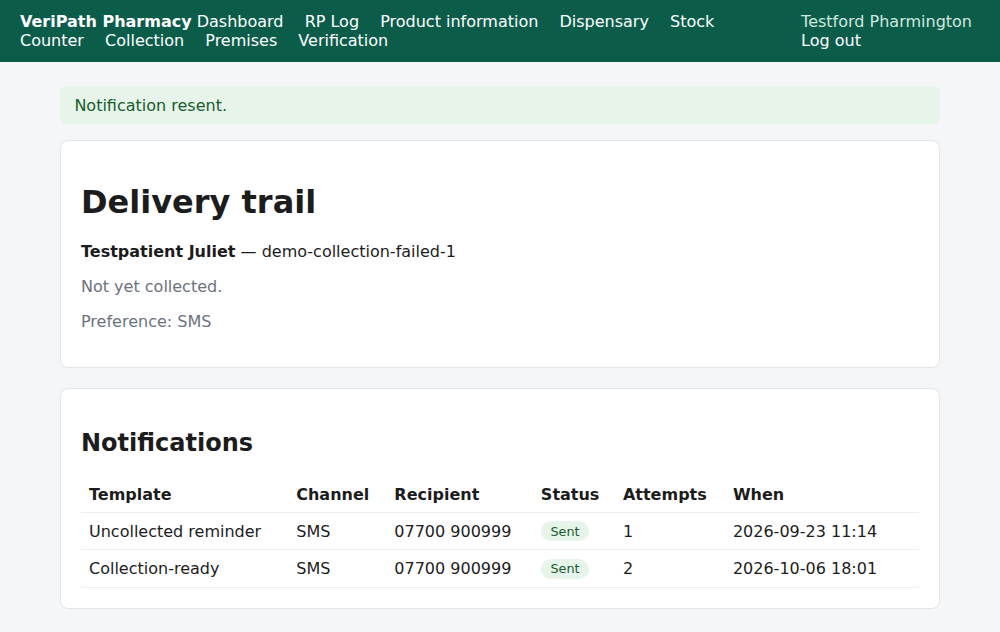
The resend: the app reports Notification resent. and the same row now reads Sent with Attempts
2 — the row is reused and the attempt counted, rather than a second notification being created. One
message per prescription per kind is what keeps the trail readable.
Two things the app will refuse:
- That notification has already been sent. — a Sent row has no Resend button; a message that has
gone is not sent again by accident. - The patient has opted out of notifications. — see E6.
If the send fails for no contact details, the fix is not more resends: record the patient's contact
details and preference first (E5), then resend.
¶ When something is not right
| What you see | What to do |
|---|---|
| No contact details recorded | The patient has no mobile and no email on file. Record them on the contact-preference screen (E5), then resend. |
| Failed with the messaging service's own reason | Read the reason on the row. An address the service rejects has to be corrected in the preference (E5) before a resend can work. |
| No Resend button | The row is not failed — it has been sent, it is queued, or the patient has opted out. |
| The patient says they were never messaged, but the trail says Sent | The app can only say it handed the message over; it cannot see the phone. Check the recipient on the row against the details the pharmacy holds (E5). |
| The patient has two prescriptions and only one was messaged | Each prescription is messaged in its own right. The one not messaged may not have been dispensed yet, or its claim may have been released. |
| You want to message a patient who has opted out | You cannot, and the app will not let you: the opt-out is honoured on every send (E6). Ask them to opt back in if they want messages. |
| The patient asks what the message said | The app does not keep the message text. Read the reference, channel, date and outcome off the trail. |
¶ What happens next
- E4 — see the delivery trail. The full record for a prescription's messages.
- E5 — record a patient's contact preference. Where the channel and the contact details come from.
- E6 — record a patient opt-out. Why a message can be suppressed.
- E2 — see which prescriptions are ready but uncollected. The list the reminder runs from.
¶ Related pages
- Pharmacy App Guides — the published guides
- Coverage Plan — every everyday task, and what is published
- Dispensing — Dispense a Prescription — the act that triggers the first message
- Roles and Permissions in the Pharmacy App