¶ Stock — Run the Expiry Check
¶ What you'll be able to do
After reading this guide you will be able to find the batches whose expiry date has passed or is coming up, read the
warning against each one, and know what to do about it — so that nothing expired is supplied, and short-dated stock is
used while it still can be.
Who does this? All four roles can read the expiry report, including the Counter Assistant. Doing something
about what it shows — taking stock out of the countable figures — needs the Responsible Pharmacist or the
Dispensing Technician (a stock adjustment, C4), and refreshing the figures first needs one of those two or the
Business Manager (C5). If Stock is not in your top menu, your login does not hold a stock role.
¶ Why the expiry check is run
An expired medicine is not something the pharmacy can supply. The professional guidance already quoted elsewhere
in these guides requires the physical condition of medicines to be protected by controlled storage, that stock
levels are monitored and that records are kept where appropriate (3.14); the GPhC's standards require that
services are managed and delivered safely (4.2) and that medicines are stored securely and safeguarded (4.3). A
pack past its date is none of those things — and finding it is a check somebody has to run, because it will not
announce itself on the shelf.
The app will not pick it for you, either. When stock is taken out of the ledger — a prescription being dispensed,
or a counter sale — the app chooses the batch with the earliest expiry first (first-expired-first-out, which the
screens call FEFO), and it never chooses a batch whose date has passed. So this report is not what stops
expired stock being supplied; it is how the pharmacy finds the stock that FEFO will leave sitting there, so that
it can be dealt with while it is still a decision rather than a discovery.
One thing to understand before you read the list. This page shows cached positions — what ERPNext last
reported — exactly as the low-stock figures do. There is no refresh button on this page, and no timestamp on it: the
figures are as current as the last position refresh, and no more. The refresh also removes any cached position
the ledger no longer reports, so what you are reading is what the last refresh found and nothing older (C5).
¶ Before you start
- If the answer matters now, refresh first. The page reads the cached positions; the refresh is on the Stock
overview (Refresh positions from ERPNext), and C5 covers it. - Only positions that carry an expiry date can appear. Every line recorded through goods-in has one, because the
goods-in form requires an expiry date (C1). - Nothing on this page can be pressed. It is a list: it takes no action, moves no stock and changes nothing.
- The columns depend on your role. Everybody sees the list — item, pool, batch, expiry and quantity. The three
stock-managing roles (Responsible Pharmacist, Dispensing Technician, Business Manager) also see five price
columns to the right of it; the Counter Assistant does not get those columns at all.
¶ Step 1: Open the expiry report
- Log in to the pharmacy app.
- Click Stock in the top menu.
- Click Expiry report — one of the buttons in the row below the headline figures.
The top menu has no expiry item of its own; the button row on the Stock overview is how this page and the other
stock screens are reached.
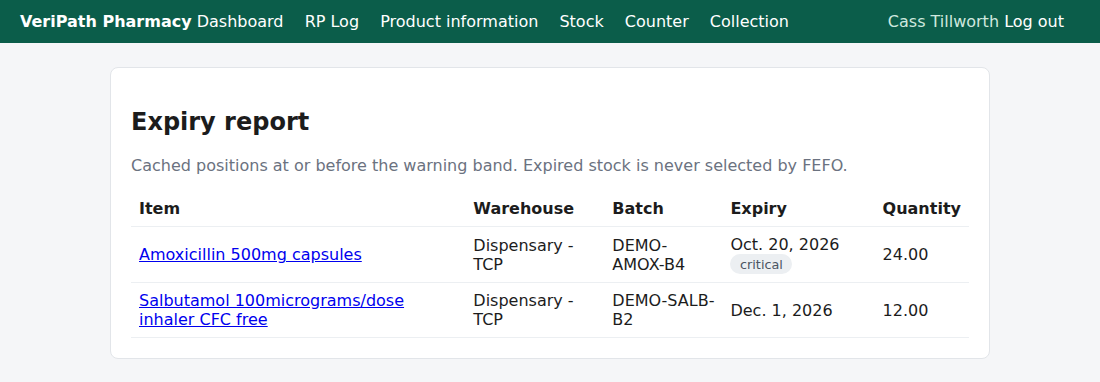
The expiry report on the test pharmacy, 2 October 2026: two batches inside the warning band, earliest expiry first —
the nearer one inside the 30-day band and marked critical, the further one short-dated with no label at all. The
page is a list, and nothing on it is a button.
¶ Step 2: Read the list
| Column | What it tells you |
|---|---|
| Item | The stock item the position belongs to. |
| Warehouse | The pool that batch is held in — the pharmacy's Dispensary or Counter warehouse, as named in ERPNext (on the test pharmacy, Dispensary - TCP). |
| Batch | The batch the position is held under. It reads — if the position has no batch against it. |
| Expiry | The date, with the warning below it where one applies. |
| Quantity | The cached quantity in that batch. One row is one batch in one pool — the same item in three batches is three rows. |
If you hold a stock-managing role the page carries five more columns, filled from the price files the pharmacy has
imported: Best price (supplier), Spread, Prices on file, Freshness and NHS reimbursement. They sit
to the right of the quantity and behave exactly as they do on the low-stock report — "No supplier data" means no file
holds the item, "Invalid price row" is not the same thing, and a stale price is struck through and is not usable for
ordering. These columns are about buying, not about expiry: the expiry report is where you see the short-dated line
and what it was last priced at, in one place. The Counter Assistant's page does not carry them at all — they
are left out of the response for that role, not merely hidden.
Three things about the list as a whole:
- It is sorted earliest expiry first, so the top row is the most urgent thing on the page.
- It is the two bands together: everything at or before the warning band, and that includes stock whose date has
already gone. The number of rows is the Stock overview's Expired figure plus its Short-dated figure. - The bands are a pharmacy setting, not printed on this page: 90 days for the warning band and 30 days for
the critical one by default. The Stock overview shows the warning band in brackets — Short-dated (90d).
The two warnings, both shown as a grey label beside the date:
| Label | What it means |
|---|---|
| expired | The date has already gone. This batch must not be supplied. |
| critical | Inside the nearer band (30 days by default) — it is not expired, but it is next. |
A batch inside the wider band but not yet inside the nearer one carries no label: it is short-dated and nothing
more.
The page in the test pharmacy today (2 October 2026) holds two lines, and the figure above is that page:
| Item | Warehouse | Batch | Expiry | Quantity |
|---|---|---|---|---|
| Amoxicillin 500mg capsules | Dispensary - TCP | DEMO-AMOX-B4 | Oct. 20, 2026 — critical | 24.00 |
| Salbutamol 100micrograms/dose inhaler CFC free | Dispensary - TCP | DEMO-SALB-B2 | Dec. 1, 2026 | 12.00 |
One batch eighteen days away, so it carries the critical label; and one inside the wider band only, so it carries
no label at all. The Stock overview reads Expired 0 and Short-dated (90d) 2 beside it — which is exactly
this list: nothing expired, two short-dated, two rows. A line arrives here either by receiving a batch with a nearby
date (C1), or by stock sitting long enough for its date to come into the band.
An expired line looks the same, with expired beside the date — and one cannot be set up to look at: goods-in
refuses an expiry date that has already passed, and the ledger refuses to move a batch past its date. An expired row is
therefore something the pharmacy finds, after stock has sat past its date, which is the whole reason this check has
to be run.
When nothing is inside the band, the page says so instead — "Nothing is expiring within the warning band." — with
the overview's Expired and Short-dated (90d) both reading 0. That is the answer, not a fault.
¶ What to do about what you see
- Expired. Do not supply it, and do not count on the app using it: FEFO will not select it for a prescription or a
counter sale, so it will simply sit there. Take it out of the countable stock with an adjustment (C4), whose
reason says what happened to it (wastage, disposal, or a return to the supplier), and set the packs aside for
disposal according to the pharmacy's own procedure. Until the adjustment is recorded, the quantity is still in the
figures — and the batch still appears here. - Critical, or short-dated. Use it first. The app already prefers the earliest-expiring batch when a prescription
is dispensed or an over-the-counter item is sold, so on a fast-moving line nothing else is needed. If it will not be
used before the date — a slow line, or more than the pharmacy can get through — decide now rather than later:
return it to the supplier, or record what you do with it (C4). - Nothing listed. "Nothing is expiring within the warning band." That is the answer, not a fault: nothing cached
is inside the bands. See If it doesn't work if that surprises you. - Something you cannot explain. The figures are what ERPNext last reported. If the shelf disagrees with them,
refresh first (C5); if it still disagrees, that is a stock correction, and whoever looks after stock needs to know.
The report tells you two things about each line — that the date has gone, or that it is near — and nothing else. It
does not know how quickly the item is used, and it does not tell you how much of the pharmacy's supply of that item is
at risk. A short-dated line on something dispensed daily may be nothing at all; on something dispensed twice a year it
is the whole stock. That judgement is yours, not the page's.
¶ If it doesn't work
| What you see | What it means |
|---|---|
| "Nothing is expiring within the warning band." | Nothing cached is inside the bands. Either there genuinely is nothing, or the positions have not been refreshed since the short-dated stock arrived — refresh (C5) and look again. |
| A batch you know is short-dated is missing | Three usual reasons: the batch has no expiry date recorded against it in ERPNext, so it cannot be placed in a band; its date is further away than the warning band; or the positions have not been refreshed since it was received. |
| A batch that has gone from the shelf still shows a quantity | Refresh (C5) first. A refresh removes any cached position the ledger no longer reports, so once one has completed successfully a batch that has left stops being listed. If the line survives a successful refresh then ERPNext is still reporting it, and the disagreement is with the shelf: that is a stock correction (C4), and it affects the stock figures as well as this list. |
| A batch that was listed here, and now is not | Two usual reasons: the refresh removed it because the ledger no longer reports that position (C5), or its expiry date now sits beyond the warning band. Neither is a loss — unlike the low-stock report, this page is a list of what is inside the bands, so leaving it is the point. |
| Every figure is 0 and the Stock overview's refresh reads never | No positions have ever been cached, so there is nothing to list. Anyone with a stock-managing role can refresh from the overview (C5). |
| A button is refused when you press it | Your role does not hold the permission for that action. All four roles can read this page; refreshing and adjusting are not open to everyone. |
| The number of rows does not match the Expired and Short-dated figures on the Stock overview | Both screens read the same cache, and this page lists both of those groups, so the row count is the two figures added together. If they disagree, one of the two pages was read either side of a refresh — read them again. |
¶ What this screen does not do
- It does not remove or move stock. There is no button on it; the only way stock leaves the ledger is an
adjustment or wastage, which is C4. - It does not order stock, and it does not tell a supplier. Ordering supplies is not part of the app — a
short-dated or low line is something the pharmacy acts on outside it. - It does not refresh itself, and it does not print, download or export the list.
- It does not know the shelf — only what ERPNext last reported. Stock that is on the shelf but not in the ledger,
or the reverse, is a correction (C4). - It does not cover Controlled Drugs. The pharmacy app holds no Controlled Drug register; the stock figure for a
CD item is a figure like any other.
¶ Related
- Stock — Coverage — where this guide sits in the stock group
- Stock — Check Stock Levels and the Low-Stock Report — the
cached stock figures, the refresh timestamp, and the same price columns (C2) - Stock — Sync Stock Positions with the Ledger — the refresh
this page depends on, and the positions it removes (C5) - Stock — Receive a Delivery — where a batch and its expiry are
recorded into stock (C1) - Stock — Order Stock and Export the Order File
— what the price columns are for (C6) - Roles and Permissions in the Pharmacy App — what each role
may read and do - Record an Adjustment or Wastage (C4)