¶ NICE Guideline Recall Settings
¶ What you'll be able to do
After reading this guide you will understand how VeriPath Dental uses NICE guideline recall intervals to decide when a patient should next be seen. You will learn what the six NICE intervals are (3 to 24 months), how a patient's risk category selects the right interval, where the practice's recall rules are summarised, and how to set or change a patient's risk category on their Recall Profile.
Who does this? Clinicians set a patient's risk category during their assessment (at checkout or when updating the recall profile). Practice staff use the Recalls area to see the rules and the patients due under each one.
Related guide: this page covers the settings and intervals behind recalls. For how the app sends reminders and generates recall appointments, see Automated Reminders (Recalls).
¶ About NICE recall intervals
NICE (the National Institute for Health and Care Excellence) recommends that the interval between a patient's dental check-ups is based on their risk of developing disease — not a fixed "six monthly" for everyone. VeriPath Dental models these intervals directly:
| Recall interval | NICE risk category | Typical patient |
|---|---|---|
| 3 months | High risk | Rapidly progressing disease, high caries or periodontal risk |
| 6 months | Standard | The usual recall for a patient with moderate risk |
| 9 months | Moderate | Good oral health with some risk factors |
| 12 months | Low risk | Healthy mouth, low disease risk |
| 18 months | Stable | Consistently healthy recalls over several visits |
| 24 months | Very low risk | Long-term stable, very low disease risk |
The app stores each rule as a recall rule: an appointment type, a risk category, and the interval that applies. The interval is kept both in months (the NICE choice) and in days (used to calculate the actual due date).
¶ Step 1: Open the Recalls area
- Log in to VeriPath Dental.
- Click Recalls in the top navigation bar.
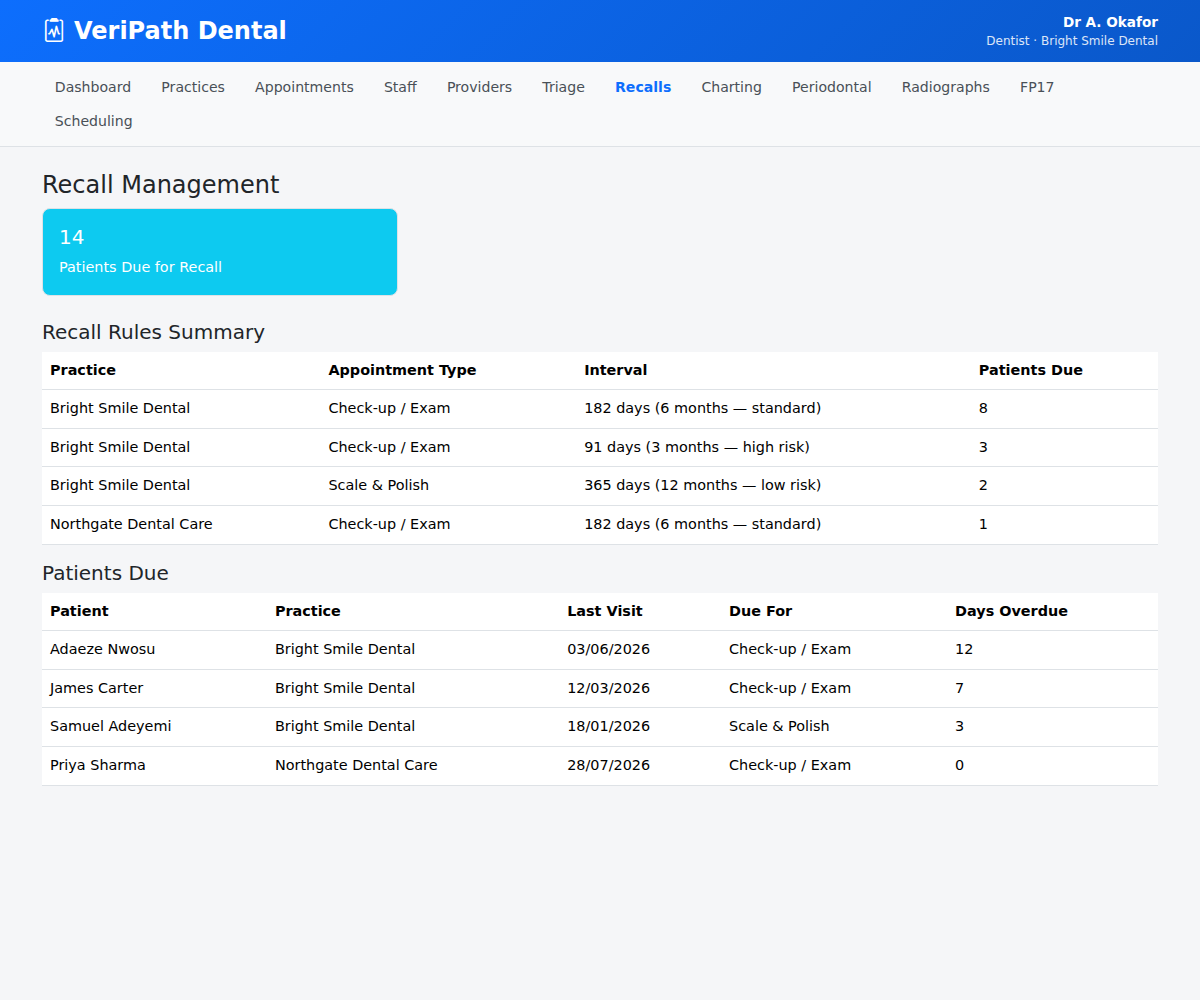
The Recall Management screen opens. The blue card shows how many patients are due for recall overall.
¶ Step 2: Read the Recall Rules Summary
The Recall Rules Summary table lists every active recall rule across practices:
| Column | What it shows |
|---|---|
| Practice | Which practice the rule belongs to |
| Appointment Type | What the recall is for (e.g. Check-up / Exam, Scale & Polish) |
| Interval | The recall interval in days, with the NICE months and risk category (e.g. 182 days (6 months — standard)) |
| Patients Due | How many patients are due under this rule |
This is where you can see at a glance how each appointment type maps to an interval — and which rules are generating the most recalls.
¶ Step 3: Set a patient's risk category
The risk category you set for a patient is what selects their recall interval.
- Open the patient's Recall Profile (from the patient's record in the system).
- Under Risk Category, choose the option that matches your clinical assessment:
| Option | Meaning |
|---|---|
| Low | Low risk of disease |
| Moderate | Moderate risk |
| High | High risk — shortest interval applies (3 months) |
| Complex | Complex needs — treated with additional care |
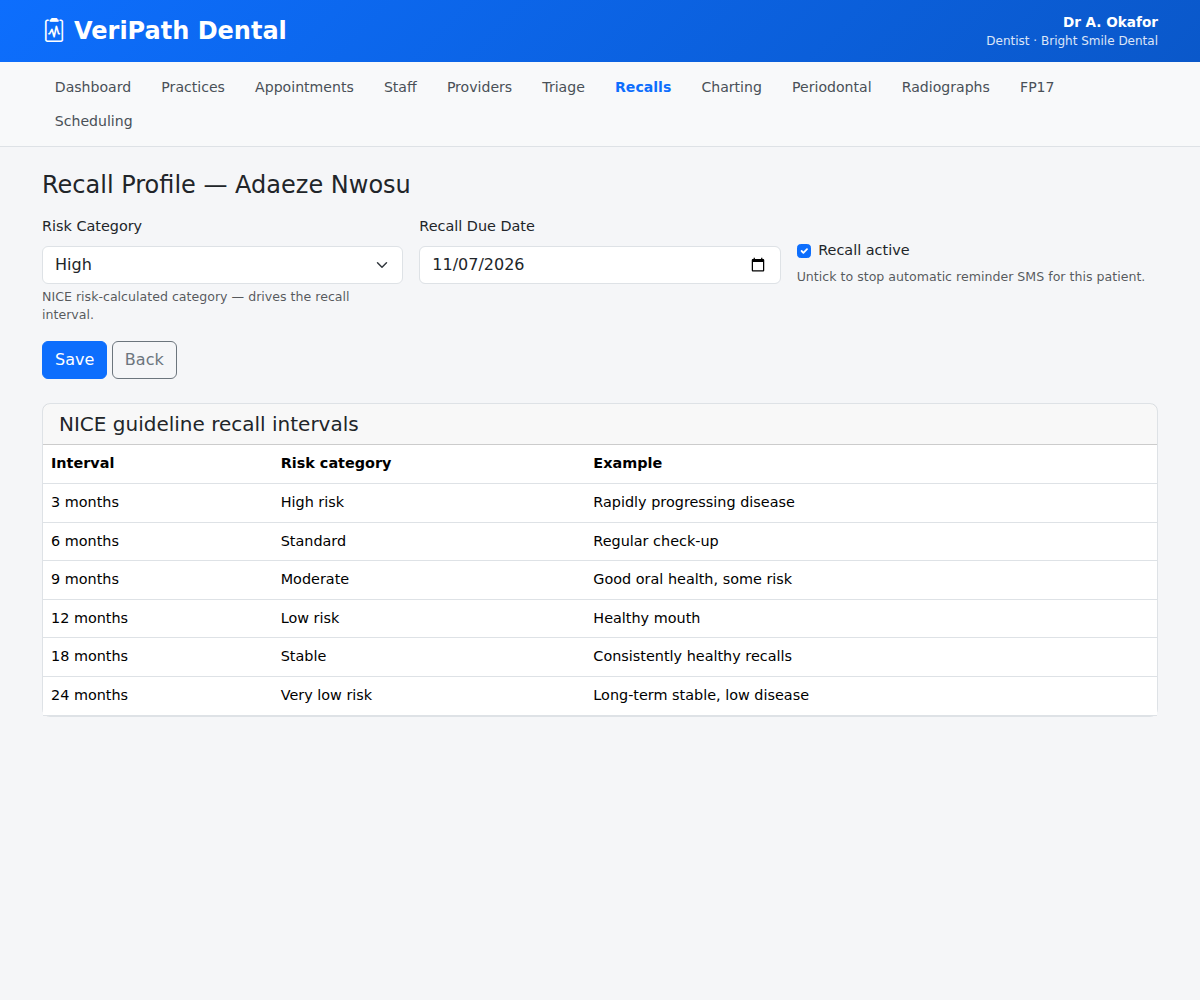
- Set the Recall Due Date (when the next recall becomes due) and confirm Recall active is ticked if the patient should receive automatic reminders.
- Click Save.
The system uses the rule that matches the patient's risk category to drive their recall timing.
¶ Step 4: Check the patient is due at the right time
Back on the Recall Management screen, the Patients Due table lists the patients who are due for recall, their last visit, what they are due for, and how many days they are overdue. A patient whose risk category was raised (e.g. to High) will appear due sooner, because their rule uses the shorter interval.
¶ Useful tips
- The risk category drives the interval — changing a patient from Low to High risk moves their recall from 12 months to 3 months, so review it whenever the patient's condition changes.
- NICE intervals are a guide, not a rule — apply clinical judgement; the app stores the interval, you set the risk.
- Rules are per practice — each practice has its own recall rules, so intervals can be tailored to how each practice runs its recalls.