¶ Counter — Add the NHS Prescription Charge
¶ What you'll be able to do
After reading this guide you will be able to add the NHS prescription charge to a customer's sale:
find the prescription the charge belongs to, put the £9.90 on the basket as its own line, and read
back what the customer now pays — and know what to do when the app says a charge cannot be collected.
Who does this? The Counter Assistant owns the counter, and every other staffing role can add
the charge too.Who decided the charge is due? The pharmacist, when the prescription was dispensed. The
declaration made at that moment says either that a charge is due or that the patient is exempt, and
it cannot be changed afterwards. The counter does not decide it — it collects what the
declaration says.
¶ Why the charge is a line of its own
The prescription and the shop sale are two things on one bill. A customer hands over a
prescription and buys something from the shelf; the charge for the prescription goes on the same
basket as its own line, at the NHS charge, separate from the goods.
The counter records the prescription, not the patient. The charge line carries an opaque
token reference — the app's own handle for that prescription — and the sale is recorded against
the standing counter customer. The counter is a sales surface, not a clinical one: no patient name,
no clinical detail. That is what the app means by the sale records the opaque token reference and no
patient identity.
The charge is zero-rated, never exempt. £9.90 goes on the sale with no VAT inside it — the
app shows it as Zero-rated with £0.00 VAT, unlike a shop item, whose price already has the VAT
inside it.
The amount is not typed at the counter. £9.90 is the charge configured for the pharmacy. It
changes when the national charge changes, and it is never entered by hand at the till.
A basket is still a draft. Adding the charge posts nothing and moves no stock — like the goods,
it becomes a document only when the sale is completed (see D3). And once a sale carrying a
prescription's charge has been completed, the same prescription cannot be charged again: the app
refuses it.
¶ Before you start
- The till must be open, and the basket must still be open. If a colleague holds the till, they
hand it over to you first (see D6). - The prescription must be collectable. The picker lists only prescriptions whose charge can
actually be collected: dispensed or endorsed, with the pharmacist's declaration that the charge is
due, and not already charged on a completed sale. One still being worked in the dispensary, an
exempt one, or one already paid for is not in the list.
¶ Step 1: Open the basket
Start the sale as you would any other (see D1): New basket, then scan or search for anything the
customer is buying. The charge is added to the sale in progress, so there is no separate screen for it.
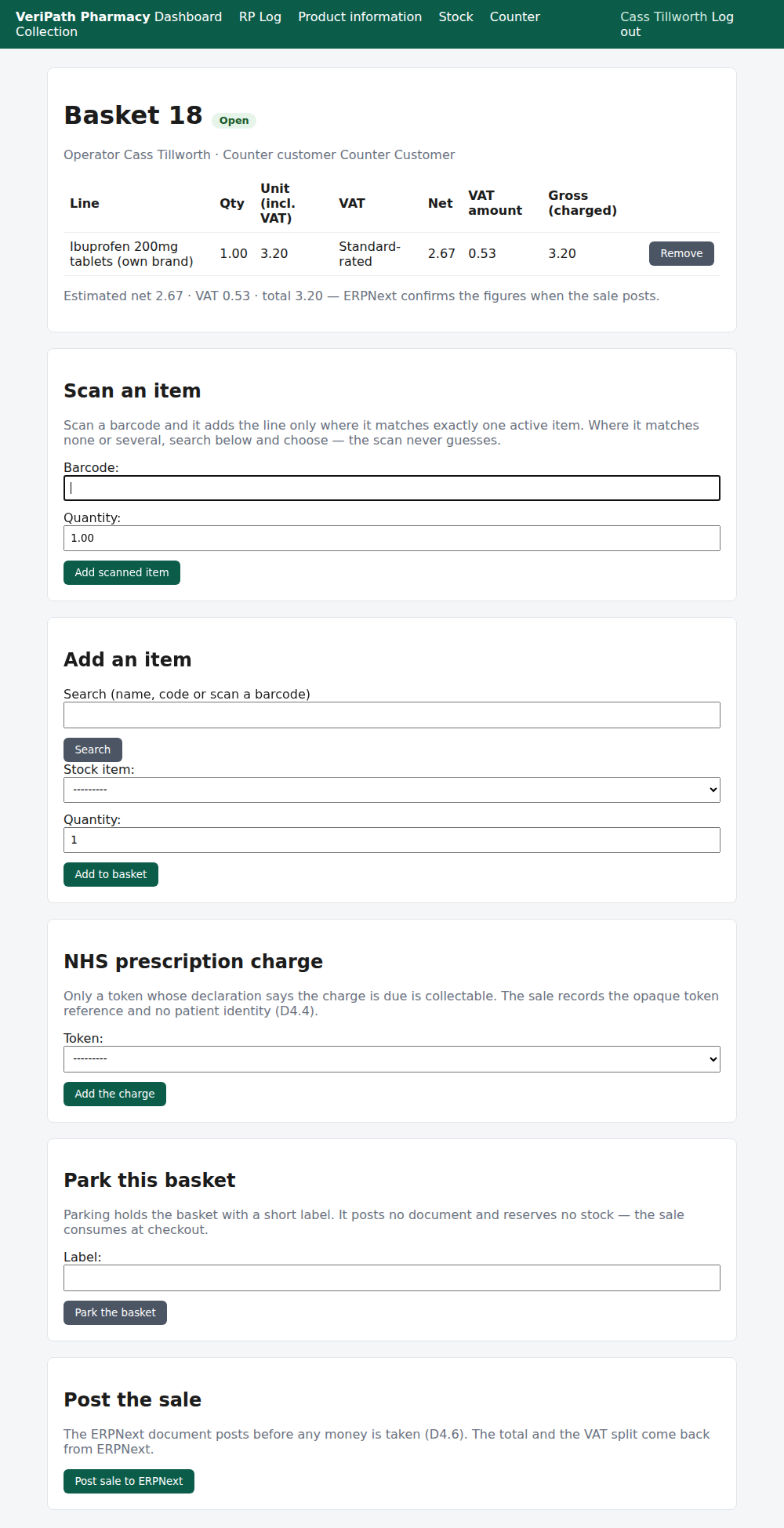
Basket 18 on the test pharmacy, 6 October 2026, as the Counter Assistant: an over-the-counter item
already on the basket, and further down the same page the NHS prescription charge card with its
Token picker and Add the charge button.
¶ Step 2: Choose the prescription
- Go to the NHS prescription charge card.
- Open the Token list. It lists only the prescriptions that can be collected — dispensed or
endorsed, charge due, not already charged — most recently worked first, each shown as its token
reference and state, for example demo-token-dispensed-1 (Dispensed). - Choose the prescription the customer is paying for.
- Press Add the charge.
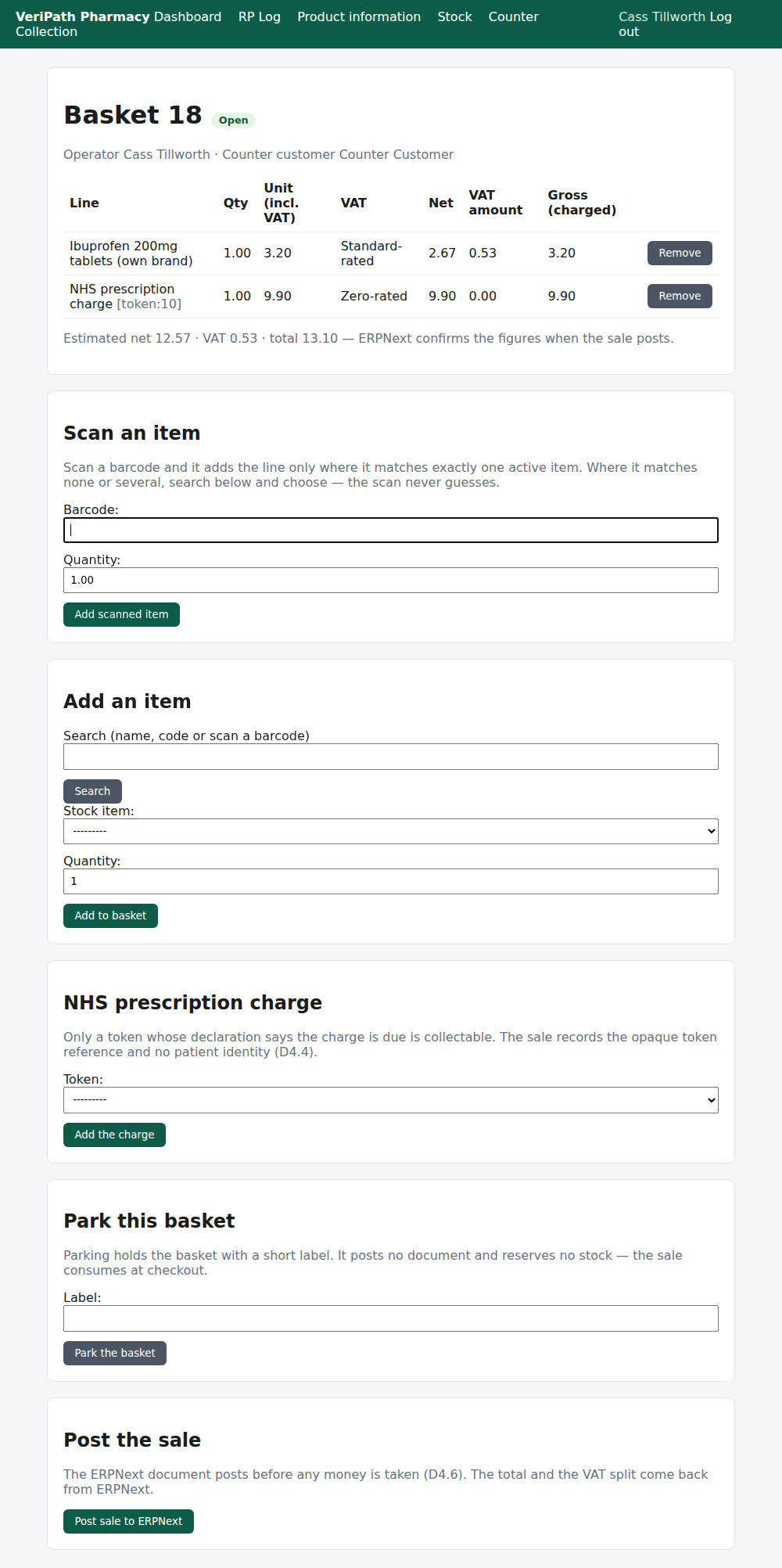
The charge added: a second line — NHS prescription charge [token:10], one at £9.90,
Zero-rated, with £0.00 VAT — and the estimate moved by £9.90 to £13.10. The VAT is unchanged,
because there is none in the charge.
The brackets after the line name are the token reference: the app's own handle for that prescription.
It is how the sale can be traced back to the prescription without the counter ever holding the
patient's details.
¶ Step 3: Check the basket before you take any money
Everything in D1 about reading the basket still applies, and the charge behaves like any other line:
| On the screen | What it means |
|---|---|
| NHS prescription charge [token:…] | One prescription charge. A second prescription is a second line, with its own reference. |
| Unit (incl. VAT) / Gross (charged) | £9.90 — the NHS charge the customer pays. |
| VAT | Zero-rated. The charge carries no VAT — nothing is added to the £9.90. |
| Remove | Takes the charge off the basket. Nothing has posted, so nothing needs undoing. |
The running Estimated net · VAT · total is still the app's own figure; ERPNext confirms the
numbers when the sale posts (see D3).
¶ When something is not right
| What you see | What to do |
|---|---|
| The declaration says no charge is due (exempt). | The pharmacist recorded the patient as exempt when the prescription was dispensed, so there is nothing to collect. Take the sale without the charge. If the customer says otherwise, that is the pharmacist's declaration to correct — not the counter's. |
| The charge for this token has already been collected. | That prescription's charge has already been taken on a completed sale. Do not collect it again — check you are on the prescription the customer means. |
| Choose a dispensing token. | Nothing was picked in the Token list. Choose the prescription, then press Add the charge. |
| The prescription is not in the list at all | It cannot be collected: not dispensed yet, the claim was cancelled, the pharmacist declared it exempt, or its charge is already on a completed sale. The dispensary or the pharmacist can say which. |
| The prescription is offered but refused when you add it | Rare — the charge was taken on another till between the list loading and your press. Reload the basket; the prescription will be gone from the list. |
| The amount is not what you expected | The charge is the pharmacy's configured figure, not something typed at the counter. Ask the business manager. |
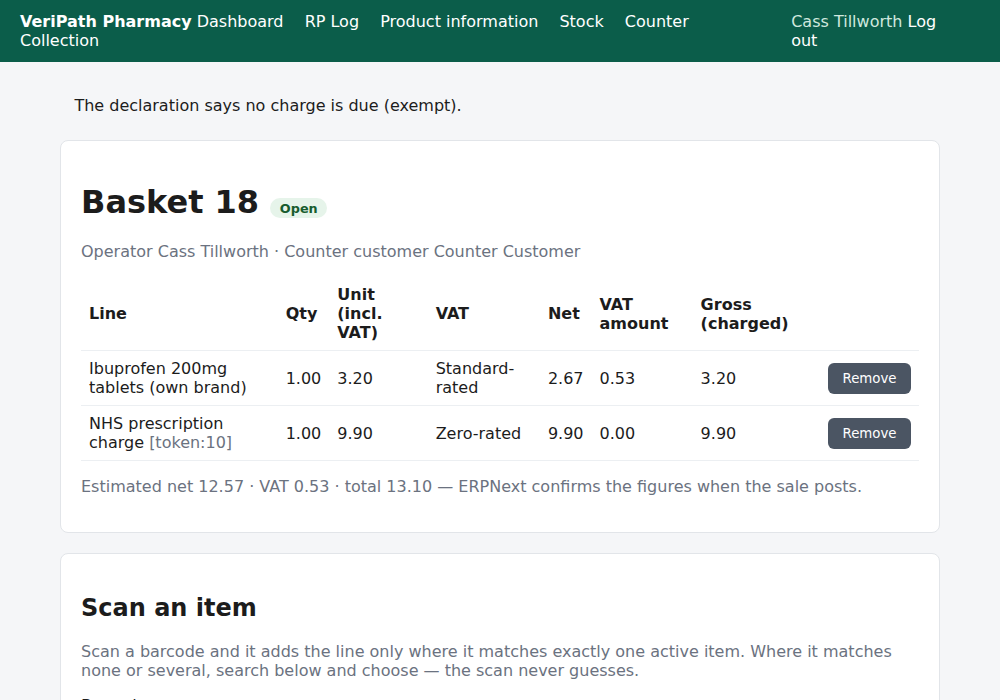
Collecting an exempt prescription: the app refuses it and says why — The declaration says no
charge is due (exempt). Nothing is added to the basket.
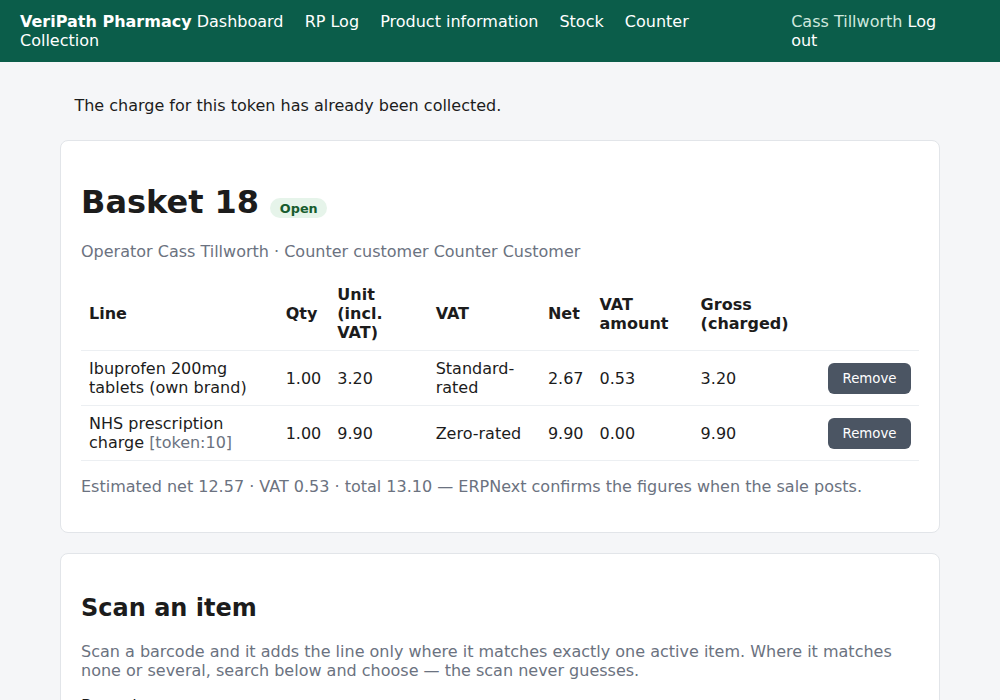
The same card, refusing a charge that has already been taken: The charge for this token has
already been collected. Again, nothing is added.
¶ What happens next
- D3 — take payment and close the sale. The charge posts with the sale as its own zero-rated
line; the goods are consumed from stock and the charge is not — it is not a stock item. - D4 — give the customer a receipt. The receipt carries the charge as its own line, zero-rated,
with the VAT shown per rate. - D5 — refund or void a sale. If the sale has to be reversed, the charge goes back with it.
- D6 — the till and the day's takings. Today's takings include the charges collected.
- D1 — sell an over-the-counter item. The rest of the counter: scanning, searching, parking.
¶ Related pages
- Pharmacy App Guides — the published guides
- Counter — Sell an Over-the-Counter Item — D1, the sales flow the charge is added to
- Dispensing — Dispense a Prescription — where the charge declaration is made
- Coverage Plan — every everyday task, and what is published
- Roles and Permissions in the Pharmacy App