¶ Stock — Sync Stock Positions with the Ledger
¶ What you'll be able to do
After reading this guide you will be able to bring the app's stock figures up to date with the ledger the pharmacy
actually keeps, read how current they now are, and know what refreshing does — and does not — change.
Who does this? The Responsible Pharmacist, the Dispensing Technician and the Business Manager can
refresh the positions. The Counter Assistant can read every stock screen but cannot refresh them (the request is
refused with 403 Forbidden). Refreshing needs the app to reach ERPNext; if it cannot, you get a red message and
nothing is changed.
¶ Why the figures have to be refreshed
The pharmacy app does not hold the stock ledger — ERPNext does. The screens staff read are built from a copy of
what ERPNext last reported: the stock overview's figures, the low-stock report (C2) and the expiry report (C3) all read
it. That copy is called the positions in these screens, and it is only ever as current as the last refresh. The
stock overview says so explicitly, with the line Last position refresh.
Nothing refreshes it for you. There is no nightly job and no automatic schedule: the figures move when somebody
presses the button. A pharmacy that has not refreshed since Friday is looking at Friday's stock, however much has been
dispensed, sold, delivered or written off since — which is why a delivery recorded yesterday (C1) or a wastage
recorded this morning (C4) will not appear in the figures until somebody refreshes.
Refreshing is safe to repeat. It reads ERPNext and updates the app's own copy; it posts nothing to the ledger
and changes no stock quantity anywhere. Unlike a stock adjustment, pressing it twice does no harm at all.
¶ Step 1: Refresh the positions
- Log in to the pharmacy app.
- Click Stock in the top menu.
- Click Refresh positions from ERPNext — the button directly beneath the figures.
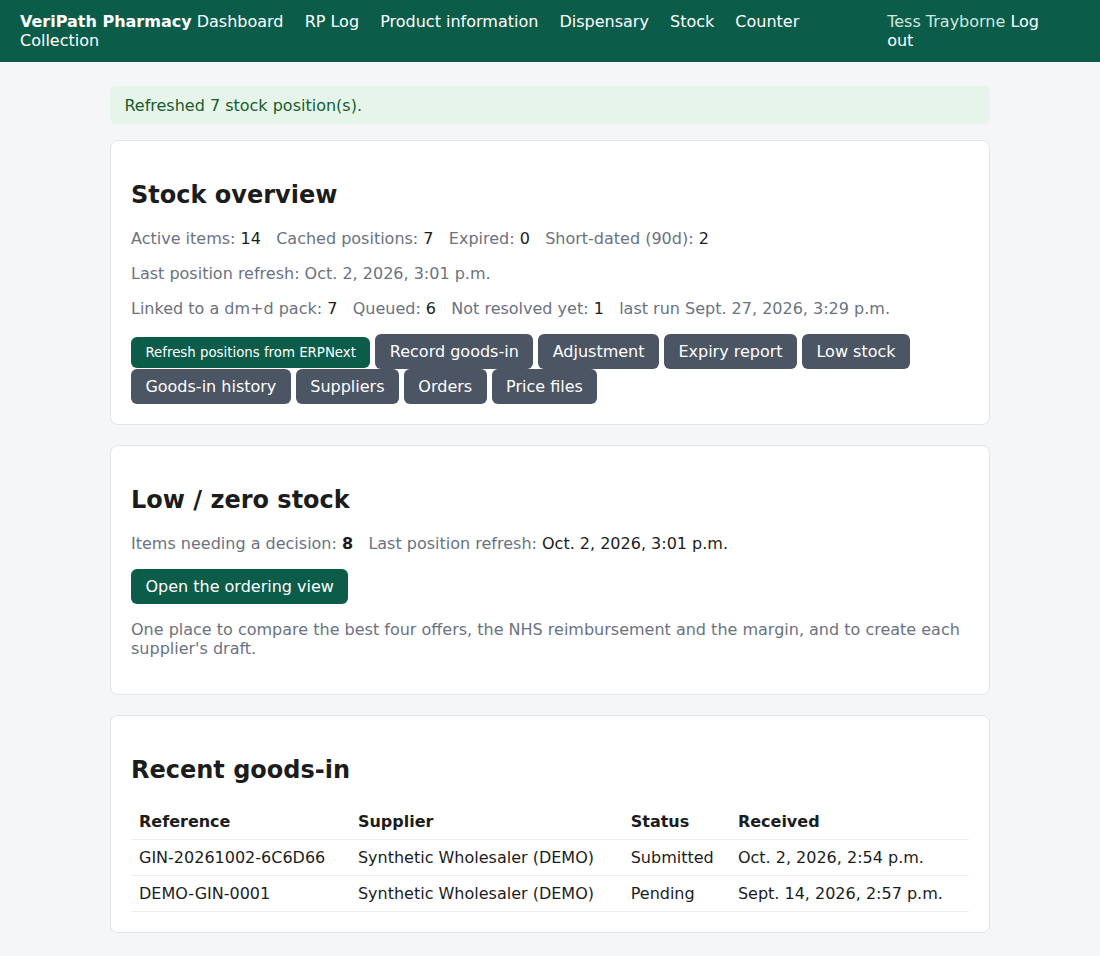
The stock overview straight after a refresh: the green banner reports how many positions ERPNext returned, the
figures above are rebuilt from them, and Last position refresh has moved to the time you pressed the button.
The refresh reads, for every active stock item, the batch positions ERPNext holds in the pharmacy's two pools —
its Dispensary warehouse and its Counter warehouse — and rebuilds the app's copy of them: the batch, the
expiry date and the quantity of every position ERPNext reports, and the removal of a cached one ERPNext does not.
¶ Step 2: Read what happened
| What you see | What it tells you |
|---|---|
| "Refreshed 7 stock position(s)." | ERPNext returned that many batch positions — its count, one per item, pool and batch. A position the app held that ERPNext did not report is removed in the same pass (see below), so after a successful refresh this figure and the app's own cached positions agree. |
| Last position refresh now reads a fresh date and time | When the figures were last taken from ERPNext. It reads never until the first refresh. |
| The figures above the button changed | Active items, Cached positions, Expired and Short-dated are all rebuilt from the positions just refreshed. |
Dates render as Django does, for example Sept. 21, 2026, 3:21 p.m.
The refresh also removes what the ledger no longer reports. It does not only add and update: for each item and pool
it has just read successfully, a cached position that ERPNext did not report is deleted. So a batch that has
been consumed, adjusted away or otherwise taken out of the ledger stops counting in the figures, and stops appearing on
the expiry report (C3), as soon as a refresh completes — rather than lingering at its last known quantity.
The careful part is when that deletion happens: only after ERPNext has been read without error, item by item and
pool by pool. A refresh that fails part-way, or cannot reach ERPNext at all, leaves everything it did not manage to
read exactly as it was — it never empties the cache. That is the safety in the button: the app's copy can be stale,
but a failed refresh cannot make it wrong.
¶ What depends on the last refresh
Everything that reads the cached positions:
| Screen | What it reads from the cache |
|---|---|
| Stock overview (C2) | Active items, cached positions, expired and short-dated counts, and the low/zero stock panel |
| Low stock (C2) | The quantity each item is holding, checked against its alert level |
| Expiry report (C3) | Every position's batch, expiry date and quantity |
Two things that do not touch the cache, and so never depend on the refresh: a receipt (C1) and an
adjustment (C4) — both post straight to the ERPNext ledger. That is why the figures can disagree with what you have
just done until the positions are refreshed.
¶ If it doesn't work
| What you see | What it means |
|---|---|
| "Could not refresh stock positions from ERPNext." | The refresh could not reach ERPNext, or ERPNext refused the request. Nothing has been removed or changed by the attempt — the figures are as they were, or whatever part of the refresh had already completed. Press the button again; if it keeps failing, tell your Business Manager. |
| "Refreshed 0 stock position(s)." | ERPNext answered and reported no positions at all for the pharmacy's items in its Dispensary and Counter warehouses. If you expect stock, this is worth raising — it usually means the items or the warehouses do not line up in ERPNext. |
| The count is lower than a number you have seen elsewhere | They count different things. This one is ERPNext's count of batch positions — one per item, pool and batch — while the expiry report lists the cached positions inside the warning band, which is the overview's Expired figure plus its Short-dated figure. |
| The figures still look wrong after a refresh | Then the cache is telling the truth about ERPNext, and the disagreement is with the shelf. That is a stock correction (C4), and worth telling whoever looks after stock. |
| Last position refresh still reads never | No refresh has completed successfully yet — the figures are showing nothing at all. |
| You tried to open the refresh directly in the address bar | The refresh is a button, not a page: its address on its own is refused, and you must go through the button on the stock overview. |
| A button is refused when you press it | Your role does not hold the permission. All four roles can read the stock screens; refreshing is open to three of them. |
¶ What this does not do
- It does not change any stock. It reads ERPNext and updates the app's own copy. The ledger is untouched: no stock
entry is created and no quantity moves. Recording stock movements is goods-in (C1), an adjustment (C4) and dispensing
or a sale. - It does not run on a schedule. No nightly job exists — the refresh is manual, and the timestamp is the only
guarantee you have of how current the figures are. - It does not tile or aggregate anything. It copies positions (one row per batch per pool); the totals you see are
added up from those rows at the moment the page is drawn. - It does not keep anything the ledger no longer holds. A cached position ERPNext stops reporting is removed by the
next successful refresh: the app's copy is ERPNext's, not a history of its own. - It does not refresh anything else — no prices, no account balances, no dispensing records. It is stock positions
only. - It does not fix the shelf. If the cached figures and the physical stock disagree after a refresh, that is a
correction to be recorded (C4), not a stale cache.
¶ Related
- Stock — Coverage — where this guide sits in the stock group
- Stock — Check Stock Levels — the figures this refresh updates,
and the last-refresh timestamp (C2) - Stock — Run the Expiry Check — the report that depends on
these positions most (C3) - Stock — Record an Adjustment or Wastage — the change that
needs a refresh before you can see it (C4) - Stock — Receive a Delivery — the other change that does (C1)
- Roles and Permissions in the Pharmacy App — who may refresh