¶ Gingival Recession & Mobility Scoring
¶ What you'll be able to do
After reading this guide you will be able to record the structural signs of gum and tooth-support health — tooth mobility, furcation involvement and gingival recession — during a periodontal exam in VeriPath Dental. You will learn what the mobility grades and furcation classes mean, where on the tooth form they are recorded, and how to read them back on the exam record.
Who does this? Dentists and dental hygienists record mobility, furcation and recession while they chart a periodontal exam. Practice managers and dental admins can view the records. Receptionists do not see Periodontal in their menu and cannot open the screens — periodontal data is clinical.
Related guides: these measurements are recorded on the same exam as the 6-point pocket depths. See Periodontal Charting (6-Point Probe) for the full charting workflow, and Plaque & Bleeding Indices for the two derived scores.
¶ About mobility, furcation and recession
Three structural indicators of gum and tooth-support health are recorded during a periodontal examination:
| Indicator | What it measures | How it is recorded |
|---|---|---|
| Tooth mobility | How much a tooth moves in its socket | A grade from Grade 0 (firm) to Grade III (visibly loose) |
| Furcation involvement | How far gum disease has advanced into the fork of the roots (multi-rooted teeth only) | A class from None to Class III |
| Gingival recession | How far the gum margin has moved away from the tooth | Measured in millimetres (mm) at each of the six tooth surfaces |
Mobility grades are:
- Grade 0 — the tooth is firm (normal).
- Grade I — the tooth moves slightly (up to 1 mm).
- Grade II — the tooth moves noticeably (about 1–2 mm).
- Grade III — the tooth moves freely in every direction (2 mm or more, and often vertically too).
Furcation classes (molars and other multi-rooted teeth) are:
- Class I — the probe enters the furcation but less than a third of the way across.
- Class II — the probe reaches more than a third of the way, but not right through.
- Class III — the furcation is open right through from one side to the other.
These are recorded as part of a periodontal exam — a full-mouth session that also captures pocket depths, plaque and bleeding scores.
¶ Step 1: Open the Periodontal screen
- Log in to VeriPath Dental with a clinical role (Dentist or Dental Hygienist).
- Click Periodontal in the top navigation bar.
The Periodontal Exams list opens. It shows one row per exam with the patient, the clinician who recorded it, the overall Plaque % and Bleeding % scores, whether the exam is Completed (a date) or still Open (an orange badge), and the appointment it was performed at.
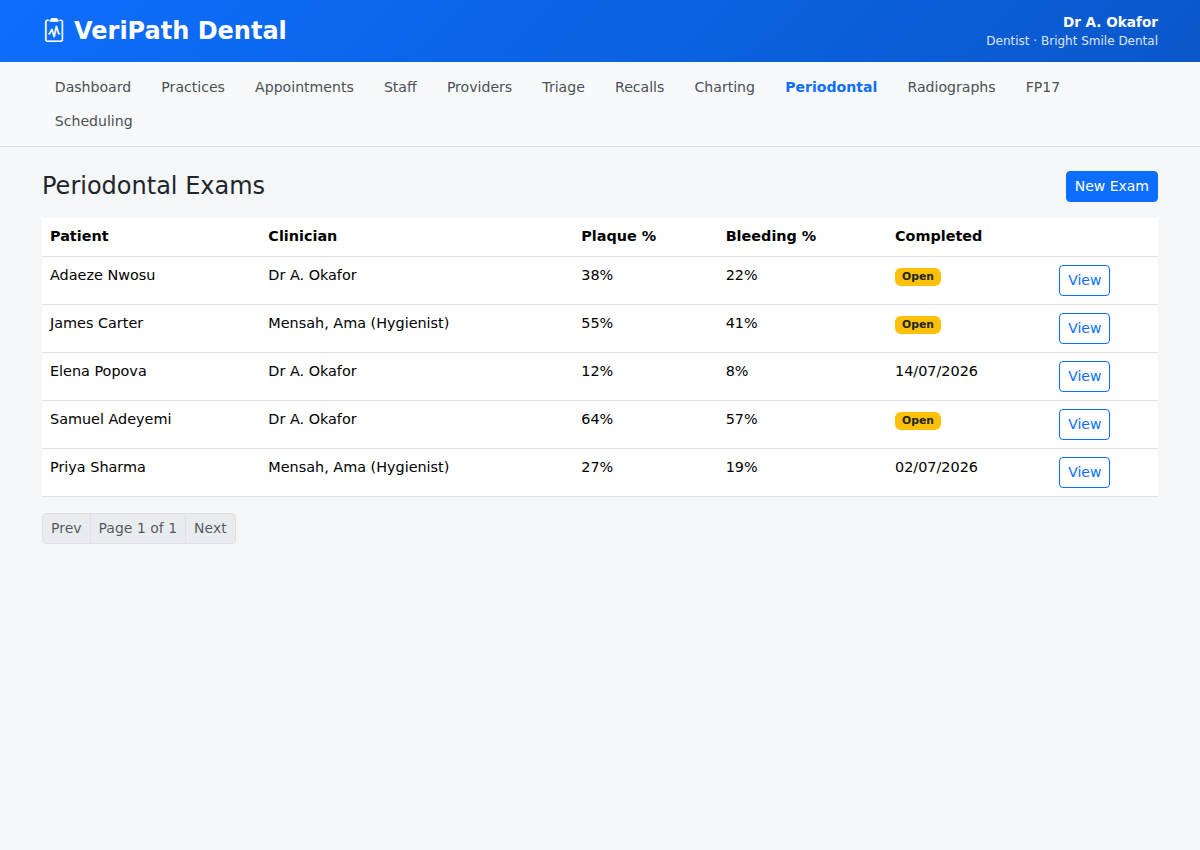
| Column | What it shows |
|---|---|
| Patient | The patient the exam belongs to |
| Clinician | The dentist or hygienist who recorded it |
| Plaque % | Overall plaque score for the mouth (0–100%) |
| Bleeding % | Overall bleeding-on-probing score (0–100%) |
| Completed | The completion date, or an Open badge if still in progress |
| Appointment | The visit the exam was performed at |
| View | Opens the exam's tooth records |
¶ Step 2: Find the patient and start a new exam
- Type the patient's Patient ID into the Filter by Patient ID box and click Filter.
- The list narrows to that patient and a New Exam button appears at the top right.
- Click New Exam.
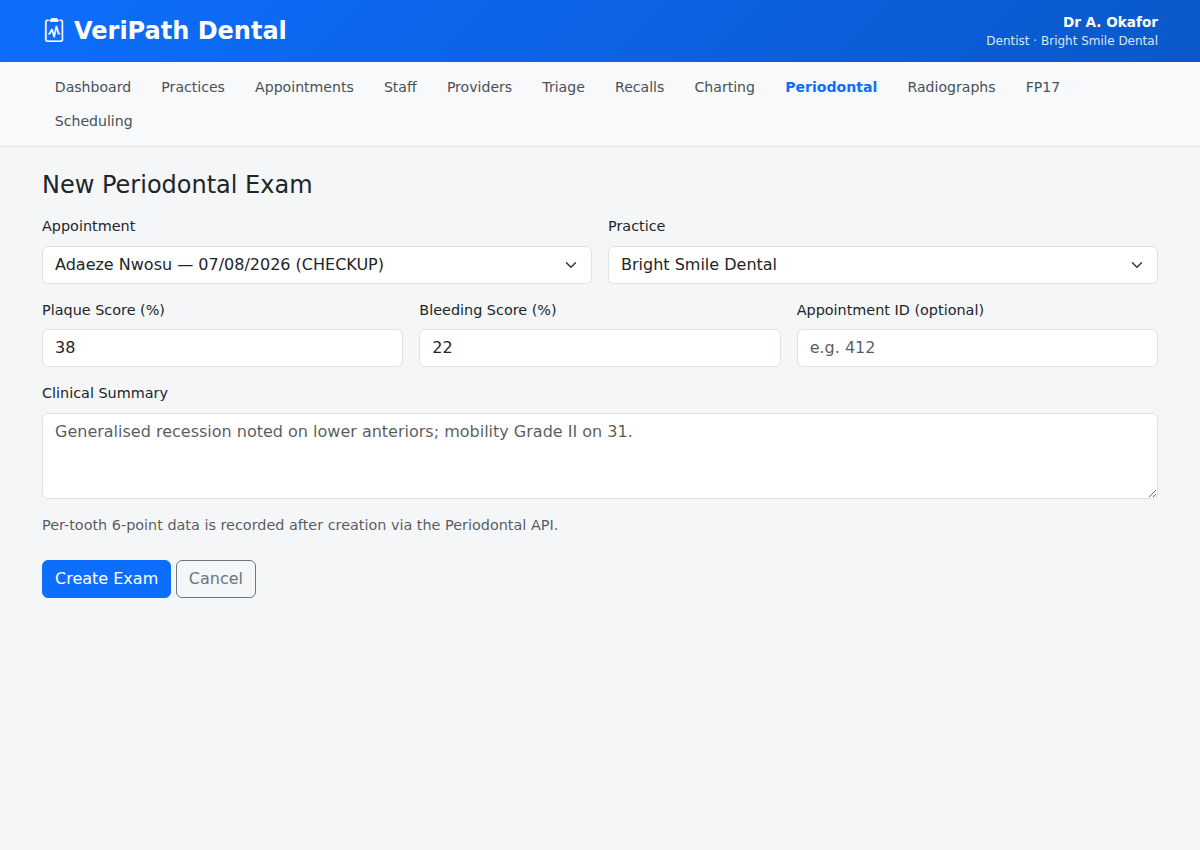
- Appointment (required) — select the appointment this exam was performed at. The patient and practice are taken from the appointment, which is why it is mandatory.
- Clinical Summary (optional) — add a short summary, for example "Generalised recession noted on lower anteriors; mobility Grade II on 31."
- Click Create Exam.
The exam is saved and you land on its detail page, ready to record the teeth. There are no score boxes to fill in on this form — the per-tooth measurements are what build the record.
You can also start an exam from the appointment itself: open the appointment in the diary and use the Periodontal Exam button.
¶ Step 3: Record mobility, furcation and recession on a tooth
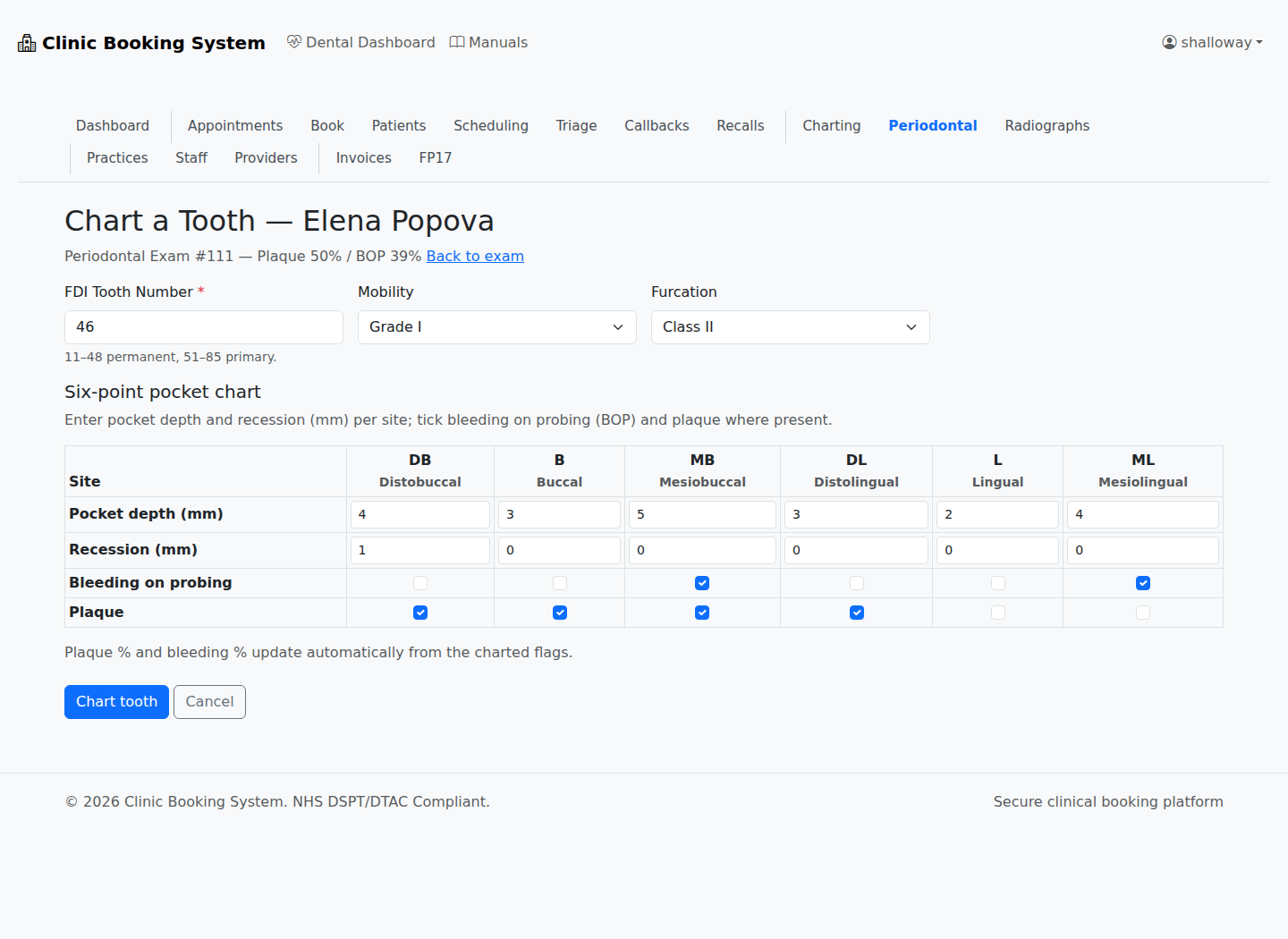
The structural signs are recorded tooth by tooth on the Chart a Tooth form:
- On the exam detail page, click Add tooth.
- Enter the FDI Tooth Number for the tooth (adult teeth 11–48, primary teeth 51–85).
- Set Mobility — choose the grade from the drop-down (Grade 0 – Grade III). Grade 0 is the default for a firm tooth.
- For molars and other multi-rooted teeth, set Furcation — choose None or the relevant class (Class I – Class III).
- In the Six-point pocket chart, enter the Recession (mm) for each surface where the gum margin has receded (the pocket-depth, bleeding and plaque rows are covered in the other guides).
- Click Chart tooth.
The tooth is saved and appears in the exam's records table. Use Add tooth again for the next tooth, or Edit on a row to correct a grade or measurement.
Record mobility before probing — mobility is easiest to judge while the tooth is undisturbed, so assess it before you take the depth readings at that tooth.
Tip: furcation applies to multi-rooted teeth (molars and, less often, upper premolars) — for single-rooted teeth leave it as None.
¶ Step 4: Review the records on the exam
The exam detail page shows the overall scores at the top, any clinical summary, and the Tooth Records (6-point) table — one row per charted tooth:
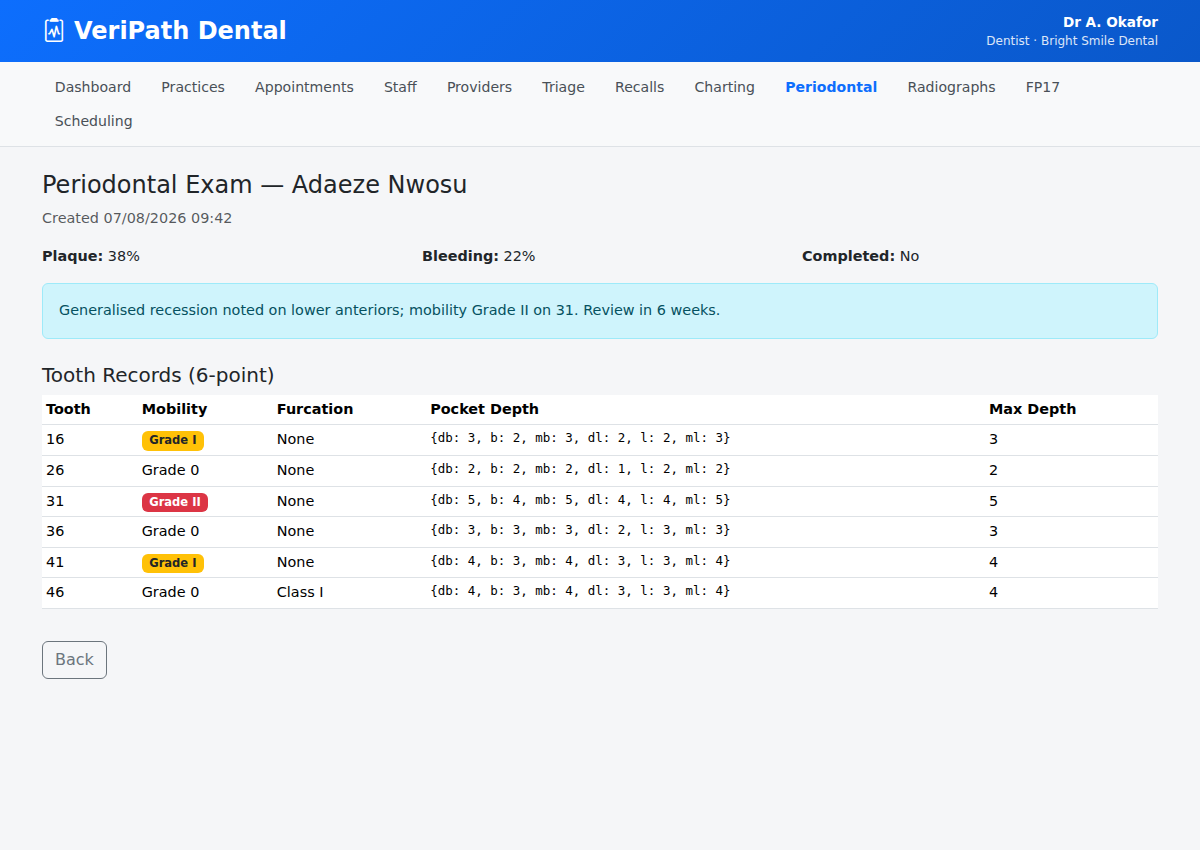
| Column | What it shows |
|---|---|
| Tooth | The FDI tooth number (adult 11–48, primary 51–85) |
| Mobility | The mobility grade (Grade 0 – Grade III) |
| Furcation | Furcation involvement class (None, Class I – Class III) |
| Pocket depths | The six depth readings db b mb dl l ml in order, e.g. 4 3 5 4 3 5 |
| Max | The deepest single pocket reading for that tooth |
| BOP sites | The sites that bled on probing, e.g. DL MB ML |
| Plaque sites | The sites with visible plaque, e.g. B DB DL MB |
While the exam is Open you can correct mistakes with the per-row Edit (same form as Step 3, headed "Edit Tooth …") or Delete to remove the tooth from the exam entirely.
Tip: the six standard periodontal surfaces are db (distobuccal), b (buccal), mb (mesiobuccal), dl (distolingual), l (lingual) and ml (mesiolingual) — recession is recorded per surface in millimetres.
¶ Step 5: Finish the exam
When the chart is complete, click the green Complete exam button. The exam is stamped with the completion date and the name of the person who completed it, and the record is signed off and locked: the Add tooth button and the per-row Edit / Delete controls disappear, and the record is frozen as the finished chart.
When are mobility, furcation and recession recorded? They are part of the full 6-point exam, which is taken at the visit where it is clinically indicated — for example at a check-up where the basic screening exam (BPE) flags deeper pockets or tooth mobility, at active-periodontal (gum disease) review or maintenance visits, or before and after periodontal treatment to record the baseline and the outcome. VeriPath Dental records the 6-point exam itself; the quick BPE screening that decides when a full chart is needed is recorded outside the app.
¶ Useful tips
- Use the same FDI tooth numbers as charting — so the perio record lines up with the patient's chart.
- Assess mobility first, then probe — handling the tooth disturbs it, so grade mobility before taking depth readings.
- Record recession in mm at each surface — noting the surface (e.g. buccal 31) matters more than just "recession present".
- Keep the exam Open until the chart is finished — then complete it to lock the record.