¶ Periodontal Charting (6-Point Probe)
¶ What you'll be able to do
After reading this guide you will be able to record a full-mouth periodontal chart in VeriPath Dental using the standard 6-point probe method. You will learn what the six measurement points are and where they sit on the tooth, how to start a periodontal exam for a patient, how to chart each tooth with its six pocket-depth readings (plus mobility, furcation, recession, bleeding and plaque), and how to read the finished record back. You will also see how the exam is signed off once the chart is complete.
Who does this? Dentists and dental hygienists carry out periodontal charting. Practice managers and dental admins can view the records. Receptionists do not see Periodontal in their menu and cannot open the screens — periodontal data is clinical.
Related guides: this page covers the full 6-point exam. For what the Plaque % and Bleeding % scores mean (they are calculated for you as you chart), see Plaque & Bleeding Indices. For mobility and recession scoring in detail, see Gingival Recession & Mobility Scoring.
¶ About the 6-point probe
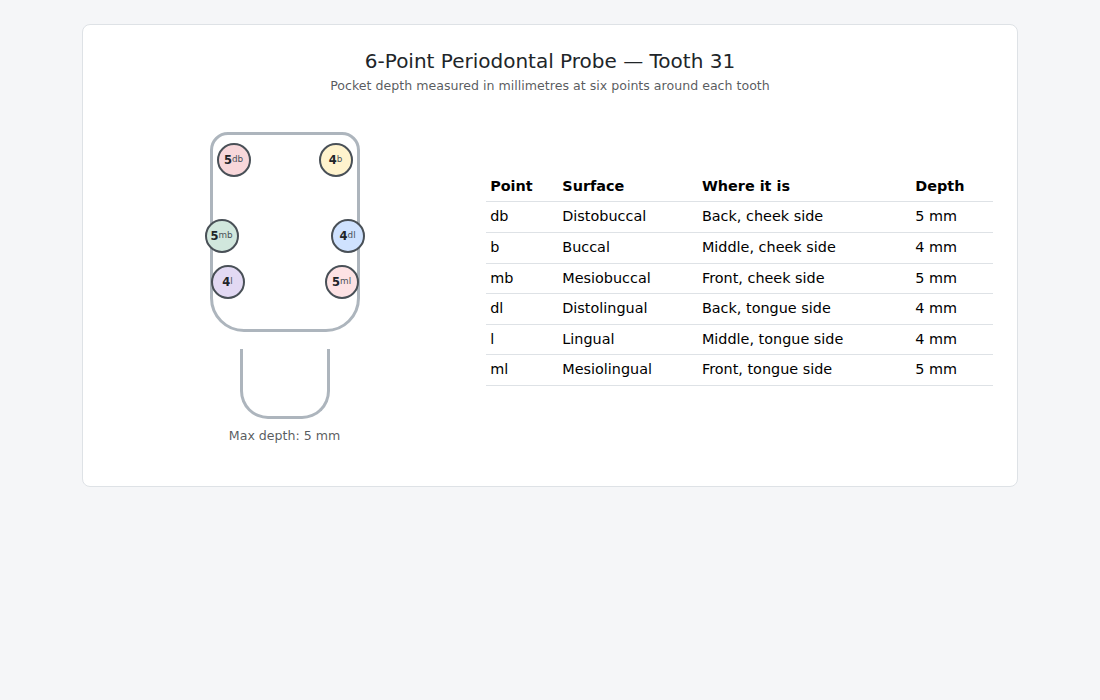
Periodontal charting measures the depth of the gum pocket around each tooth using a periodontal probe. Every tooth is measured at six points — three on the cheek (buccal) side and three on the tongue (lingual) side:
| Point | Surface | Where it is |
|---|---|---|
| db | Distobuccal | Back, cheek side |
| b | Buccal | Middle, cheek side |
| mb | Mesiobuccal | Front, cheek side |
| dl | Distolingual | Back, tongue side |
| l | Lingual | Middle, tongue side |
| ml | Mesiolingual | Front, tongue side |
Each reading is recorded in millimetres. The deepest reading for the tooth is its max depth — an important indicator of the severity at that site.
¶ Step 1: Open the Periodontal screen
- Log in to VeriPath Dental with a clinical role (Dentist or Dental Hygienist).
- Click Periodontal in the top navigation bar.
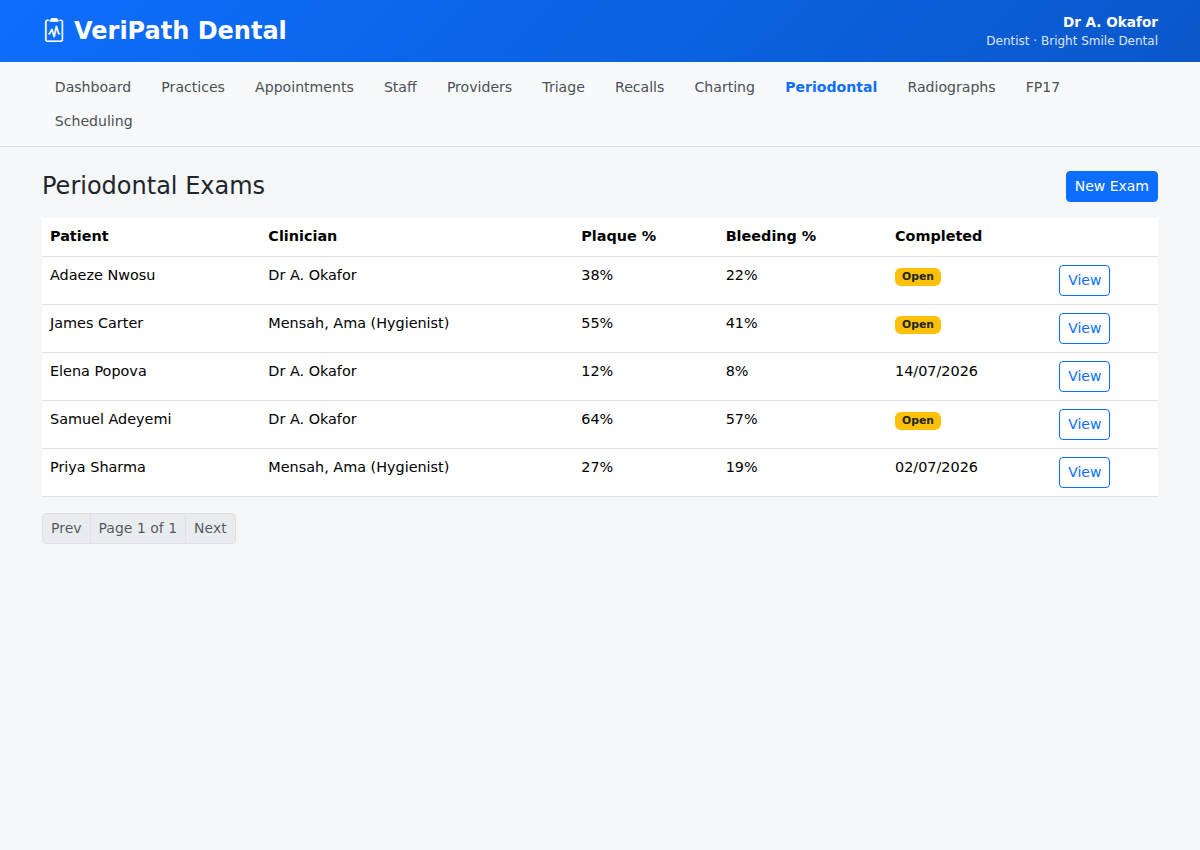
The Periodontal Exams list opens. Each row is one full-mouth exam session, showing the patient, the clinician who recorded it, the overall Plaque % and Bleeding % scores, whether the exam is Completed (a date) or still Open, and the appointment the exam was performed at.
The Plaque % and Bleeding % columns are calculated automatically from the charted teeth — a new exam shows 0% until teeth are charted.
¶ Step 2: Find the patient and start a new exam
- Type the patient's Patient ID into the Filter by Patient ID box and click Filter.
- The list narrows to that patient and a New Exam button appears at the top right.
- Click New Exam.
The New Periodontal Exam form opens for the selected patient.
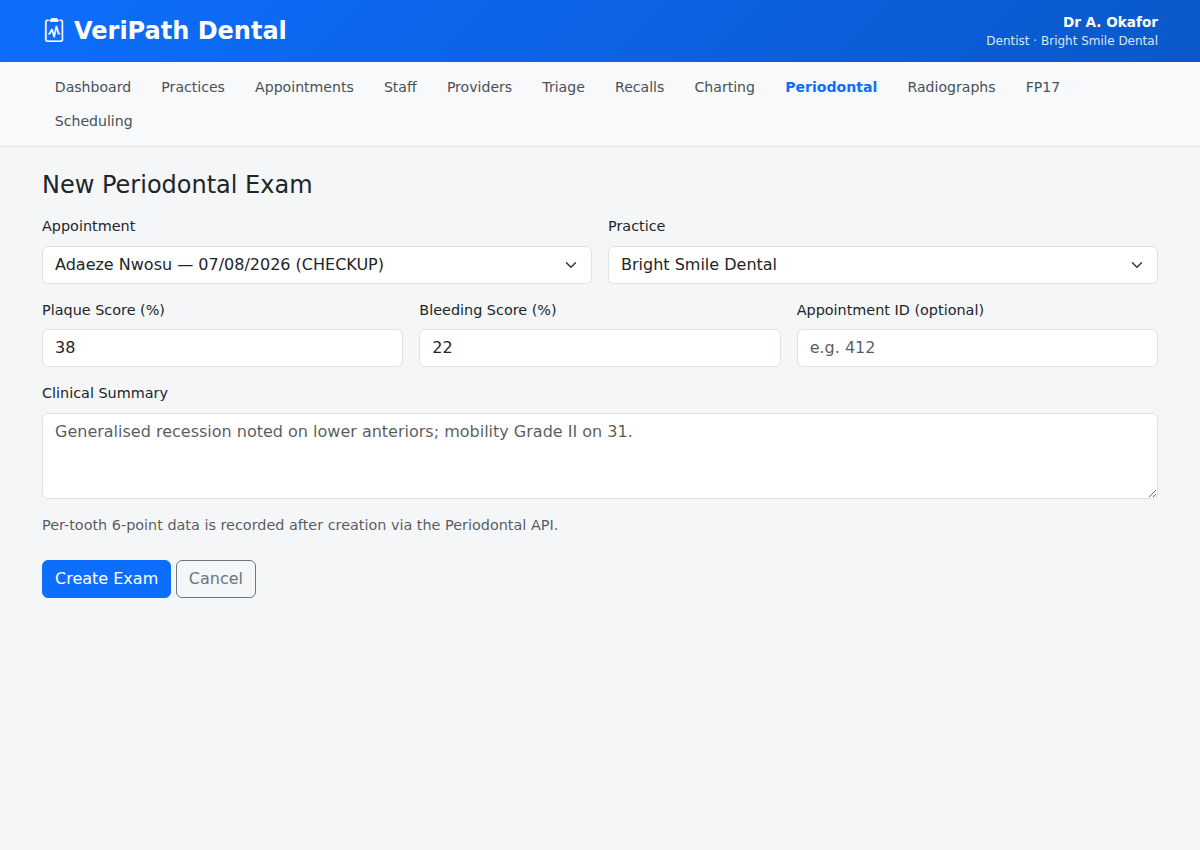
- Appointment (required) — select the appointment this 6-point exam was performed at. The list shows the patient's appointments (all types — a 6-point chart can be taken at any visit, not just a check-up), most recent first, with attended visits marked. The patient and practice are taken from the appointment, which is why it is mandatory.
- Clinical Summary (optional) — add a short note, for example "Moderate generalised pocketing. Good oral hygiene."
There are no Plaque % or Bleeding % boxes to fill in — those two scores are worked out from the tooth records as you chart them (see Step 4).
- Click Create Exam.
The exam is saved and you land on its detail page. Because no teeth are charted yet, the exam shows Plaque 0% / Bleeding 0% and the message "No tooth records yet — chart the first tooth."
You can also start an exam from the appointment itself: open the appointment in the diary and use the Periodontal Exam button.
¶ Step 3: Chart a tooth
- On the exam detail page, click Add tooth.
- Enter the FDI Tooth Number for the tooth you are charting (adult teeth 11–48, primary teeth 51–85).
- If relevant, set Mobility (Grade 0 – Grade III) and Furcation (None, Class I – Class III — molars only).
- In the Six-point pocket chart, enter the readings for that tooth, one column per site (db, b, mb, dl, l, ml):
- Pocket depth (mm) — the probing depth at each site.
- Recession (mm) — how far the gum margin has receded, where present.
- Bleeding on probing — tick each site that bled when probed.
- Plaque — tick each site with visible plaque.
- Click Chart tooth.
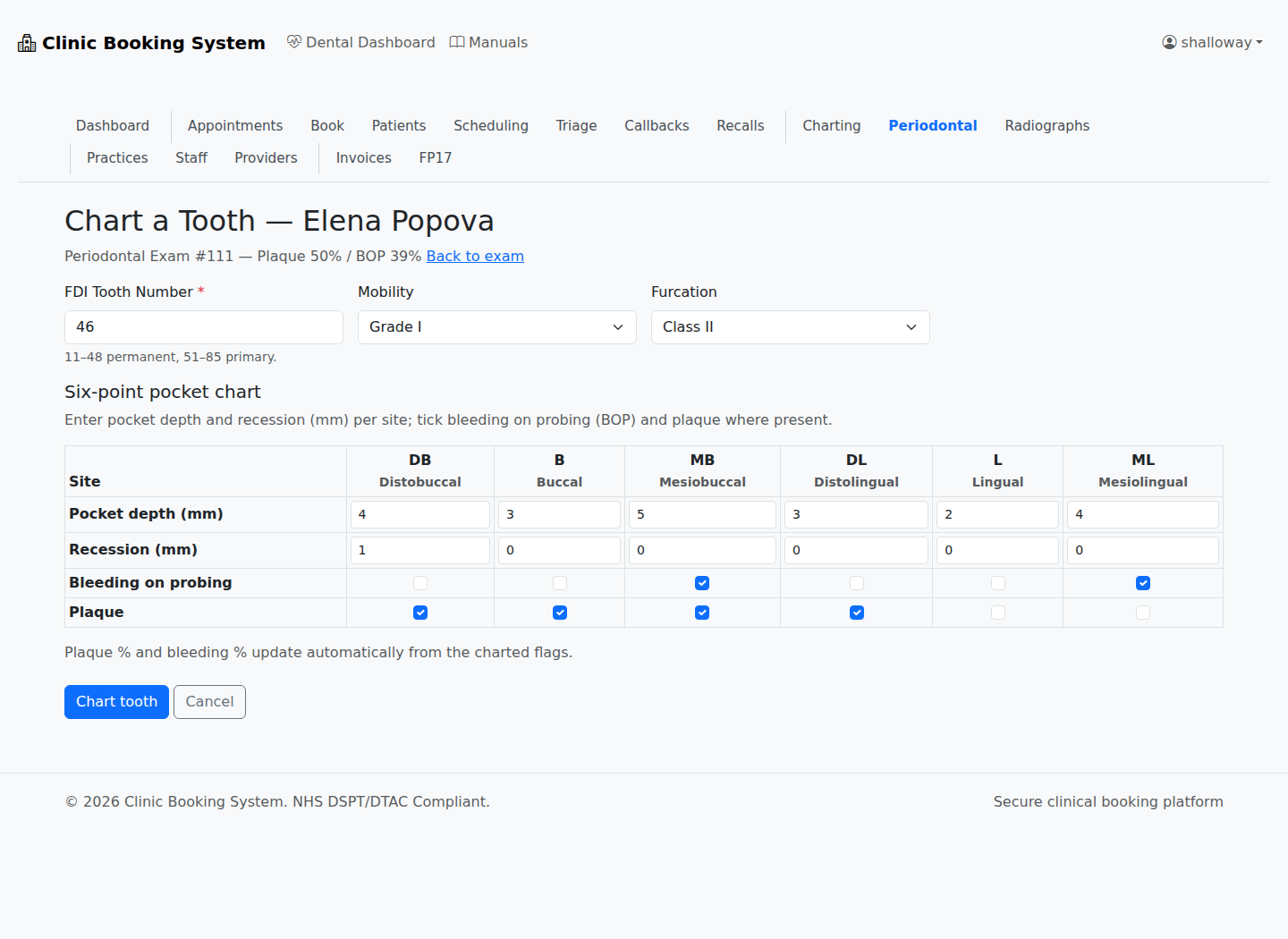
The tooth is saved and you return to the exam detail page, where the tooth now appears in the records table and the Plaque % / Bleeding % have been recalculated from everything charted so far.
Each tooth can be charted only once per exam — if you try to add a tooth that is already on the exam, you will see "Tooth 26 is already charted for this exam." Use Edit on the existing row instead.
¶ Step 4: Read the tooth records
The exam detail page shows the overall scores at the top, then one row per charted tooth:
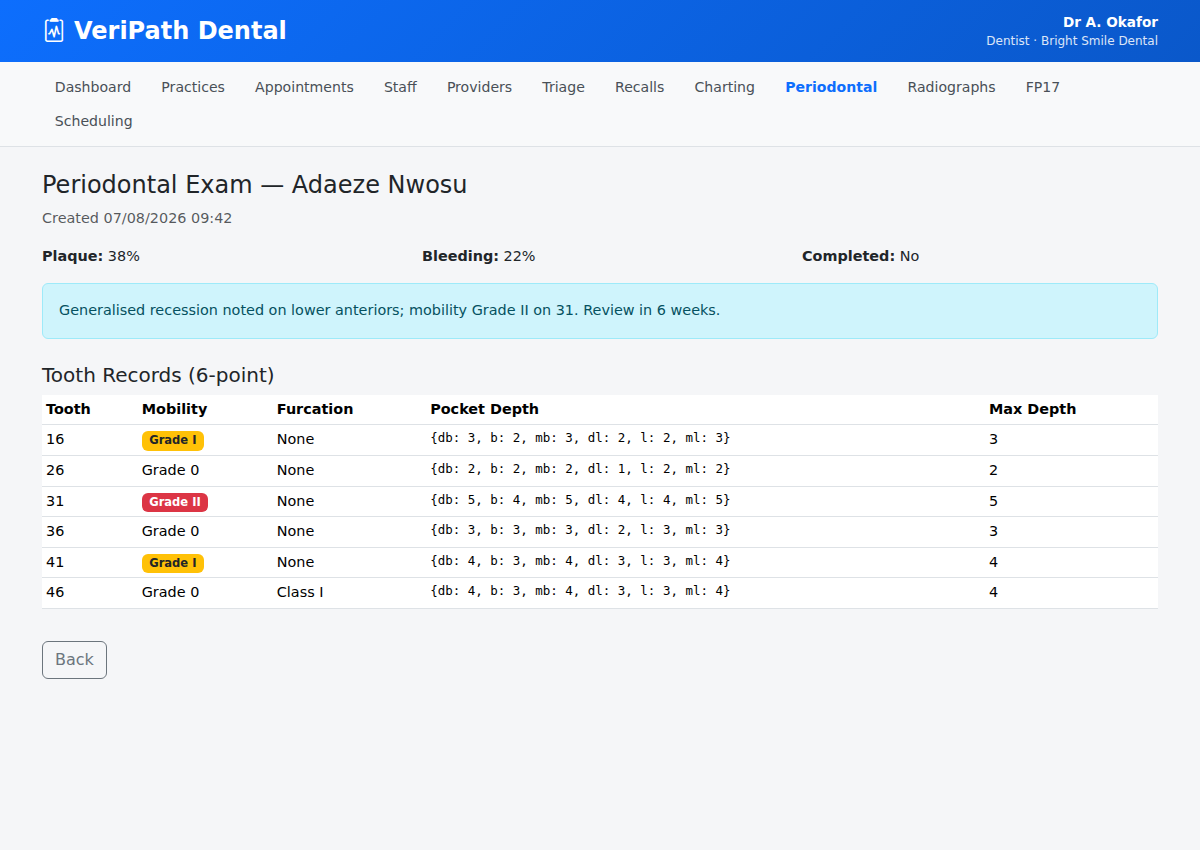
| Column | What it shows |
|---|---|
| Tooth | The FDI tooth number (adult 11–48, primary 51–85) |
| Mobility | Tooth mobility grade (Grade 0 – Grade III) |
| Furcation | Furcation involvement class (None, Class I – Class III), where relevant |
| Pocket depths | The six readings db b mb dl l ml in order, e.g. 4 3 5 4 3 5 |
| Max | The deepest single pocket reading for that tooth |
| BOP sites | The sites that bled on probing, e.g. DL MB ML |
| Plaque sites | The sites with visible plaque, e.g. B DB DL MB |
While the exam is Open you can correct mistakes: use Edit on a tooth row to change its readings (the form is the same as Step 3, headed "Edit Tooth …"), or Delete to remove the tooth from the exam. Every change recalculates the Plaque % and Bleeding % automatically.
Tip: chart every tooth in the same exam so the chart is a complete full-mouth record. You can chart teeth over more than one sitting while the exam stays Open.
¶ Step 5: Finish and sign off the exam
When the chart is complete:
- Click the green Complete exam button at the top of the detail page.
The exam is stamped with the completion date and the name of the person who completed it, and the list shows the date instead of the Open badge.
A completed exam is signed off and locked:
- The Add tooth button and the per-row Edit / Delete controls disappear.
- The overall scores are frozen as the finished record.
When is a 6-point chart done? The full 6-point chart is the detailed record, taken at the visit where it is clinically indicated — for example at a check-up where the basic screening exam flags deeper pockets, at active-periodontal (gum disease) review or maintenance visits, or before and after periodontal treatment to record the baseline and the outcome. VeriPath Dental records the 6-point exam itself; the quick screening exam (BPE) that decides when a full chart is needed is recorded outside the app.
¶ Useful tips
- Probe gently and consistently — light, controlled pressure keeps readings accurate and comparable between visits.
- Record all six points per tooth — a full 6-point set is what makes the chart clinically useful over time.
- Chart the whole mouth in one exam — and keep the exam Open until you have finished probing, then complete it to lock the record.
- Max depth tells the story — the deepest pocket at each tooth is usually the site that needs the most attention.