¶ Recording Symptoms & Triage
¶ What you'll be able to do
After reading this guide you will know how to record what a patient tells you about their symptoms when booking an appointment, what happens after you save the booking (the automatic triage and priority score), and how the triage queue is used. You will also understand what SNOMED codes are and where symptoms are reviewed before treatment.
Who does this? Receptionists and administrative staff record symptoms when booking. Clinicians review symptoms in the triage queue and check them again before treatment.
¶ Why record symptoms
Recording symptoms when a patient books an appointment:
- Helps the clinician prepare for the consultation
- Flags potentially urgent cases so they are not missed
- Adds a standard clinical code (SNOMED) to the appointment for audit and reporting
The app does the flagging for you — as soon as an appointment with symptoms is saved, it runs an automatic triage and gives the appointment a priority score.
¶ Step 1: Record symptoms when booking
- Book the appointment as usual (see Appointment Booking (Private vs. NHS)).
- In the Book Appointment form, find Patient-reported symptoms — this box is optional.
- Type what the patient tells you, in their own words. For example: "Pain on sweet, dark spot on lower left molar".
- Complete the rest of the form and click Save Appointment.
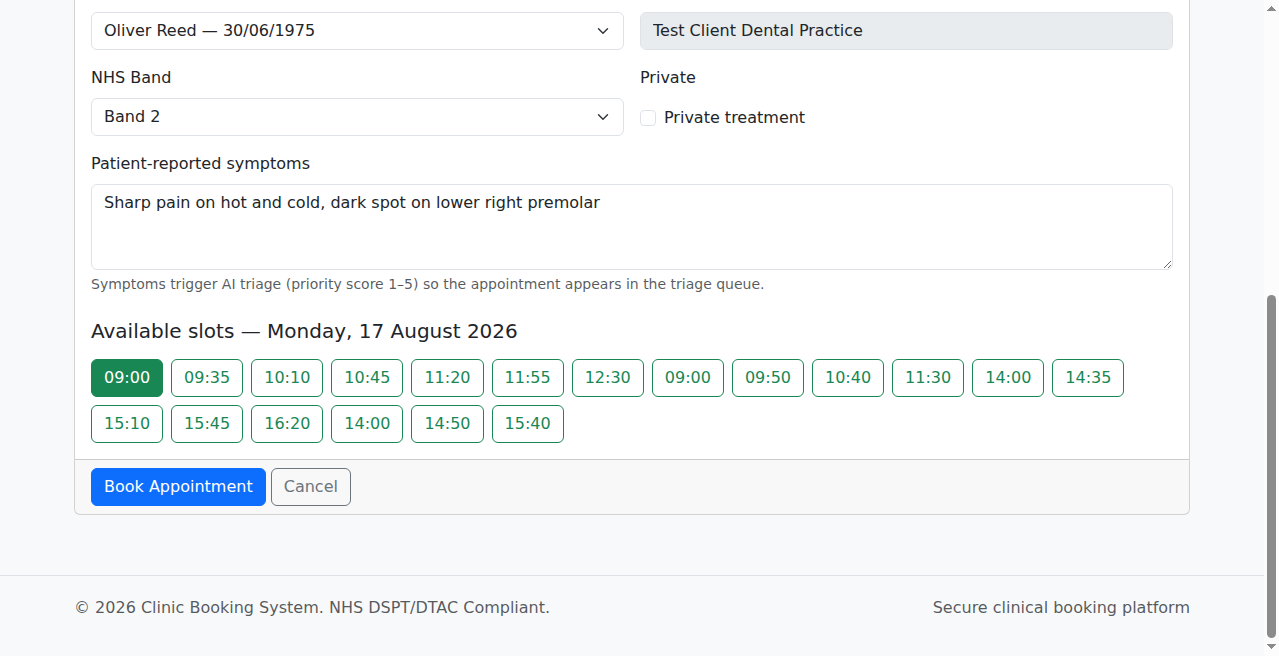
Note: Symptoms are optional. If nothing is entered, the appointment is simply booked — no triage runs.
¶ Step 2: What happens after you save
If you entered symptoms, the app immediately:
- Scores the urgency — priority 1 to 5, where 1 is routine and 5 is emergency
- Maps the symptoms to a standard clinical code (SNOMED), for example "toothache" maps to Toothache
- Stores both on the appointment, so the clinician sees them when it opens
The appointment then appears in the triage queue for review.
¶ Priority scores
| Score | Badge | What it means | Example symptoms |
|---|---|---|---|
| 1 | Routine | Regular appointment, no concerns | Check-up, no symptoms |
| 2 | Semi-Urgent | Mild symptoms, not urgent | Bleeding gums, sensitive teeth |
| 3 | Urgent | Needs attention within days | Toothache, cavity, loose tooth |
| 4 | High | Significant symptoms, same-day review | Broken tooth, dry socket |
| 5 | Emergency | Severe symptoms, immediate attention | Abscess, facial swelling |
¶ Step 3: Read the triage queue
The AI Triage Dashboard (the Triage item in the clinical menu) shows two lists:
- Needs Triage — appointments with symptoms that have not been prioritised yet. Each row shows the time, patient, symptoms, appointment type, and provider, with a Review button.
- Triaged Appointments — appointments with their priority badge (1–5), the symptoms, and the mapped SNOMED code.
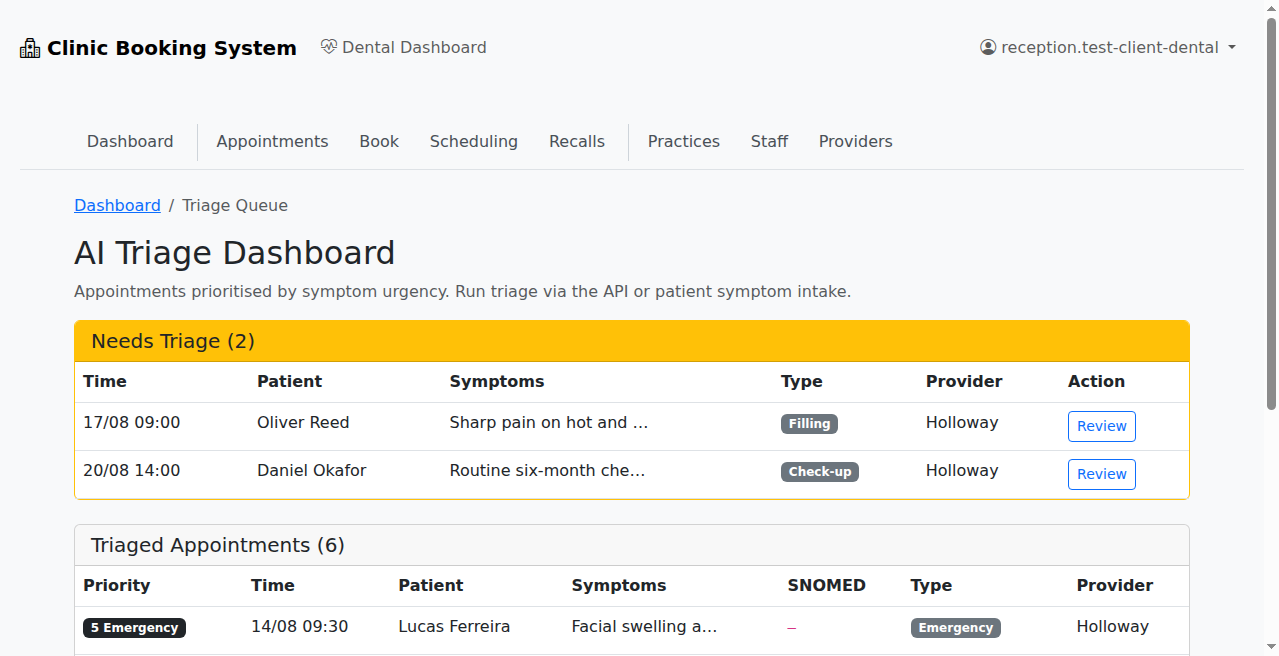
Note: Triage is not in the receptionist's menu — recording symptoms at booking is all the front desk needs to do. The team reviewing the queue are clinicians, hygienists, and practice managers.
¶ What are SNOMED codes?
SNOMED CT is a standard set of clinical codes used across the NHS so that records stay consistent. When triage runs, the app automatically picks the closest dental code for the symptoms described — for example, "toothache" maps to Toothache. You do not need to type codes when booking; the app does the mapping. Clinicians can also record SNOMED finding and procedure codes in Clinical Notes for a patient.
¶ Step 4: Review symptoms before treatment (clinicians)
Before any procedure, the clinical team checks the patient's symptoms again:
- Open the appointment and go to Medical History.
- The Pre-Treatment Check shows what the patient reported, the appointment type, and the AI priority score, alongside the patient's declared allergies, medications, and conditions.
- Tick the confirmation box and click Confirm Medical History Reviewed.
See Digital Patient Intake (Forms) for the full walkthrough.
¶ Good practice
- Record the patient's own words — do not translate into medical jargon.
- If the patient describes something urgent (for example swelling, an abscess, bleeding, or an injury), tell a clinician straight away — do not wait for the queue.
- Triage categorises urgency only — it is not a diagnosis. Clinical decisions stay with the clinicians.
- Symptoms are clinical data: keep them inside the app and never repeat patient details outside it.