¶ NHS Contract & FP17 Claims — The Full Journey
Status: the day-to-day path is verified against the live app (10 September 2026) — booking, course of treatment, closing and billing, patient charge, payment and the ERPNext leg were walked through end to end. The month-end and associate-pay screens in Part 7 are written from the app but have not yet been walked through live. The figures below are illustrations built from the app's own templates rather than live captures, and show the demo practice with synthetic patients.
The detailed guides (FP17 Claim Submission, UDA Auditing, Invoicing, Private Ledger Billing) are being refreshed after this page.
¶ What you'll be able to do
After reading this guide you will understand the complete NHS journey in VeriPath Dental — how the practice's arrangement with the NHS is set up, how an NHS course of treatment becomes an FP17 claim, how patient charges are collected and accounted for, how accepted claims turn into UDA credit and monthly schedule payments, and how the practice runs month-end reconciliation and associate pay. Everything is explained in the order the work happens in a real practice.
Who does this? Setting up and reviewing the NHS arrangement is a practice manager / admin job. Reception books patients and records arrivals. Dentists (clinicians) open and treat courses. Month-end statement work and associate pay sit with the practice manager / admin.
Demo numbers: this guide uses the demo practice ("Test Client Dental Practice", ODS TESTCD01) with synthetic patients (Mei, Fatima, Daniel, …). Patient charges shown are the England statutory rates as configured for 2026/27 — your practice's band-charge table is date-effective and maintained by your VeriPath administrator.
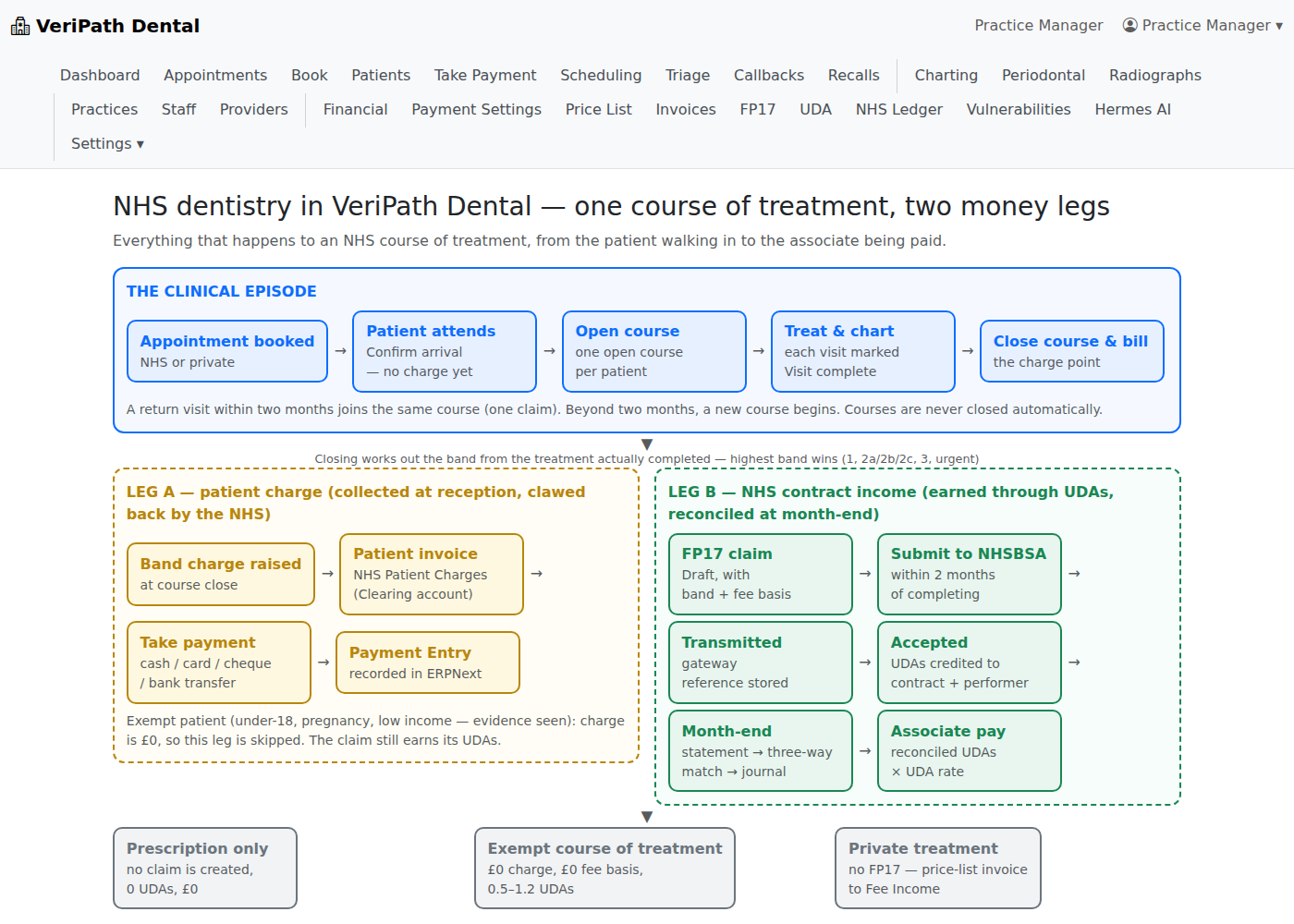
One course of treatment, two money legs: the clinical episode across the top, the patient-charge leg and the NHS contract leg below it, with the exempt, prescription-only and private branches at the foot.
¶ Part 1 — How NHS dental money works
NHS dental money has two legs, and the app keeps them apart:
- Leg A — patient charges. The patient pays a fixed band charge at the practice (or £0 if exempt). The practice collects it, but the money belongs to the NHS: the NHS deducts ("claws back") what was collected from the next monthly payment.
- Leg B — NHS contract income. The practice's real income, earned through UDA credit on the claims it delivers, reconciled at the month-end schedule.
The shape of it:
- The practice holds an NHS contract (its "arrangement with the NHS") with an agreed Annual Contract Value (ACV), a monthly payment (usually ACV ÷ 12) and a UDA target for the year.
- Each completed NHS course of treatment is reported on an FP17 claim. The claim's band decides its UDA value and the patient charge.
- The money equation (per month):
NHS monthly payment − patient charges collected = net payout to the practice.
Bands, charges and UDAs (England, 2026/27 as configured):
| Course of treatment | Patient charge | UDAs | Typical content |
|---|---|---|---|
| Band 1 | £27.90 | 1 | Examination, radiographs, scale & polish, advice |
| Band 2a | £76.60 | 3 | 1–2 fillings/extractions (non-molar endo excluded) |
| Band 2b | £76.60 | 5 | 3 or more restorative teeth, or root canal on a non-molar |
| Band 2c | £76.60 | 7 | Root canal on a permanent molar |
| Band 3 | £332.10 | 12 | Laboratory work — crowns, bridges, dentures |
| Urgent | £27.90 | 1.2* | Emergency-only care (no planned treatment) |
| Exempt patient | £0 | per band | Under-18, pregnancy, low-income (evidence seen) |
| Exempt CoT | £0 | 0.5–1.2 | Arrest of bleeding, suture removal, appliance repairs, nurse fluoride varnish |
| Prescription only | £0 | 0 | Logged, no claim created |
* The urgent UDA value is set on the contract (the demo default is 1.2).
Rules that matter: one course of treatment = one claim, and the claim is priced by the highest band of treatment performed — five fillings still cost one Band 2a/2b charge, not five charges. Claims must be submitted within two months of completing the course, or the UDA credit is lost. Accepted claims are the legal record of contract delivery — falling below roughly 96% of target by the mid-year point risks year-end clawback.
¶ Part 2 — Your practice's NHS arrangement
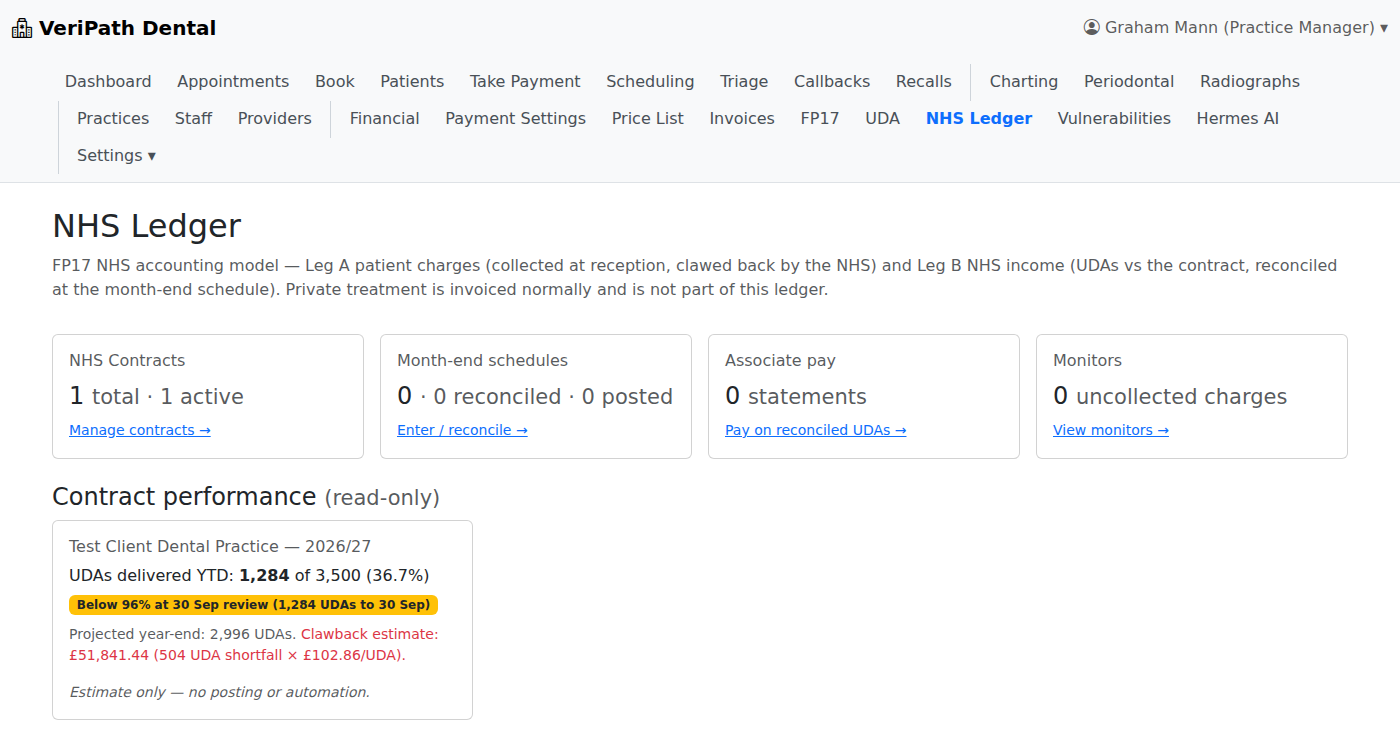
The NHS Ledger area is where the arrangement lives. Open NHS Ledger in the top navigation (practice manager / admin). The home screen shows four cards — NHS Contracts, Month-end schedules, Associate pay and Monitors — plus, for each contract, a read-only Contract performance panel (see Part 7).
¶ 2.1 The contract — NHS Ledger → NHS Contracts
Each contract covers one financial period (for example 2026/27) and records the deal with the NHS. Use Add Contract to create one:
| Field | What it is | Demo value |
|---|---|---|
| Practice | Which practice the contract belongs to | Test Client Dental Practice |
| Contract period | The financial year the deal covers | 2026/27 |
| Annual contract value (ACV) | Total NHS money for the year | £360,000 |
| Monthly payment | ACV ÷ 12, paid monthly | £30,000 |
| UDA target | Units of activity the practice must deliver | 3,500 |
| Notes | Anything worth recording | — |
A practice normally has one active contract per period. Superseded contracts are deactivated, not deleted.
¶ 2.2 Pay profiles — NHS Ledger → Associate pay → Pay profiles
Pay profiles define how each performer (dentist) is paid for NHS work:
| Field | What it is | Demo (Sarah Holloway) |
|---|---|---|
| Performer | The clinician | Sarah Holloway |
| Target UDAs | Their personal share of the contract target | 600 |
| UDA pay rate (£) | Earned per reconciled UDA | £12.00 |
| Lab split (%) | Share of lab-work cost borne by the performer | 20% |
| Super (%) | Superannuation deduction applied at pay time | 8.4% |
¶ 2.3 UDA allocations — UDA → Allocations
Allocations record each performer's UDA target for a contract period; the UDA dashboard then tracks delivered against allocated. Use New Allocation per performer and period, and Manage Allocations to review them.
¶ 2.4 Supporting tables and the ERPNext link
- Price List (top navigation) holds the private treatment charges — one active price per appointment type.
- NHS band charges are date-effective (England, uplifted each 1 April) and maintained by your VeriPath administrator.
- Payment Settings (top navigation) holds the practice's payment configuration (deposit percentage, currency, card credentials).
- The practice's books live in ERPNext. Patient-charge invoices post to the NHS Patient Charges (Clearing) account, private invoices to Fee Income, and the month-end journal moves money between the bank, clearing and NHS Contract Income accounts. "Open in ERPNext" on an invoice or a payment opens the matching document.
¶ Part 3 — The patient journey (day to day)
- Reception books the appointment — patient, date, appointment type, and NHS band or private. For an NHS course the band shown at booking is the planned band; the claim's band is decided by the treatment actually completed.
- The patient arrives — reception uses Confirm arrival (attended). The appointment shows Attended. No charge is raised at this point — attendance alone never bills.
- The clinician opens a course of treatment — from the appointment, choose Open course of treatment. A patient can have one open course at a time, on one funding basis.
- Treatment is charted and completed — the clinician records the work on the chart (FDI tooth numbers, surfaces, procedure codes) and, at the end of the visit, marks Complete treatment. The appointment then shows Visit complete.
- Further visits in the same course — if the patient returns within two months of the course's last treatment, the new appointment joins the same course automatically (continuation — one claim at the end). Beyond two months, or if the clinician deliberately starts a new course, a fresh course begins. Courses are never closed automatically.
What the Course of Treatment card tells you. The card on the appointment page is the running state of the episode:
- the course number and status (Open / Completed / Cancelled), and Private or the band it will bill at;
- whether the patient is Exempt (with the exemption and whether evidence was seen) and, for NHS courses, Exempt — no patient charge;
- how many appointments are in the course, and each appointment's state — Visit complete, Booked, or Attended — not completed;
- for an open course, whether it is Ready to close or Not ready, and (NHS) would bill at band ….
¶ Part 4 — Closing the course and the claim
When the course's treatment is finished, the clinician closes it with Close course & bill. A course can only be closed when every attended appointment in it has been completed and no booked appointment remains — the card shows Ready to close when that is true.
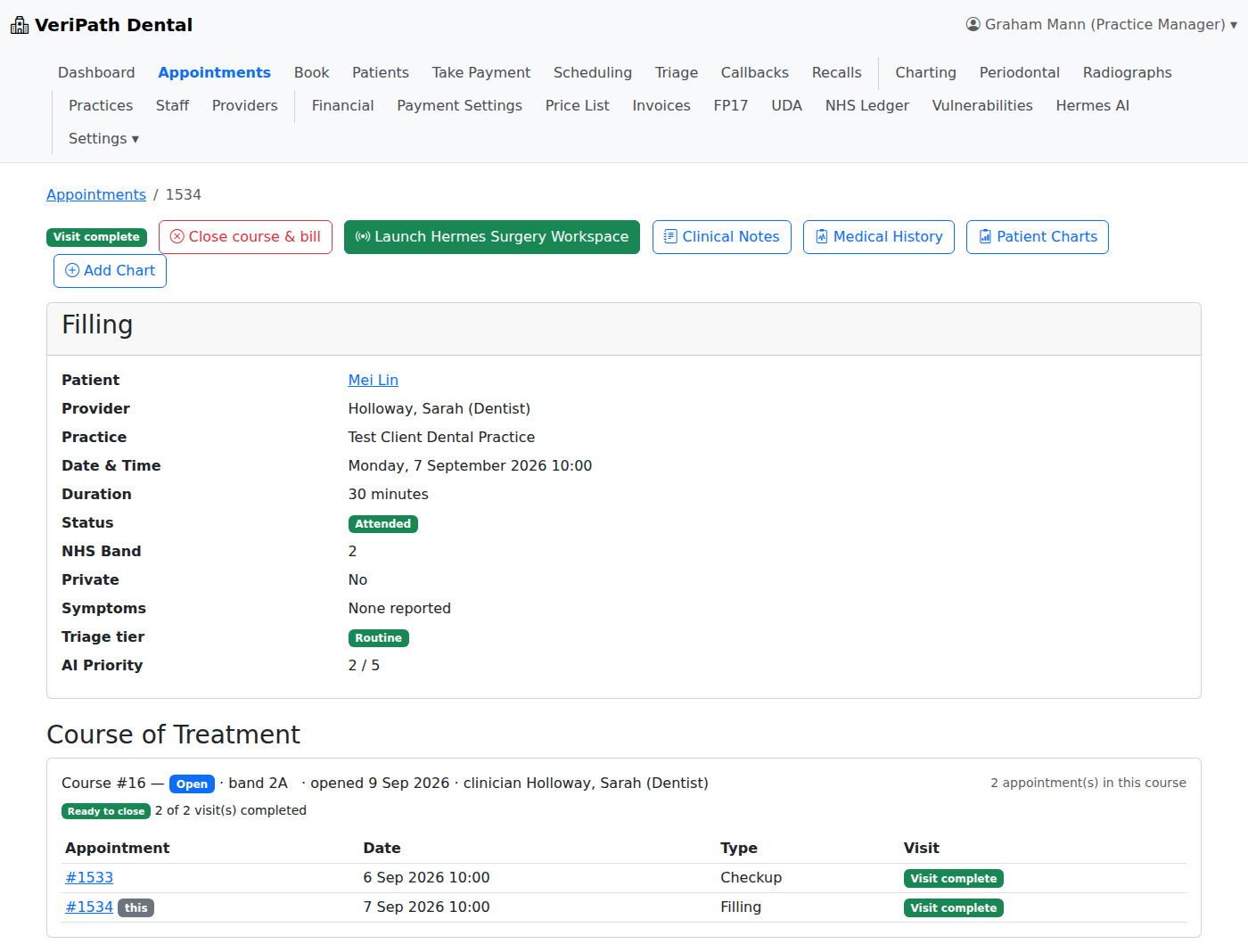
Closing does the billing. VeriPath Dental then:
- Works out the band from the completed treatment — the highest band wins (Part 1 table). A check-up plus one filling closes as Band 2a.
- Creates the FP17 claim (Draft) with the band, the date-anchored statutory patient charge and the frozen NHS fee basis (the claim's reference value).
- Raises the patient-charge transaction — the amount the patient owes (nothing for an exempt patient).
- Raises the invoice and queues it to ERPNext — NHS patient charges to the clearing account, private charges to Fee Income.
What you get for each kind of course:
| Course closed | Claim? | Patient charge | Fee basis | UDAs when accepted |
|---|---|---|---|---|
| NHS Band 1 (exam only) | Yes — Band 1 | £27.90 | £27.90 | 1 |
| NHS Band 2a/2b/2c | Yes — sub-band code | £76.60 | £76.60 | 3 / 5 / 7 |
| NHS Band 3 (lab work) | Yes — Band 3 | £332.10 | £332.10 | 12 |
| NHS urgent (emergency only) | Yes — Urgent | £27.90 | £27.90 | per contract (1.2 default) |
| NHS, exempt patient | Yes — band code | £0 (exemption recorded) | band charge | per band |
| NHS exempt CoT | Yes — exempt code | £0 | £0 | 0.5–1.2 |
| Prescription only | No claim | £0 | — | 0 |
| Private | No FP17 claim — private invoice instead | practice price | — | — |
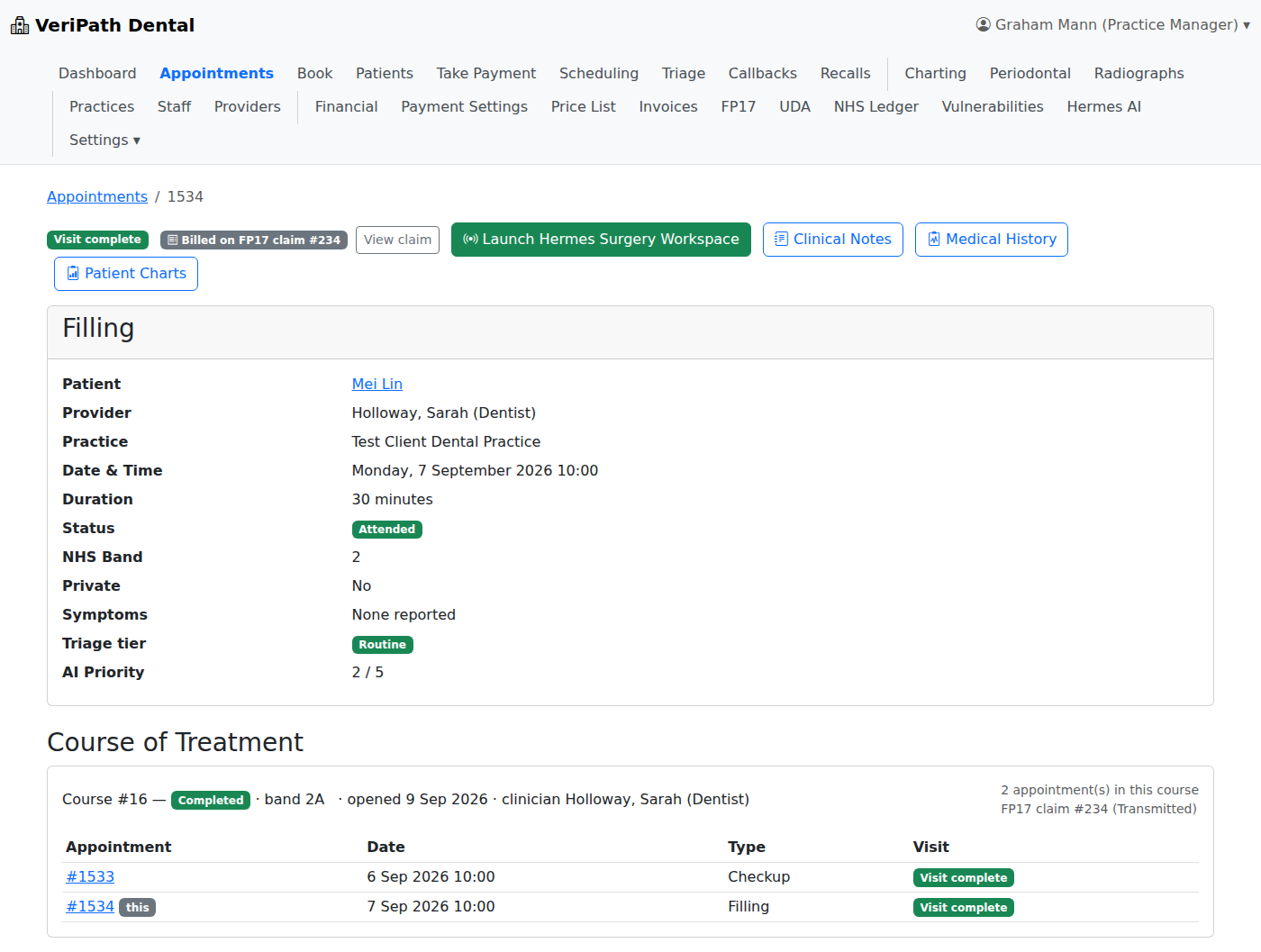
Once an appointment is billed it is finished. The appointment page then shows Billed on FP17 claim #… with a View claim link, and the option to open a course is withdrawn. If a course still holds a booked or unattended visit for the same treatment, the app refuses the close and tells you why.
¶ Part 5 — Patient charges and payments
- Who pays: non-exempt NHS patients pay the band charge; exempt patients pay nothing (the exemption category and whether evidence was seen are recorded and shown on the claim); private patients pay the price-list amount.
- What is owed: the Take Payment queue lists every appointment with money outstanding and the total to collect, with the funding basis (NHS or private) shown per row.
- Recording a payment: open the row and use Record payment — amount, payment method, who paid and any reference. Methods are Cash, Card (terminal), Bank transfer and Cheque; card payments are confirmed against the practice's card provider, and the Card option is unavailable if the practice's card settings are not configured.
- What happens next: the transaction moves to Paid, its invoice settles to Paid, and the matching Payment Entry is recorded in ERPNext — the transaction row then offers Open in ERPNext.
¶ Part 6 — The claim lifecycle
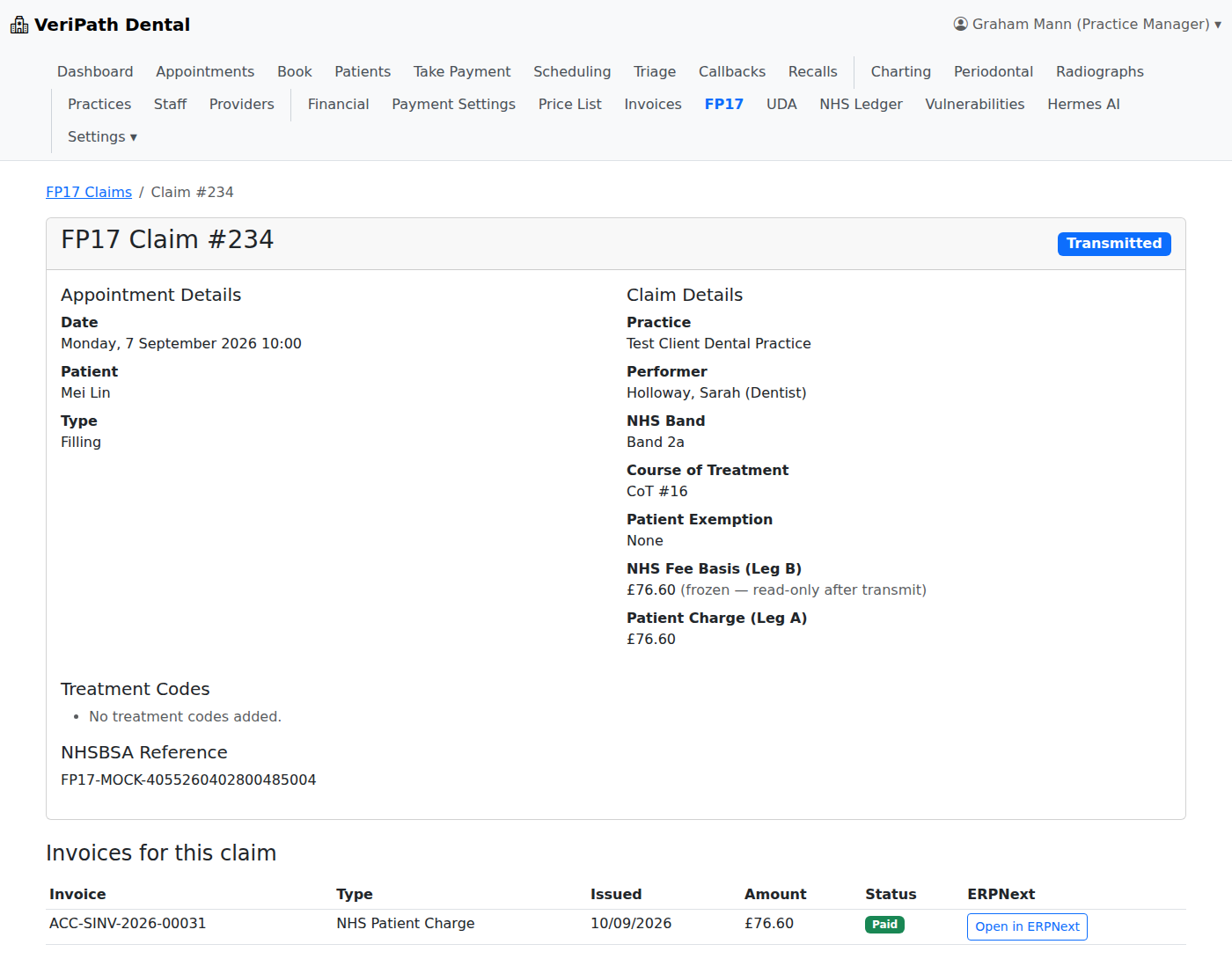
From the FP17 claims list, open a claim to review it (band, patient charge, fee basis, exemption, treatment codes, and the course it came from). The detail page offers the actions available at that claim's status:
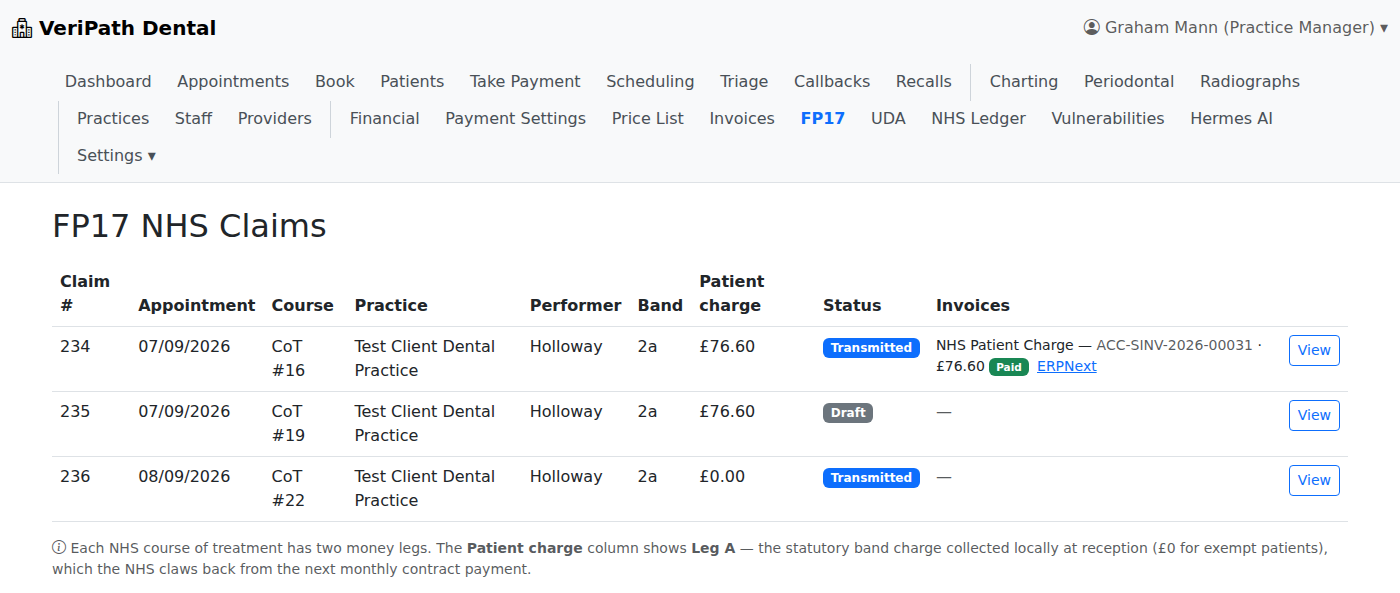
| Action / status | What it means |
|---|---|
| Draft | Created by closing the course, not yet submitted. |
| Submit to NHSBSA | Queues and transmits the claim through the NHSBSA gateway. |
| Transmitted | Sent and acknowledged by the gateway; a gateway reference is stored. |
| Accepted | The claim is accepted and its UDAs count towards the contract. |
| Partially paid | The gateway has paid part of the claim. |
| Rejected | The claim was rejected and the reason is shown; Return to Draft releases it for correction. |
Two safeguards are visible on the claim itself: a claim carries an outside 2-month submission window badge once the course is more than two months old (submitting it is blocked, because the UDA credit would be lost), and an exempt claim is marked exempt CoT — no patient charge.
¶ Part 7 — Month-end, reconciliation and pay
At the end of each month the practice checks what the NHS paid against what was delivered.
- Enter the statement — NHS Ledger → Month-end schedules → Enter Statement. Record the month's NHS statement: period start and end, Gross contract payment, Patient-charge clawback, Superannuation and notes. The list then shows each statement's gross, clawback, super, net paid and status.
- Run the three-way match. The statement detail shows the month's money — gross contract payment, patient-charge clawback (which drains the clearing account), superannuation, and net paid (banked) — and matches the month's claims on fee basis, UDAs credited and patient-charge clawback. Exempt courses match on the UDA side with no clawback. Claims are marked reconciled, or left unmatched for investigation.
- Post the ERPNext Journal Entry. The month's money posts as Dr Bank (net paid) + Dr NHS Patient Charges — Clearing (clawback) / Cr NHS Contract Income (gross).
- Associate pay — NHS Ledger → Associate pay → Generate Statement. Pick the clinician and period; the statement is built from reconciled UDAs only — reconciled UDAs × the performer's UDA rate, with the lab split and superannuation applied — and shows reconciled UDAs, gross, lab, super and net pay. Posting records it in ERPNext.
- Monitors — NHS Ledger → Monitors. Two watchlists: uncollected patient charges due for clawback (accepted claims whose band charge has not been collected — the NHS claws it back whether or not you collected it, so an unpaid charge here is money lost) and disputed or audited exemptions (accepted exempt claims whose £0 charge still earns an NHS fee basis, and which carry retrospective-clawback risk if the exemption is challenged).
- Contract performance — NHS Ledger home. For each contract: UDAs delivered year-to-date against target (with a percentage), the 96% at 30 September mid-year check, projected year-end UDAs, and — where a shortfall is projected — a labelled clawback estimate (shortfall in UDAs × the UDA unit value). This panel is an estimate only; it posts nothing and automates nothing.
¶ Where things are — quick reference
| I want to… | Where |
|---|---|
| Review or add the NHS contract | NHS Ledger → NHS Contracts |
| Set performer pay profiles | NHS Ledger → Associate pay → Pay profiles |
| Track UDA targets | UDA → Allocations |
| See contract performance | NHS Ledger (home) |
| See clawback and exemption watchlists | NHS Ledger → Monitors |
| See claims and submit them | FP17 (top navigation) |
| See UDA production | UDA (top navigation) |
| See invoices, and open them in ERPNext | Invoices |
| See what is owed and take payment | Take Payment |
| Set private prices | Price List |
| Set payment and deposit configuration | Payment Settings |
| Run month-end | NHS Ledger → Month-end schedules |
Related guides: FP17 Claim Submission · UDA Auditing · Invoicing (ERPNext) · Private Ledger Billing · Appointment Booking · Check-In & Arrival